For a demo, I installed Oracle EBS on a laptop with Oracle Linux version 4.
Because the consultants take thelaptop with them during the demo, and I am not present at that demo, I wanted the Oracle EBS to start when the laptop was turned on and also stopped when the laptop was turned off...
Starting Oracle EBS at laptop startup was not that kind of a problem. I just created a script in the /etc/rc.d/init.d directory called 'oracleebs'. Just a simple start script for EBS, just be sure to put this line in the script...
# chkconfig: 2345 99 10
This lets the chkconfig tool know in which runlevel the script must be started (2345) and the script should be started after all ohther scripts (99), the stop must be the 10th script to be run (10)
After creating the script, add your script using the chkconfig tool
chkconfig --add oraclebs
to check if the script was added.....
[root@ebsdemo init.d]# chkconfig --list
ipmi 0:off 1:off 2:off 3:off 4:off 5:off 6:off
sysstat 0:off 1:on 2:on 3:on 4:on 5:on 6:off
readahead 0:off 1:off 2:off 3:off 4:off 5:on 6:off
apmd 0:off 1:off 2:on 3:on 4:on 5:on 6:off
arptables_jf 0:off 1:off 2:on 3:on 4:on 5:on 6:off
oracleebs 0:off 1:off 2:on 3:on 4:on 5:on 6:off
I tested the startup and everything went fine. But when shutting down the laptop, the script was not executed. Offcourse the Oracle EBS was stopped, but I wanted it to be stopped the right way. I noticed the K* scripts in the runlevels 0,1 and 6. So why isn't the stop script executed ??
I found out, a simple touch was missing :)
The shutdown is checking if the proces that has to be stopped is actually running. If the proces is running, there must be an entry in the /var/lock/subsys...
So, when a touch /var/lock/subsys/oracleebs is added to the startup part of the script, the shutdown will also execute the stop part of the script. This time the Oracle EBS was stopped nicely.
Oh, booting linux is hanging on ' starting killall' .....
Don't forget to remove the created lock after the EBS is stopped. At the end of the script add
rm -f /var/lock/subsys/oracleebs
Now, booting linux runs smoothly
Friday, March 14, 2008

Wednesday, March 12, 2008
Oracle White papers
On the Oracle Insight blog I found this interesting site : the Oracle White papers site
A nice site with a lot of white papers concerning Oracle..
You have to register yourself before accessing the white papers.
Enjoy !!
A nice site with a lot of white papers concerning Oracle..
You have to register yourself before accessing the white papers.
Enjoy !!

Thursday, March 06, 2008
uCertify
Last week I received an email from uCertify. This company creates preparation kits for different certification programs, like Oracle OCP Dba....
They noticed my blog and asked me if I was willing to review one of their preparation kits and share my experience with this prep kit. Because I am studying for my OCP 10g, I agreed and yesterday I received the registration key for the 1Z0-043 PrepKit. During the download I noticed what in the prepkit, and I must say..it looks good !
Full version includes:
282 challenging questions with full explanation
199 Study Notes and Articles
5 Full length interactive tests
Detailed reports and analysis tools
No adware, malware or spyware
One year free upgrades
24x7 Support
100% money back guarantee
I will continu my study and use the prep kit also. I will share my experience with the prep kit in future posts...
For more info check the site http://www.ucertify.com/
They noticed my blog and asked me if I was willing to review one of their preparation kits and share my experience with this prep kit. Because I am studying for my OCP 10g, I agreed and yesterday I received the registration key for the 1Z0-043 PrepKit. During the download I noticed what in the prepkit, and I must say..it looks good !
Full version includes:
282 challenging questions with full explanation
199 Study Notes and Articles
5 Full length interactive tests
Detailed reports and analysis tools
No adware, malware or spyware
One year free upgrades
24x7 Support
100% money back guarantee
I will continu my study and use the prep kit also. I will share my experience with the prep kit in future posts...
For more info check the site http://www.ucertify.com/
Tuesday, March 04, 2008
Accessing Oracle EBS from linux client...
We cloned an Oracle EBS enviroment to a laptop for demo purposes. We installed Oracle Enterprise Linux 4, and cloned an excisting EBS environment.
After I got the EBS running, I tried to access the application from the linux laptop. But there was one problem, Jinitiator only works with windows. So, I was able to download the jini.exe, but could not execute it. Another way to work with the Oracle EBS (11.5.10.2) is using the sun java plugin.
I found out no plugins were installed in Firefox yet, so I had to download the sun java plugin.
I decided to download version 1.5.0.12. After installing the downloaded file, the plugin has to be noticed by Firefox. You can do this by creating a link in the FIREFOX_HOME/plugins directory.
Create a link to the libjavaplugin_oji.so from the installed jre...
ln -s /usr/java/jre1.5.0_12/plugin/i386/ns7/libjavaplugin_oji.so ./libjavaplugin_oij.so
After the link is created, the java plugin is recognized in Firefox.
Next step is to let EBS now, you can also use the sun java plgin instead of the default jinitiator. This can be done by adjusting the $OA_HTML/bin/appsweb_sid.cfg and change the following lines.
sun_plugin_mimetype=application/x-java-applet;jpi-version=1.5.0_12
sun_plugin_version=1.5.0_12
After bouncing the webserver you can use the sun java plugin, but also the default jinitiator.
After I got the EBS running, I tried to access the application from the linux laptop. But there was one problem, Jinitiator only works with windows. So, I was able to download the jini.exe, but could not execute it. Another way to work with the Oracle EBS (11.5.10.2) is using the sun java plugin.
I found out no plugins were installed in Firefox yet, so I had to download the sun java plugin.
I decided to download version 1.5.0.12. After installing the downloaded file, the plugin has to be noticed by Firefox. You can do this by creating a link in the FIREFOX_HOME/plugins directory.
Create a link to the libjavaplugin_oji.so from the installed jre...
ln -s /usr/java/jre1.5.0_12/plugin/i386/ns7/libjavaplugin_oji.so ./libjavaplugin_oij.so
After the link is created, the java plugin is recognized in Firefox.
Next step is to let EBS now, you can also use the sun java plgin instead of the default jinitiator. This can be done by adjusting the $OA_HTML/bin/appsweb_sid.cfg and change the following lines.
sun_plugin_mimetype=application/x-java-applet;jpi-version=1.5.0_12
sun_plugin_version=1.5.0_12
After bouncing the webserver you can use the sun java plugin, but also the default jinitiator.
Friday, February 29, 2008
GAPP performance approach
Yesterday evening I visited an Amis query about performance. Speaker this time was Gerwin Hendriksem from Amis, a real performance freak. He designed his own approach for solving performance problems, and it was a good session. Gerwin used Oracle data mining to spot performance issues. He gathered system data for more then a year and using data mining to analyze and predict the bottlenecks. He succesfully used this approach with at least two customers.
Next week he will be giving the same presentation in the VS at the Hotsos symposium in Dallas. He also gave his approach a name, the GAPP approach.
So, be ware of te GAPP....
Next week he will be giving the same presentation in the VS at the Hotsos symposium in Dallas. He also gave his approach a name, the GAPP approach.
So, be ware of te GAPP....
Thursday, February 21, 2008
Changing IP and hostname in Application Server 10g
Because we moved our new OEM10gr2 server to the datacenter, the IP address and the hostname changed. When added to the datacenter I had to start all the services again, but first I had to change the opmn configuration. Instead of changing all the config files by hand, I noticed a shell script in the $OMS_HOME/chgip/scripts, called chgiphost.sh
This script changes all the config files and replaces the ip and hostname. It will ask you for the source and target ip/hostname...
Saved me some time...
This script changes all the config files and replaces the ip and hostname. It will ask you for the source and target ip/hostname...
Saved me some time...
Friday, February 15, 2008
Discovering windows host in linux oms...
Yesterday I decided to add a windows host to my Oracle 10gr2 Grid. The 10gr2 Grid control is running on Oracle Enterprise Linux release 4.5
I downloaded the windows agent 10.2.0.3 and installed this agent on the windows machine. After installing I checked my OEM site to see if the target was already discovered....
I did not see the windows host, so I decided to check the windows agent log files. The following error was found :
Thread-7244 ERROR pingManager: nmepm_pingReposURL: Cannot connect to https://oemserver.local:1159/em/upload: retStatus=-12008-02-14 12:45:17 Thread-928 ERROR upload: Error in uploadXMLFiles. Trying again in 900.00 seconds or earlier.2008-02-14 12:45:32 Thread-2924 ERROR upload: Error in uploadXMLFiles
It seems the agent cannot connect to the oms, but why ? I tried uploading the data manually...
D:\oracle\agent\10203\agent10g\BIN>emctl upload
Oracle Enterprise Manager 10g Release 3 Grid Control 10.2.0.3.0.Copyright (c) 1996, 2007 Oracle Corporation. All rights reserved.
---------------------------------------------------------------
EMD upload error: uploadXMLFiles skipped :: OMS version not checked yet..
Checking Metalink brought me the sollution. It had to unsecure the agent...
To unlock the oms you do
OMS_HOME/bin/emctl secure oms unlock
Then restart the agent
AGENT_HOME/bin/emctl start agent
and unsecure it using:
AGENT_HOME/bin/emctl unsecure agent
then issue a clearstate for the agent:
AGENT_HOME/bin/emctl clearstate agent
then attempt the upload
AGENT_HOME/bin/emctl upload agent
And thsi time the upload was succesfull. Checking the status of the agent today showed me the following...
D:\oracle\agent\10203\agent10g\BIN>emctl status agent
Oracle Enterprise Manager 10g Release 3 Grid Control 10.2.0.3.0.Copyright (c) 1996, 2007 Oracle Corporation. All rights reserved.
---------------------------------------------------------------
Agent Version : 10.2.0.3.0
OMS Version : 10.2.0.3.0
Protocol Version : 10.2.0.2.0
Agent Home : D:\oracle\agent\10203\agent10g
Agent binaries : D:\oracle\agent\10203\agent10g
Agent Process ID : 6828
Agent URL : http://agenthost.local:3872/emd/main/
Repository URL : http://oemhost.local:4889/em/upload/
Started at : 2008-02-14 14:36:10
Started by user : SYSTEM
Last Reload : 2008-02-14 14:36:10
Last successful upload : 2008-02-15 10:39:37
Total Megabytes of XML files uploaded so far : 20.17
Number of XML files pending upload : 0
Size of XML files pending upload(MB) : 0.00
Available disk space on upload filesystem : 95.40%
Last successful heartbeat to OMS : 2008-02-15 10:41:37
---------------------------------------------------------------
Agent is Running and Ready
I downloaded the windows agent 10.2.0.3 and installed this agent on the windows machine. After installing I checked my OEM site to see if the target was already discovered....
I did not see the windows host, so I decided to check the windows agent log files. The following error was found :
Thread-7244 ERROR pingManager: nmepm_pingReposURL: Cannot connect to https://oemserver.local:1159/em/upload: retStatus=-12008-02-14 12:45:17 Thread-928 ERROR upload: Error in uploadXMLFiles. Trying again in 900.00 seconds or earlier.2008-02-14 12:45:32 Thread-2924 ERROR upload: Error in uploadXMLFiles
It seems the agent cannot connect to the oms, but why ? I tried uploading the data manually...
D:\oracle\agent\10203\agent10g\BIN>emctl upload
Oracle Enterprise Manager 10g Release 3 Grid Control 10.2.0.3.0.Copyright (c) 1996, 2007 Oracle Corporation. All rights reserved.
---------------------------------------------------------------
EMD upload error: uploadXMLFiles skipped :: OMS version not checked yet..
Checking Metalink brought me the sollution. It had to unsecure the agent...
To unlock the oms you do
OMS_HOME/bin/emctl secure oms unlock
Then restart the agent
AGENT_HOME/bin/emctl start agent
and unsecure it using:
AGENT_HOME/bin/emctl unsecure agent
then issue a clearstate for the agent:
AGENT_HOME/bin/emctl clearstate agent
then attempt the upload
AGENT_HOME/bin/emctl upload agent
And thsi time the upload was succesfull. Checking the status of the agent today showed me the following...
D:\oracle\agent\10203\agent10g\BIN>emctl status agent
Oracle Enterprise Manager 10g Release 3 Grid Control 10.2.0.3.0.Copyright (c) 1996, 2007 Oracle Corporation. All rights reserved.
---------------------------------------------------------------
Agent Version : 10.2.0.3.0
OMS Version : 10.2.0.3.0
Protocol Version : 10.2.0.2.0
Agent Home : D:\oracle\agent\10203\agent10g
Agent binaries : D:\oracle\agent\10203\agent10g
Agent Process ID : 6828
Agent URL : http://agenthost.local:3872/emd/main/
Repository URL : http://oemhost.local:4889/em/upload/
Started at : 2008-02-14 14:36:10
Started by user : SYSTEM
Last Reload : 2008-02-14 14:36:10
Last successful upload : 2008-02-15 10:39:37
Total Megabytes of XML files uploaded so far : 20.17
Number of XML files pending upload : 0
Size of XML files pending upload(MB) : 0.00
Available disk space on upload filesystem : 95.40%
Last successful heartbeat to OMS : 2008-02-15 10:41:37
---------------------------------------------------------------
Agent is Running and Ready
Tuesday, February 05, 2008
Concurrent Manager recovery
This morning I faced an issue with the concurrent managers in a production environment.
After bouncing the database because of a memory fault, I decided also to startup the concurrent managers again.
But after starting them, using the start script in the $COMMON_TOP/admin/scripts, the application showed me no concurrent managers ??
Checking the logfile of the internal manager for errors...
APP-FND-01564: ORACLE error 1000 in afpsmrsc
Cause: afpsmrsc failed due to ORA-01000: maximum open cursors exceeded.
The SQL statement being executed at the time of the error was: &SQLSTMT and was executed from the file &ERRFILE.
The parameter open_cursors seemed high enough, so I looked for another reason. I also checked the v$open_cursor, which showed me a lot of open cursors. I already bounced the database, so that did not solve anything.
I decided to use the 'Concurrent Manager recovery' in Oracle Application Manager.
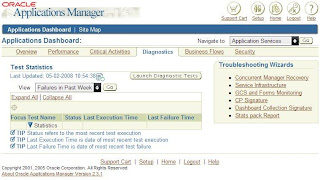
This recovery proces showed me concurrent managers with an active status in the database, but no active process on the OS or a active connection to the database. Maybe, that's the reason for the open cursor error ?
After cleaning them using this recovery tool, and going throuhg all the steps, I started the concurrent managers again. And this time, they started !
After bouncing the database because of a memory fault, I decided also to startup the concurrent managers again.
But after starting them, using the start script in the $COMMON_TOP/admin/scripts, the application showed me no concurrent managers ??
Checking the logfile of the internal manager for errors...
APP-FND-01564: ORACLE error 1000 in afpsmrsc
Cause: afpsmrsc failed due to ORA-01000: maximum open cursors exceeded.
The SQL statement being executed at the time of the error was: &SQLSTMT and was executed from the file &ERRFILE.
The parameter open_cursors seemed high enough, so I looked for another reason. I also checked the v$open_cursor, which showed me a lot of open cursors. I already bounced the database, so that did not solve anything.
I decided to use the 'Concurrent Manager recovery' in Oracle Application Manager.

This recovery proces showed me concurrent managers with an active status in the database, but no active process on the OS or a active connection to the database. Maybe, that's the reason for the open cursor error ?
After cleaning them using this recovery tool, and going throuhg all the steps, I started the concurrent managers again. And this time, they started !
Friday, February 01, 2008
Grid control 10g
The last two days I have been busy installing and upgrading Grid control 10g.
Because of problems wth an older version of OEM 10g , we decided to install a new version (10gr2).
On a new dell server I installed Oracle Enterprise Linux release 4 (update 6). After installing linux, I started the 10.2.0.1 Grid install.
Next step was the 10.2.0.3 upgrade of the oms and agent. I also decided to upgrade the database itself, which is default 10.1.0.4 (even after the 10.2.0.3 upgrade...)
Before upgrading the database, I tested the Grid control. Everything worked fine. Stopped and started the oms/agents a few time to check stability. No problems so far.
I started the upgrade, which means I first had to install the 10.2.0.1 Oracle software in a new $ORACLE_HOME. After this fresh install, upgrade the new ORACLE_HOME to 10.2.03. When the software is patched to the desired level, use the dbua from your new home to upgrade the excisting 10.1.0.4 database. At this point, some problems occured.
At first the dbua could not perform any OEM configuration ?? Checking the logfile only told me to try this manually...so I did. Oke, the configuration ended without errors, so lets try to start things up.
I started up the oms, no problems. Next, I started the agent....
Seems the agent would not start, the http server could not be started ? Does thsi has anything to do with my database upgrade ??? I can't see how ?
The logfiles showed me there was a port conflict. Suddenly the agent http server wants to use the same port as the oms http server ? Before the upgrade the could work together without a problem, but suddenly they are fighting over the same 6102 port....
The problem was fixed easy, I just changed the local port in the /oem/oemprd01/oms10g/opmn/conf/opmn.xml file.
After this change, the startup succeeded.
But I still don't understand why this port conflict arrived after the database upgrade ?
Because of problems wth an older version of OEM 10g , we decided to install a new version (10gr2).
On a new dell server I installed Oracle Enterprise Linux release 4 (update 6). After installing linux, I started the 10.2.0.1 Grid install.
Next step was the 10.2.0.3 upgrade of the oms and agent. I also decided to upgrade the database itself, which is default 10.1.0.4 (even after the 10.2.0.3 upgrade...)
Before upgrading the database, I tested the Grid control. Everything worked fine. Stopped and started the oms/agents a few time to check stability. No problems so far.
I started the upgrade, which means I first had to install the 10.2.0.1 Oracle software in a new $ORACLE_HOME. After this fresh install, upgrade the new ORACLE_HOME to 10.2.03. When the software is patched to the desired level, use the dbua from your new home to upgrade the excisting 10.1.0.4 database. At this point, some problems occured.
At first the dbua could not perform any OEM configuration ?? Checking the logfile only told me to try this manually...so I did. Oke, the configuration ended without errors, so lets try to start things up.
I started up the oms, no problems. Next, I started the agent....
Seems the agent would not start, the http server could not be started ? Does thsi has anything to do with my database upgrade ??? I can't see how ?
The logfiles showed me there was a port conflict. Suddenly the agent http server wants to use the same port as the oms http server ? Before the upgrade the could work together without a problem, but suddenly they are fighting over the same 6102 port....
The problem was fixed easy, I just changed the local port in the /oem/oemprd01/oms10g/opmn/conf/opmn.xml file.
After this change, the startup succeeded.
But I still don't understand why this port conflict arrived after the database upgrade ?
Thursday, January 24, 2008
plsql developer
When trying to compile a package using plsql developer in a 9.2.0.1 Oracle database, the developer ran into an ORA-00600 error. The error is generated in plsql developer and looks like this...


This problem can easily be fixed when bouncing the database, but the problem was that this production database could not be stopped. I had to find another way to solve this.
Could it be they are using a wrong version of plsql developer ? I couldn't find out if they were using a wrong version, so upgrading plsql developer seems useless....
I found another work around for this problem.
Maybe it has something to do with the "debug information" mode. To verify this, go to Tools > Preferences > Debugger tab page, disable the "Add debug information when compiling" option, and retry the compilation.
The developers tried to compile the package again and it worked...
Tuesday, January 22, 2008
Using logminer
A customer wanted to know how a certain record in their EBS database was updated.
A colleque of mine decided to use logminer to find out what happened to that specific record.
Using logminer, all changes in our archived logfiles are written to the v$logmnr_contents and you can query this view using sql statements.
So, how does it work ? We choose the online catalog variant..(see Meatlink note 291686.1 for more options)
First, try to find out which logfiles you should examine. In our case, when was the record updated. We figured it had to be between 10:00 am untill 04:00 pm. So we had to use like 33 archived logfiles ! Teh change had to be in one of them.
Once you have decided which logfiles to use, you must 'add' them using the following syntax :
SQL> execute DBMS_LOGMNR.ADD_LOGFILE (LOGFILENAME => '/XXX01.LOG',OPTIONS =>DBMS_LOGMNR.NEW);
The first logfile must be added with the LOGMNR.NEW option. If you have more logfiles, the follwoing ones must have the LOGMNR.addfile option. Otherwise, only the last logfile is used :)
When all logfiles are added, you can start the logminer
SQL> EXECUTE DBMS_LOGMNR.START_LOGMNR(OPTIONS => RBMS_LOGMNR.DICT_FROM_ONLINE_CATALOG);
Now, you can query the v$logmnr_contents view. We decided to spool the output, make it a little bit eassier to search.
SQL> select username, operation, SQL_REDO,SQL_UNDO FROM V$LOGMNR_CONTENTS where sql_redo like '%updated_table%';
When finished..
SQL> EXECUTE DBMS_LOGMNR.end_LOGMNR
Now the searching begins. We finally succeeded, but searching is not easy.
A colleque of mine decided to use logminer to find out what happened to that specific record.
Using logminer, all changes in our archived logfiles are written to the v$logmnr_contents and you can query this view using sql statements.
So, how does it work ? We choose the online catalog variant..(see Meatlink note 291686.1 for more options)
First, try to find out which logfiles you should examine. In our case, when was the record updated. We figured it had to be between 10:00 am untill 04:00 pm. So we had to use like 33 archived logfiles ! Teh change had to be in one of them.
Once you have decided which logfiles to use, you must 'add' them using the following syntax :
SQL> execute DBMS_LOGMNR.ADD_LOGFILE (LOGFILENAME => '/XXX01.LOG',OPTIONS =>DBMS_LOGMNR.NEW);
The first logfile must be added with the LOGMNR.NEW option. If you have more logfiles, the follwoing ones must have the LOGMNR.addfile option. Otherwise, only the last logfile is used :)
When all logfiles are added, you can start the logminer
SQL> EXECUTE DBMS_LOGMNR.START_LOGMNR(OPTIONS => RBMS_LOGMNR.DICT_FROM_ONLINE_CATALOG);
Now, you can query the v$logmnr_contents view. We decided to spool the output, make it a little bit eassier to search.
SQL> select username, operation, SQL_REDO,SQL_UNDO FROM V$LOGMNR_CONTENTS where sql_redo like '%updated_table%';
When finished..
SQL> EXECUTE DBMS_LOGMNR.end_LOGMNR
Now the searching begins. We finally succeeded, but searching is not easy.
Friday, January 18, 2008
vmware converter

For a colleague ( an Oracle EBS functional consultant), I had to install 2 EBS environments on a hard disk (500gb). Using vmware, he would be able to play around, or use the the environments for a demo. I already created both environments using vmware workstation, but decided it would be better to use vmware server. Because vmware server cannot work with the already created workstation environments, I thought starting over waas the only option. Just to check if someone else already faced the same problem, I decided to google for 'vmware conversion' and I found something about Vmware Converter. It seems vmware already created a tool for this kind of conversions !! You can download the tool from the vmware site. I converted the first workstation environment and it worked. I started the new vmware server environment and everything worked like before. Great tool !!
Friday, January 11, 2008
Tagged.....
I have been tagged.....three times already :). Gareth Roberts , OCP Advisor and Atul Kumar tagged me.
Following the rules of this new tagging feature among Oracle bloggers, I shuold now blog 8 things about myself and tag other Oracle bloggers. Look here for the rules.
So 8 things about myself you don't know already....Publish Post
1. My name is actually Bastiaan
2. I have a seasons ticket for Ajax for 18 years now...
3. My gaming alias is Djewie
4. I am part of a gaming (COD4) clan called Bullet Proof Underwear
5. I have studied economics, but never finished it
6. I love to get together for a drink with friends
7. My youngest son has been sick for three years now (..he is three years old :(..)
8. I love running to clear my head
Now, who am I going to tag ?
1. Marco Gralike
2. Rene Kuss
3. Arian Stijf
4. Bandari Huang
5. Johan Louwers
6. Richard Byrom
7. Madan Mohan
8. Navdeep Saini
Maybe some of them are already tagged by now, but we will see.
Following the rules of this new tagging feature among Oracle bloggers, I shuold now blog 8 things about myself and tag other Oracle bloggers. Look here for the rules.
So 8 things about myself you don't know already....Publish Post
1. My name is actually Bastiaan
2. I have a seasons ticket for Ajax for 18 years now...
3. My gaming alias is Djewie
4. I am part of a gaming (COD4) clan called Bullet Proof Underwear
5. I have studied economics, but never finished it
6. I love to get together for a drink with friends
7. My youngest son has been sick for three years now (..he is three years old :(..)
8. I love running to clear my head
Now, who am I going to tag ?
1. Marco Gralike
2. Rene Kuss
3. Arian Stijf
4. Bandari Huang
5. Johan Louwers
6. Richard Byrom
7. Madan Mohan
8. Navdeep Saini
Maybe some of them are already tagged by now, but we will see.
Thursday, January 10, 2008
Recover database
Monday evening I was told a company needed some help recovering an important database.
They were not able to get the database back online. The next morning, after the 'oke' from my manager, I visited the company. It seemed the just moved to a new building, stopped all servers and started them again in the new building. The Oracle Dba who used to work over there was gone, so nowbody really knew what to do or how i should work.
The database that could not be started was a online clone, using snapshots, from a production database. The production database could not be stopped, so they used the online snapshot technology to clone the database. So, what was the problem. Using a online backup for your clone means recovery, so I first checked the status of the database. It seemed the status was ' mounted', so the control creation succeeded ?
Next I tried a to open the database, but this command resulted in the following error..
SQL> alter database open resetlogs;
alter database open resetlogs
*
ERROR at line 1:
ORA-01113: file 1 needs media recovery
ORA-01110: data file 1: '/ORA/ONTW/DATA/system01.dbf'
More recovery ??
Because I did not know what happened exactly, I decided to clone again. This way I could see with my own eyes what was going wrong.
During the copy fase of cloning, I also decided to create a new backup of the controlfile. The script used for the new controlfile creation was already a year old. On the production database I created a new backup using the ' alter database backup control file to trace' statement. I was going to use this one instead of the old one. Maybe they had removed or added some datafiles...
After the copy was ready I could start the actual clone.
$ sqlplus /nolog
SQL*Plus: Release 9.2.0.6.0 - Production on Wed Jan 9 09:24:30 2008
Copyright (c) 1982, 2002, Oracle Corporation. All rights reserved.
SQL> conn / as sysdba
Connected to an idle instance.
SQL> startup nomount
ORACLE instance started.
Total System Global Area 1060074720 bytes
Fixed Size 738528 bytes
Variable Size 922746880 bytes
Database Buffers 134217728 bytes
Redo Buffers 2371584 bytes
SQL> @control_ontw.sql
SQL> select status from v$instance;
STATUS
------------
MOUNTED
SQL> select status, checkpoint_change#,
2 to_char(checkpoint_time, 'DD-MON-YYYY HH24:MI:SS') as
3 checkpoint_time,
4 count(*)
5 from v$datafile_header
6 group by status, checkpoint_change#, checkpoint_time
7 order by status, checkpoint_change#, checkpoint_time;
STATUS CHECKPOINT_CHANGE# CHECKPOINT_TIME COUNT(*)
------- ------------------ -------------------- ----------
ONLINE 1.2965E+10 09-JAN-2008 08:45:49 43
In the create controlfile I used the resetlogs, which is needed when renaming the database, and the query showed me the datafiles were in sync.
So, now lets try to recover..
SQL> RECOVER DATABASE USING BACKUP CONTROLFILE
ORA-00279: change 12964929028 generated at 01/09/2008 08:45:49 needed for
thread 1
ORA-00289: suggestion : /ORA/ONTW/ARCH/arch60558.dbf
ORA-00280: change 12964929028 for thread 1 is in sequence #60558
Specify log: {=suggested filename AUTO CANCEL}
Strange, the archive logfile suggested is not copied. And on the production server, the file isn't there neither ??? So, the recover process is asking me for a future archive log ?? This seems strange, the data that's missing must be in the online log files.
Searching the net showed me the solution. Just enter the path to your online log files !!
The first logfile didn't fix the problem, but the second one did..
Specify log: {=suggested filename AUTO CANCEL}
/ORA/ONTW/DATA/redo02a.log
Log applied.
Media recovery complete.
SQL> alter database open resetlogs;
Database altered.
SQL> select status from v$instance;
STATUS
------------
OPEN
The database is open and ready to use.
They were not able to get the database back online. The next morning, after the 'oke' from my manager, I visited the company. It seemed the just moved to a new building, stopped all servers and started them again in the new building. The Oracle Dba who used to work over there was gone, so nowbody really knew what to do or how i should work.
The database that could not be started was a online clone, using snapshots, from a production database. The production database could not be stopped, so they used the online snapshot technology to clone the database. So, what was the problem. Using a online backup for your clone means recovery, so I first checked the status of the database. It seemed the status was ' mounted', so the control creation succeeded ?
Next I tried a to open the database, but this command resulted in the following error..
SQL> alter database open resetlogs;
alter database open resetlogs
*
ERROR at line 1:
ORA-01113: file 1 needs media recovery
ORA-01110: data file 1: '/ORA/ONTW/DATA/system01.dbf'
More recovery ??
Because I did not know what happened exactly, I decided to clone again. This way I could see with my own eyes what was going wrong.
During the copy fase of cloning, I also decided to create a new backup of the controlfile. The script used for the new controlfile creation was already a year old. On the production database I created a new backup using the ' alter database backup control file to trace' statement. I was going to use this one instead of the old one. Maybe they had removed or added some datafiles...
After the copy was ready I could start the actual clone.
$ sqlplus /nolog
SQL*Plus: Release 9.2.0.6.0 - Production on Wed Jan 9 09:24:30 2008
Copyright (c) 1982, 2002, Oracle Corporation. All rights reserved.
SQL> conn / as sysdba
Connected to an idle instance.
SQL> startup nomount
ORACLE instance started.
Total System Global Area 1060074720 bytes
Fixed Size 738528 bytes
Variable Size 922746880 bytes
Database Buffers 134217728 bytes
Redo Buffers 2371584 bytes
SQL> @control_ontw.sql
SQL> select status from v$instance;
STATUS
------------
MOUNTED
SQL> select status, checkpoint_change#,
2 to_char(checkpoint_time, 'DD-MON-YYYY HH24:MI:SS') as
3 checkpoint_time,
4 count(*)
5 from v$datafile_header
6 group by status, checkpoint_change#, checkpoint_time
7 order by status, checkpoint_change#, checkpoint_time;
STATUS CHECKPOINT_CHANGE# CHECKPOINT_TIME COUNT(*)
------- ------------------ -------------------- ----------
ONLINE 1.2965E+10 09-JAN-2008 08:45:49 43
In the create controlfile I used the resetlogs, which is needed when renaming the database, and the query showed me the datafiles were in sync.
So, now lets try to recover..
SQL> RECOVER DATABASE USING BACKUP CONTROLFILE
ORA-00279: change 12964929028 generated at 01/09/2008 08:45:49 needed for
thread 1
ORA-00289: suggestion : /ORA/ONTW/ARCH/arch60558.dbf
ORA-00280: change 12964929028 for thread 1 is in sequence #60558
Specify log: {
Strange, the archive logfile suggested is not copied. And on the production server, the file isn't there neither ??? So, the recover process is asking me for a future archive log ?? This seems strange, the data that's missing must be in the online log files.
Searching the net showed me the solution. Just enter the path to your online log files !!
The first logfile didn't fix the problem, but the second one did..
Specify log: {
/ORA/ONTW/DATA/redo02a.log
Log applied.
Media recovery complete.
SQL> alter database open resetlogs;
Database altered.
SQL> select status from v$instance;
STATUS
------------
OPEN
The database is open and ready to use.
Friday, January 04, 2008
Cloning error
Yesterday I started cloning an EBS environment. After running the preclone, I started copying the enviroment on our netapp filer.
After the environment was copied, I started the actual clone.
But when adcfgclone is trying to create my new controlfile, the following error is reported in my alert.log..
Fri Jan 4 10:30:01 2008
scumnt: failed to lock /oebs/pubtst22/pubtst22db/9.2.0/dbs/lkPUBTST22 exclusive
Fri Jan 4 10:30:01 2008
ORA-09968: scumnt: unable to lock file
Linux Error: 37: No locks available
Additional information: 300
Fri Jan 4 10:30:01 2008
ORA-1503 signalled during: CREATE CONTROLFILE REUSE SET DATABASE "PUBTST22"
It seems linux cannot lock the file that's needed to mount the database...
I searched Metalink and google, but could not find anything that could cause my problem.
Finanlly we decided to umount the complete mount point. But all directories were still visible ???
We umounted again, adn this time the directories were gone. It seemed the mount point was mounted twice ?
After mounting againg, I started the clone again. This time no lock problems.....
Fri Jan 4 11:04:30 2008
Successful mount of redo thread 1, with mount id 2212425917
Fri Jan 4 11:04:30 2008
Completed: CREATE CONTROLFILE REUSE SET DATABASE "PUBTST22"
After the environment was copied, I started the actual clone.
But when adcfgclone is trying to create my new controlfile, the following error is reported in my alert.log..
Fri Jan 4 10:30:01 2008
scumnt: failed to lock /oebs/pubtst22/pubtst22db/9.2.0/dbs/lkPUBTST22 exclusive
Fri Jan 4 10:30:01 2008
ORA-09968: scumnt: unable to lock file
Linux Error: 37: No locks available
Additional information: 300
Fri Jan 4 10:30:01 2008
ORA-1503 signalled during: CREATE CONTROLFILE REUSE SET DATABASE "PUBTST22"
It seems linux cannot lock the file that's needed to mount the database...
I searched Metalink and google, but could not find anything that could cause my problem.
Finanlly we decided to umount the complete mount point. But all directories were still visible ???
We umounted again, adn this time the directories were gone. It seemed the mount point was mounted twice ?
After mounting againg, I started the clone again. This time no lock problems.....
Fri Jan 4 11:04:30 2008
Successful mount of redo thread 1, with mount id 2212425917
Fri Jan 4 11:04:30 2008
Completed: CREATE CONTROLFILE REUSE SET DATABASE "PUBTST22"
Thursday, December 27, 2007
Oracle mix
Just before the new year, I found this site...
https://mix.oracle.com/
We all know Linkedin or Plaxo. Now Oracle has it's own network site (beta..)
Check it out and login using your Oracle sso account (otn account)
https://mix.oracle.com/
We all know Linkedin or Plaxo. Now Oracle has it's own network site (beta..)
Check it out and login using your Oracle sso account (otn account)
Wednesday, December 19, 2007
Oracle EBS R12 Applications DBA Beta Exam
Today I received an email from Oracle in which they announced the Oracle EBS R12 Applications DBA Beta Exam. This exam is open to register and this beta period runs from January 03 – April 04, 2008
The exam is called :
Oracle EBS R12: Install, Patch and Maintain Applications [1Z0-238]
This new exam is required as part of earning the new Oracle EBS R12 Applications Database Administrator Certified Professional certification.
I am not sure if I am going to participate in this beta exam....
The exam is called :
Oracle EBS R12: Install, Patch and Maintain Applications [1Z0-238]
This new exam is required as part of earning the new Oracle EBS R12 Applications Database Administrator Certified Professional certification.
I am not sure if I am going to participate in this beta exam....
Wednesday, December 12, 2007
Enterprise Manager
We had a problem using OEM 10g. During the day a database proces (ora_j001) was consuming 100% cpu. Because of this OEM coud not be reached, oms down. Looking for a solution, I ran into the job_queue_processes database parameter. This parameter was set to 10 in our database. I searched the net and could only find out that the value of this parameter should be > 0, if you want to use OEM. Prefered value is 10 (our original value...), but it looks like a value of 10 leads to the 100 % cpu problem.
I changed the job_queue_processes parameter to 2, also changed the aq_tm_processes parameter to 1. The OEM database seems to be more stable, but I don't know if everthing still works in OEM....
Has anyone got any experience with this ??
I changed the job_queue_processes parameter to 2, also changed the aq_tm_processes parameter to 1. The OEM database seems to be more stable, but I don't know if everthing still works in OEM....
Has anyone got any experience with this ??
Monday, December 10, 2007
Colors in vi
So after turning off the colors in the 'ls' command on linux, I also had to deal with the colors using vi...
When reading a logfile for example, the file is presented in 5 or 6 different colors..
To turn off these colors edit the following file (as root)...
/usr/share/vim/vim60/macros/vimrc
In this file you will see the following lines:
" Switch syntax highlighting on, when the terminal has colors
" Also switch on highlighting the last used search pattern.
if &t_Co > 2 has("gui_running")
syntax on
set hlsearch
endif
You can disable coloring by placing " in front of these lines..
" Switch syntax highlighting on, when the terminal has colors
" Also switch on highlighting the last used search pattern.
"if &t_Co > 2 has("gui_running")
" syntax on
" set hlsearch
"endif
Now all colors are gone, and I believe reading is much easier ....
When reading a logfile for example, the file is presented in 5 or 6 different colors..
To turn off these colors edit the following file (as root)...
/usr/share/vim/vim60/macros/vimrc
In this file you will see the following lines:
" Switch syntax highlighting on, when the terminal has colors
" Also switch on highlighting the last used search pattern.
if &t_Co > 2 has("gui_running")
syntax on
set hlsearch
endif
You can disable coloring by placing " in front of these lines..
" Switch syntax highlighting on, when the terminal has colors
" Also switch on highlighting the last used search pattern.
"if &t_Co > 2 has("gui_running")
" syntax on
" set hlsearch
"endif
Now all colors are gone, and I believe reading is much easier ....
Friday, December 07, 2007
Colors in linux terminal
This week I started my new job with Smartapps. The first thing I usually do is check out the excisting EBS environments. I also did the same starting here...When starting a putty session on one of the EBS nodes, I noticed the different colors when using the ' ls' or 'll' commando. I find it very annoying, so I decided with my new colleagues to remove this.
I found this was caused by the use of aliasses.
alias cp='cp -i'
alias l.='ls -d .[a-zA-Z]* --color=tty'
alias ll='ls -l --color=tty'
alias ls='ls --color=tty'
alias mv='mv -i'
alias rm='rm -i'
alias vi='vim'
So, all I had to do was unalias the ' ls' and the 'll' commando (and make a new alias for ' ll' )
I found this was caused by the use of aliasses.
alias cp='cp -i'
alias l.='ls -d .[a-zA-Z]* --color=tty'
alias ll='ls -l --color=tty'
alias ls='ls --color=tty'
alias mv='mv -i'
alias rm='rm -i'
alias vi='vim'
So, all I had to do was unalias the ' ls' and the 'll' commando (and make a new alias for ' ll' )
Upgrade R12
a few months ago, I had an EBS R12 poll on my blog. The question was if anyone already upgrade their EBS environemnt from 11i to R12. The results of the poll showed me that nobody had upgraded or was going to...
For those who are planning to upgrade their 11i environment, Steven Chan has writen an article abouot this on his blog.
Check it out !! http://blogs.oracle.com/schan/2007/11/29#a2268
For those who are planning to upgrade their 11i environment, Steven Chan has writen an article abouot this on his blog.
Check it out !! http://blogs.oracle.com/schan/2007/11/29#a2268
Tuesday, November 27, 2007
Last day
Today is my last day at the customer site. I am leaving Amis after almost two years. Last Friday I had diner with my customer colleagues. Almost everyone of them is external. Because I had a great time working with them I decided to place some pictures of Friday night on this blog. In the following order you see : René Kuss, Siwa Soekhoe, Robbert Wolters and Ali Akgurbuz. Missing on the photos is Arian Stijf, who could not be there....
Thanks guys !!!
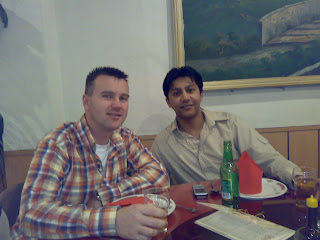


Thanks guys !!!


Wednesday, November 14, 2007
Trace Analyzer
Today I installed to Trace Analyzer (note 224270.1 from Metalink) to see if
this tool could make my trace files easier to read.
You can download the tool from Metalink in zip format (trca.zip)
Install the tool...
unzip the trca.zip file
in the trca directory start a sqlplus session as sysdba...
[oracle@vamisux32 trca]$ sqlplus /nolog
SQL*Plus: Release 9.2.0.6.0 - Production on Sat Nov 10 17:02:08 2007
Copyright (c) 1982, 2002, Oracle Corporation. All rights reserved.
SQL> conn / as sysdba
Connected.
SQL> @install/tacusr.sql (askes for pwd and default tablespaces)
SQL> @tactab.sql
... Creating TRCA$_TRACE_ID Sequence
... Creating TRCA$... tables
NOTE:
TACTAB complete. Please check tactab.lis for any errors.
SQL> @tacpkg.sql
Taking a snapshot of DBA_EXTENTS (may take several minutes)
NOTE:
TACPKG complete. Please check tacpkg.lis for any errors.
Now the Trace Analyzer is installed in the EBS database.
I decided to create a trace file in EBS when querying journals in General ledger.
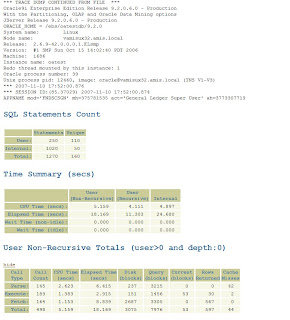
this tool could make my trace files easier to read.
You can download the tool from Metalink in zip format (trca.zip)
Install the tool...
unzip the trca.zip file
in the trca directory start a sqlplus session as sysdba...
[oracle@vamisux32 trca]$ sqlplus /nolog
SQL*Plus: Release 9.2.0.6.0 - Production on Sat Nov 10 17:02:08 2007
Copyright (c) 1982, 2002, Oracle Corporation. All rights reserved.
SQL> conn / as sysdba
Connected.
SQL> @install/tacusr.sql (askes for pwd and default tablespaces)
SQL> @tactab.sql
... Creating TRCA$_TRACE_ID Sequence
... Creating TRCA$... tables
NOTE:
TACTAB complete. Please check tactab.lis for any errors.
SQL> @tacpkg.sql
Taking a snapshot of DBA_EXTENTS (may take several minutes)
NOTE:
TACPKG complete. Please check tacpkg.lis for any errors.
Now the Trace Analyzer is installed in the EBS database.
I decided to create a trace file in EBS when querying journals in General ledger.

So, the trace file is created in the udump direcory. Lets see how it looks like
without analyzer....
*** TRACE DUMP CONTINUED FROM FILE ***
Oracle9i Enterprise Edition Release 9.2.0.6.0 - Production
With the Partitioning, OLAP and Oracle Data Mining options
JServer Release 9.2.0.6.0 - Production
ORACLE_HOME = /ebs/oatestdb/9.2.0
System name: Linux
Node name: vamisux32.amis.local
Release: 2.6.9-42.0.0.0.1.ELsmp
Version: #1 SMP Sun Oct 15 14:02:40 PDT 2006
Machine: i686
Instance name: oatest
Redo thread mounted by this instance: 1
Oracle process number: 39
Unix process pid: 12460, image: oracle@vamisux32.amis.local (TNS V1-V3)
*** 2007-11-10 17:52:00.876
*** SESSION ID:(85.37029) 2007-11-10 17:52:00.874
APPNAME mod='FNDSCSGN' mh=375781535 act='General Ledger Super User' ah=3773307719
=====================
PARSING IN CURSOR #65 len=70 dep=1 uid=47 oct=42 lid=47 tim=1166712422731428 hv=2110961874 ad='6746d1e4'
alter session set events='10046 trace name context forever, level 12'
END OF STMT
EXEC #65:c=2000,e=45848,p=0,cr=0,cu=0,mis=1,r=0,dep=1,og=4,tim=1166712422729192
WAIT #0: nam='SQL*Net message to client' ela= 9 p1=1952673792 p2=1 p3=0
WAIT #0: nam='SQL*Net message from client' ela= 1217 p1=1952673792 p2=1 p3=0
RPC CALL:FUNCTION APPS.FND_TRACE.GET_TRACE_FILENAME() RETURN VARCHAR2;
RPC BINDS:
bind 0: dty=1 bfp=0af28a20 flg=0a avl=00 mxl=32767 val=""
You see, the trace file looks like any other trace file. Difficult to read and also not easy to understand. When using the analyzer...
[oracle@vamisux32 trca]$ sqlplus apps/*****
SQL*Plus: Release 9.2.0.6.0 - Production on Sat Nov 10 18:01:52 2007
Copyright (c) 1982, 2002, Oracle Corporation. All rights reserved.
Connected to:
Oracle9i Enterprise Edition Release 9.2.0.6.0 - Production
With the Partitioning, OLAP and Oracle Data Mining options
JServer Release 9.2.0.6.0 - Production
SQL> start run/trcanlzr.sql oatest_ora_12460_SYSADMIN.trc
Value passed: oatest_ora_12460_SYSADMIN.trc
~~~~~~~~~~~~
...generating trcanlzr report into UDUMP server directory
Trace Analyzer Report "trcanlzr_12460_1.html" has been created in /ebs/oatestdb/9.2.0/admin/oatest_vamisux32/udump
...trcanlzr report has been generated into UDUMP server directory
...copying trcanlzr report into local SQL*Plus client directory
...trcanlzr report was copied from UDUMP into local SQL*Plus directory
When opening the html file, you see the difference....

Tuesday, November 13, 2007
Oracle's own virtual machine...
Oracle announces a new Oracle Virtual Machine..
Instead in vmware (for example), you can now use the Oracle VM.
Read all about it in this article...
http://www.oracle.com/corporate/press/2007_nov/ovm-ga-111107.html?msgid=5803830
Instead in vmware (for example), you can now use the Oracle VM.
Read all about it in this article...
http://www.oracle.com/corporate/press/2007_nov/ovm-ga-111107.html?msgid=5803830
Friday, November 09, 2007
EBS DBa homepage
Some time ago I created my own EBS Dba home page. This homepage is a collection off all the links I once visited because of my work as an EBS Dba. So, maybe there are some use full links for you also...and if you are missing a link..let me know and I will place it on the homepage.
url EBS Dba homepage http://oappsdba.jouwpagina.nl/
url EBS Dba homepage http://oappsdba.jouwpagina.nl/
Wednesday, November 07, 2007
Missing responsibilities after cloning EBS
From my great colleague Siwa Soekhoe I received the following tip.
After we had cloned an EBS environment (11.5.9), it seemed some application users were missing some or all responsibilities they had in the original environment.
When checking the EBS, you could see the responsibilities were granted to the specific application users. No end date, nothing strange in the application.
So, why don't they see their responsibilities at login ??
It seems the problem was that the start_date and end_date in WF_LOCAL_ROLES did not match the information in the FND_RESPONSIBILITY table for roles/responsibilities assigned.
This issue is being solved by running the concurrent program FNDWFDSURV "Workflow Directory Services User/Role Validation" on the target environment.
After we had cloned an EBS environment (11.5.9), it seemed some application users were missing some or all responsibilities they had in the original environment.
When checking the EBS, you could see the responsibilities were granted to the specific application users. No end date, nothing strange in the application.
So, why don't they see their responsibilities at login ??
It seems the problem was that the start_date and end_date in WF_LOCAL_ROLES did not match the information in the FND_RESPONSIBILITY table for roles/responsibilities assigned.
This issue is being solved by running the concurrent program FNDWFDSURV "Workflow Directory Services User/Role Validation" on the target environment.
Tuesday, October 23, 2007
Custom sql scripts in OAM
I noticed Oracle Applications Manager has some very handy sql script you can use when monitoring your EBS environment.
When starting up OAM, navigate to Site Map ----> Monitoring ----> SQL Extensions
The following scripts are available...
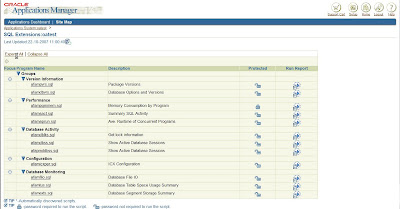
There is also a way to add your own personal sql scripts to this page. When you follow the steps mentioned in Metalink note 216816.1, you will find your own scripts on this page.
So, here is what you should do.
1. create a custom directory in the $APPL_TOP/admin directory
2. now create a directory called 'sql' in this custom directory
/appl/oatestappl/admin/custom/sql
[oracle@vamisux32 sql]$ ls
oa_info.sql patchlevel_ebs.sql
3. Now place your custom sql scripts in this directory
4. Bounce Apache to see the scripts in OAM
I have tested it with two custom scripts, and after bouncing Apache,
the two scripts are visible under 'Custom Extensions'...
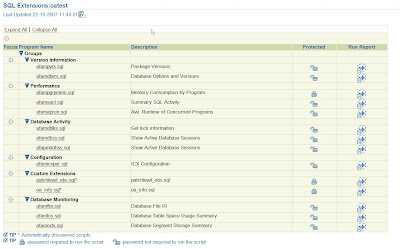
You can run the custom scripts by clicking the 'run report' button.
When starting up OAM, navigate to Site Map ----> Monitoring ----> SQL Extensions
The following scripts are available...

There is also a way to add your own personal sql scripts to this page. When you follow the steps mentioned in Metalink note 216816.1, you will find your own scripts on this page.
So, here is what you should do.
1. create a custom directory in the $APPL_TOP/admin directory
2. now create a directory called 'sql' in this custom directory
/appl/oatestappl/admin/custom/sql
[oracle@vamisux32 sql]$ ls
oa_info.sql patchlevel_ebs.sql
3. Now place your custom sql scripts in this directory
4. Bounce Apache to see the scripts in OAM
I have tested it with two custom scripts, and after bouncing Apache,
the two scripts are visible under 'Custom Extensions'...

You can run the custom scripts by clicking the 'run report' button.
Monday, October 22, 2007
Back again...
After two weeks laying down on my back because of a back injury, I started at work today.
I did not post anything the last two weeks because I could not sit down to do it :)
Hope things will be better from now on...
I did not post anything the last two weeks because I could not sit down to do it :)
Hope things will be better from now on...
Thursday, October 04, 2007
Maintenance wizard
Yesterday I noticed an announcement on Metalink of the 'Maintenance wizard' for the EBS R12 upgrade.
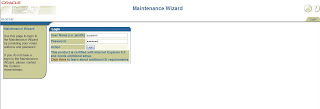
I had no idea what the Maintenance wizard looked like, or what it was supposed to do.
So, I decided to install the latest full version (2.05) of this wizard.
The wizard can be installed by downloading patch 6398371 from Metalink.
According to note 329476.1, this version only runs with a 10g database and a 10g iAS...
Here is what I did..
1. Install 10.2.0 database software
2. Install 10.1.3 iAS (choose 'Web Server and Process Management' option..)
3. create 10g database using dbca
4. create new tablespace NEWEOF
5. define new $EOF_HOME as $ORACLE_HOME/eof
6. unzip the patch in the $EOF_HOME and run the setup.sh from the config directory
So what does the wizard really do ??
According to the user's guide at least the following :
Maintenance Wizard:
• Presents a consolidated, personalized set of instructions in a step-by-step format
• Enables validation of important activities to prevent downstream issues
• Maintains log and status information for all tasks
• Enables Project Administrators to assign different groups of upgrade tasks to different users
• Downloads, merges, and installs many required patches automatically
• Provides access for Web-based operating system (OS) commands to check the upgrade processes, logs, and OS status during patch upgrades.
• Provides project management utilities to record the time taken for each task and its completion status
• Enables maintenance of multiple customer systems
I checked the wizard out, and post my experience with it very soon..
I had no idea what the Maintenance wizard looked like, or what it was supposed to do.
So, I decided to install the latest full version (2.05) of this wizard.
The wizard can be installed by downloading patch 6398371 from Metalink.
According to note 329476.1, this version only runs with a 10g database and a 10g iAS...
Here is what I did..
1. Install 10.2.0 database software
2. Install 10.1.3 iAS (choose 'Web Server and Process Management' option..)
3. create 10g database using dbca
4. create new tablespace NEWEOF
5. define new $EOF_HOME as $ORACLE_HOME/eof
6. unzip the patch in the $EOF_HOME and run the setup.sh from the config directory
So what does the wizard really do ??
According to the user's guide at least the following :
Maintenance Wizard:
• Presents a consolidated, personalized set of instructions in a step-by-step format
• Enables validation of important activities to prevent downstream issues
• Maintains log and status information for all tasks
• Enables Project Administrators to assign different groups of upgrade tasks to different users
• Downloads, merges, and installs many required patches automatically
• Provides access for Web-based operating system (OS) commands to check the upgrade processes, logs, and OS status during patch upgrades.
• Provides project management utilities to record the time taken for each task and its completion status
• Enables maintenance of multiple customer systems
I checked the wizard out, and post my experience with it very soon..

Wednesday, October 03, 2007
Survey added
I have added a survey to see how the readers of this blog feel about certain subjects concerning Oracle EBS..
Tuesday, September 25, 2007
First guest post....
So, yesterday I wrote my first guest post for the EBS OCP/OCE certification blog.
Check the blog for more interesting posts....
http://ebizocp.blogspot.com/
Check the blog for more interesting posts....
http://ebizocp.blogspot.com/

Tuesday, September 18, 2007
guest posts...
A colleague blogger of mine, Mohan Dutt, asked me to write some posts on his own blog.
His blog (http://ebizocp.blogspot.com/) is about Oracle EBS OCP and OCE. Very interesting stuff. I accepted his invitation and agreed to write some posts for his blog.
I am going to share my OCE and OCP experience with his blog readers also....
So, be sure to visit his blog also.
His blog (http://ebizocp.blogspot.com/) is about Oracle EBS OCP and OCE. Very interesting stuff. I accepted his invitation and agreed to write some posts for his blog.
I am going to share my OCE and OCP experience with his blog readers also....
So, be sure to visit his blog also.
Tuesday, September 11, 2007
Upgrade jinitiator
a simple tip I ran into at work.
We were working on a jinitiator upgrade (1.3.1.25 to 1.3.1.28), and the upgrade must be tested on both test and production environment.
How can we be sure only a few people will test the new jinitiator, while the rest is still working with the old jinitiator ??
The answer is easy. By using a profile option at user level.
The profile is : 'ICX: Forms Launcher ' , and will have the following value... http://host.domain:port/dev60cgi/f60cgi
When you want a few users to work with another version than the default jinitiator (for example 1.3.1.28), adjust the url like this :
http://host.domain:port/dev60cgi/f60cgi?config=jini13128 at user level.
This way only that user is working with the new jinitiator....
Also be sure to adjust the appsweb.cfg and add the second new jinitiator...
We were working on a jinitiator upgrade (1.3.1.25 to 1.3.1.28), and the upgrade must be tested on both test and production environment.
How can we be sure only a few people will test the new jinitiator, while the rest is still working with the old jinitiator ??
The answer is easy. By using a profile option at user level.
The profile is : 'ICX: Forms Launcher ' , and will have the following value... http://host.domain:port/dev60cgi/f60cgi
When you want a few users to work with another version than the default jinitiator (for example 1.3.1.28), adjust the url like this :
http://host.domain:port/dev60cgi/f60cgi?config=jini13128 at user level.
This way only that user is working with the new jinitiator....
Also be sure to adjust the appsweb.cfg and add the second new jinitiator...
Monday, August 20, 2007
MO: Operating Unit not set....
This morning I was asked to look at a EBS login problem.
The customer received the following error when logging in :
oracle.apps.fnd.framework.OAException: Application: FND, Message Name: SQL_PLSQL_ERROR. Tokens: ROUTINE = AppsConnectionManager.appsInitialize(int,int,int,int,Connection):-1,-1,-1,0,oracle.jdbc.driver.OracleConnection@1d12d84; REASON = java.sql.SQLException: ORA-20001: Oracle error -20001: ORA-20001: FND-ORG_ID PROFILE CANNOT READ: N, OPTION, MO: Operating Unit has been detected in FND_GLOBAL.INITIALIZE.ORA-06512: at "APPS.APP_EXCEPTION", line 70ORA-06512: at "APPS.FND_GLOBAL", line 64ORA-06512: at "APPS.FND_GLOBAL", line 1028ORA-06512: at "APPS.FND_GLOBAL", line 541ORA-06512: at line 1; ERRNO = 20001; (Could not lookup message because there is no database connection) at oracle.apps.fnd.framework.server.OAExceptionUtils.processAOLJErrorStack(OAExceptionUtils.java:988) at oracle.apps.fnd.framework.OACommonUtils.processAOLJErrorStack(OACommonUtils.java:866) at oracle.apps.fnd.framework.webui.OAPageBean.validateUser(OAPageBean.java:4572) at oracle.apps.fnd.framework.webui.OAPageBean.preparePage(OAPageBean.java:687) at oracle.apps.fnd.framework.webui.OAPageBean.preparePage(OAPageBean.java:497) at oracle.apps.fnd.framework.webui.OAPageBean.preparePage(OAPageBean.java:418) at _oa__html._OA._jspService(_OA.java:88) at oracle.jsp.runtime.HttpJsp.service(HttpJsp.java:119) at oracle.jsp.app.JspApplication.dispatchRequest(JspApplication.java:417) at oracle.jsp.JspServlet.doDispatch(JspServlet.java:267) at oracle.jsp.JspServlet.internalService(JspServlet.java:186) at oracle.jsp.JspServlet.service(JspServlet.java:156) at javax.servlet.http.HttpServlet.service(HttpServlet.java:588) at org.apache.jserv.JServConnection.processRequest(JServConnection.java:456) at org.apache.jserv.JServConnection.run(JServConnection.java:294) at java.lang.Thread.run(Thread.java:534)
So it seems the profile option 'MO:Operating Unit' is not set, or is set with a wrong value.
I decided to query the fnd_profile_option_values table and check how the profile was set. The query did not produce any rows, so the profile option is empty ??
Anyway, a colleague of mine showed me a sql script to restore the old value of the profile option.
DECLARE
stat boolean;
BEGIN
dbms_output.disable;
dbms_output.enable(100000);
stat := FND_PROFILE.SAVE('ORG_ID',, 'SITE');
IF stat THEN
dbms_output.put_line( 'Stat = TRUE - profile updated' );
ELSE
dbms_output.put_line( 'Stat = FALSE - profile NOT updated' );
END IF;
commit;
END;
The script did put a value for the MO:Operating Unit in the fnd_profile_option_values table. After bouncing Apache, the problem was solved.
The customer received the following error when logging in :
oracle.apps.fnd.framework.OAException: Application: FND, Message Name: SQL_PLSQL_ERROR. Tokens: ROUTINE = AppsConnectionManager.appsInitialize(int,int,int,int,Connection):-1,-1,-1,0,oracle.jdbc.driver.OracleConnection@1d12d84; REASON = java.sql.SQLException: ORA-20001: Oracle error -20001: ORA-20001: FND-ORG_ID PROFILE CANNOT READ: N, OPTION, MO: Operating Unit has been detected in FND_GLOBAL.INITIALIZE.ORA-06512: at "APPS.APP_EXCEPTION", line 70ORA-06512: at "APPS.FND_GLOBAL", line 64ORA-06512: at "APPS.FND_GLOBAL", line 1028ORA-06512: at "APPS.FND_GLOBAL", line 541ORA-06512: at line 1; ERRNO = 20001; (Could not lookup message because there is no database connection) at oracle.apps.fnd.framework.server.OAExceptionUtils.processAOLJErrorStack(OAExceptionUtils.java:988) at oracle.apps.fnd.framework.OACommonUtils.processAOLJErrorStack(OACommonUtils.java:866) at oracle.apps.fnd.framework.webui.OAPageBean.validateUser(OAPageBean.java:4572) at oracle.apps.fnd.framework.webui.OAPageBean.preparePage(OAPageBean.java:687) at oracle.apps.fnd.framework.webui.OAPageBean.preparePage(OAPageBean.java:497) at oracle.apps.fnd.framework.webui.OAPageBean.preparePage(OAPageBean.java:418) at _oa__html._OA._jspService(_OA.java:88) at oracle.jsp.runtime.HttpJsp.service(HttpJsp.java:119) at oracle.jsp.app.JspApplication.dispatchRequest(JspApplication.java:417) at oracle.jsp.JspServlet.doDispatch(JspServlet.java:267) at oracle.jsp.JspServlet.internalService(JspServlet.java:186) at oracle.jsp.JspServlet.service(JspServlet.java:156) at javax.servlet.http.HttpServlet.service(HttpServlet.java:588) at org.apache.jserv.JServConnection.processRequest(JServConnection.java:456) at org.apache.jserv.JServConnection.run(JServConnection.java:294) at java.lang.Thread.run(Thread.java:534)
So it seems the profile option 'MO:Operating Unit' is not set, or is set with a wrong value.
I decided to query the fnd_profile_option_values table and check how the profile was set. The query did not produce any rows, so the profile option is empty ??
Anyway, a colleague of mine showed me a sql script to restore the old value of the profile option.
DECLARE
stat boolean;
BEGIN
dbms_output.disable;
dbms_output.enable(100000);
stat := FND_PROFILE.SAVE('ORG_ID',
IF stat THEN
dbms_output.put_line( 'Stat = TRUE - profile updated' );
ELSE
dbms_output.put_line( 'Stat = FALSE - profile NOT updated' );
END IF;
commit;
END;
The script did put a value for the MO:Operating Unit in the fnd_profile_option_values table. After bouncing Apache, the problem was solved.
Tuesday, August 07, 2007
Oracle Database 10g: Administration I (1z0-042)
Today I passed the 1z0-042 exam, Oracle Database 10g: Administration I.
One step closer to OCP EBS Dba...
The next exam will be Oracle Database 10g: Administration II, the final one to become a OCP Dba 10g. Offcourse, there is also the hands on after both exams, but first I will try to pass the OCP exam.
After preparing for the OCA exam, it's now time for a holiday. I will be gone for a week, visiting France..
One step closer to OCP EBS Dba...
The next exam will be Oracle Database 10g: Administration II, the final one to become a OCP Dba 10g. Offcourse, there is also the hands on after both exams, but first I will try to pass the OCP exam.
After preparing for the OCA exam, it's now time for a holiday. I will be gone for a week, visiting France..
Wednesday, July 25, 2007
Troubleshooting Single Sign On.....
During the bootcamp and the SSO setup, I ran into some errors when trying to log in Oracle EBS.
One of the problems you can encounter is that the redirection to your SSO login page is not working. To find out what's the problem you can check the following :
One of the problems you can encounter is that the redirection to your SSO login page is not working. To find out what's the problem you can check the following :
1. Is OID running ? You can log on to OID using the orcladmin account, http://as10g.test.com:7779/oiddas
2. Is the iAS10g for your SSO running ? Check $ORACLE_HOME/opmn/bin/opmnctl status
3. Can you login EBS using the AppsLocalLogin.jsp url....(to check if the EBS services are running)
4. If this is working fine, check your config document again. Maybe something went wrong when administrating your EBS node with SSO (txkSetSSOReg.pl script)
Also check Metalink
- note 376811.1 :'Integrating Oracle E-Business Suite Release 12 with Oracle Internet Directory and Oracle Single Sign-On '
- note261914.1 : Integrating Oracle E-Business Suite Release 11i with Oracle Internet Directory and Oracle Single Sign-On
- note 444573.1 : Basic checks for user integration when using Oracle E-Business Suite 11i with Oracle AS 10g
- note 295606.1 : Oracle Application Server 10g with Oracle E-Business Suite Release 11i Troubleshooting
Wednesday, July 18, 2007
Back home
Last Friday I returned home from two weeks in Montpellier. Until the last day, we worked with EBS R12 and had some great discussions regarding Single Sign On. I had configured Single Sing On with EBS R12 and tested some features the last day.
I wanted to know what would happen if a user did exist in OID, but not in EBS . There is a profile option which takes care of this issue. If the profile 'APPS_SSO_OID_IDENTITY ' is set to 'enabled', OID will create the EBS user if it does not exist..
I also noticed that when the user password is changed in EBS, this password is also transferred to OID. But I don't think passwords should be changed in EBS anymore when using Single Sign ON.....
And after two weeks of working with R12, I returned home with more R12 experience and also with more friends !
I would like to thank the staff of the Oracle/IBM Joint Solution Center in Montpellier for making the bootcamp possible. Especially Paul Bramy, for his enthusiasm and help. I also want to thank my fellow bootcampers for sharing knowledge and experience, Pascal Labrevois and Andrea Cobis. I hope to speak them soon again...
I wanted to know what would happen if a user did exist in OID, but not in EBS . There is a profile option which takes care of this issue. If the profile 'APPS_SSO_OID_IDENTITY ' is set to 'enabled', OID will create the EBS user if it does not exist..
I also noticed that when the user password is changed in EBS, this password is also transferred to OID. But I don't think passwords should be changed in EBS anymore when using Single Sign ON.....
And after two weeks of working with R12, I returned home with more R12 experience and also with more friends !
I would like to thank the staff of the Oracle/IBM Joint Solution Center in Montpellier for making the bootcamp possible. Especially Paul Bramy, for his enthusiasm and help. I also want to thank my fellow bootcampers for sharing knowledge and experience, Pascal Labrevois and Andrea Cobis. I hope to speak them soon again...
Tuesday, July 10, 2007
Last week - RAC week
So, the last week of the bootcamp in Montpellier arrived. Yesterday I spend some time installing Oracle Portal, but from today I am concentrating Oracle RAC 10g. I am planning to install a RAC database using ASM. Because I have little experience with these Oracle products, it seems valueable to me.
At the same time a colleague is working on a DMZ implementation with EBS R12, so I will be looking over his shoulder also.
Last week I also installed Oracle Discoverer and maybe we can also look at the integration of Discoverer with EBS R12. I already performed the steps mentioned in note 373634.1. Since Oracle Discoverer is not part of the EBS R12 rapid install anymore, we are curious how it is working with EBS R12....
At the same time a colleague is working on a DMZ implementation with EBS R12, so I will be looking over his shoulder also.
Last week I also installed Oracle Discoverer and maybe we can also look at the integration of Discoverer with EBS R12. I already performed the steps mentioned in note 373634.1. Since Oracle Discoverer is not part of the EBS R12 rapid install anymore, we are curious how it is working with EBS R12....
Friday, July 06, 2007
SSO and EBS R12
First week is almost over here in Montpellier. What have I done till now ?
1. - I have installed GRID control 10gR2 and upgraded it to R3. But the EBS plugin is not yet available for AIX, so I could not go on with GRID.
2. - I have installed Oracle AS10gR2 and implemented Single Sign On the EBS R12.
3. - I have installed Oracle Discoverer and configured it with SSO, so that you can also login to Discoverer using your SSO account
4. - I have managed to configure a cloned R12 environment in SSO.
Also EBS R12 was cloned from a multi node configuration to a single node configuration.
Next week I will be focusing on RAC.
1. - I have installed GRID control 10gR2 and upgraded it to R3. But the EBS plugin is not yet available for AIX, so I could not go on with GRID.
2. - I have installed Oracle AS10gR2 and implemented Single Sign On the EBS R12.
3. - I have installed Oracle Discoverer and configured it with SSO, so that you can also login to Discoverer using your SSO account
4. - I have managed to configure a cloned R12 environment in SSO.
Also EBS R12 was cloned from a multi node configuration to a single node configuration.
Next week I will be focusing on RAC.
Wednesday, July 04, 2007
EBS R12 on AIX
To start this post I would like to sum up our IBM hardware setup, on which we are working with EBS R12
Hardware:
2 4-node AIX cluster with on each 2 DB servers + 2 APPS servers
+ 1 Apps server for a Single Sign On installation and Grid Control.
Software:
- EBS release 12 for AIX
- EBS release 11.5.10.2 for AIX
- 10gR2 DB + 10.2.0.3 patchset
- 10gAS R3 ( 10.1.0.2.2 )
- 10gGrid Control (R3)
- ASM
- CRS
We have started with two multinode installations of EBS R12 on AIX. One with a vision database and the other one with an empty database. The environment with an empty database is going to be used for cloning. But after installing EBS R12 we ran into a forms problem. When creating a forms session in EBS, a FRM-92101 error occurs. We are investigating what the problem could be. I also found out OPMNCTL does not work from the command line..
opmnctl status
Unable to connect to opmn.
Opmn may not be up.
Could be same problem.
From an IBM colleague in the US we received a solution we are about to test.
More to come....
Hardware:
2 4-node AIX cluster with on each 2 DB servers + 2 APPS servers
+ 1 Apps server for a Single Sign On installation and Grid Control.
Software:
- EBS release 12 for AIX
- EBS release 11.5.10.2 for AIX
- 10gR2 DB + 10.2.0.3 patchset
- 10gAS R3 ( 10.1.0.2.2 )
- 10gGrid Control (R3)
- ASM
- CRS
We have started with two multinode installations of EBS R12 on AIX. One with a vision database and the other one with an empty database. The environment with an empty database is going to be used for cloning. But after installing EBS R12 we ran into a forms problem. When creating a forms session in EBS, a FRM-92101 error occurs. We are investigating what the problem could be. I also found out OPMNCTL does not work from the command line..
opmnctl status
Unable to connect to opmn.
Opmn may not be up.
Could be same problem.
From an IBM colleague in the US we received a solution we are about to test.
More to come....
Monday, July 02, 2007
Montpellier

I have arrived in Montpellier. I got stuck in Paris for more then a hour, but around 01:00 this morning I arrived at my hotel.
After a few hours of sleep, I hooked up with another EBS dba, and together we went to IBM France for the bootcamp.
After a few hours of sleep, I hooked up with another EBS dba, and together we went to IBM France for the bootcamp.
We first designed our strategy for the coming 2 weeks as you can see on the picture.
Next we divided the tasks and made sure everybody was able to login the machines.
We are now starting with an EBSR12 install, both vision and an empty database.
Also we are installing a Grid control 10GR3 to manage the databases....unfortunately the EBS plugin is not yet available for the IBM platform...(only Linux and Solaris..)
Next we divided the tasks and made sure everybody was able to login the machines.
We are now starting with an EBSR12 install, both vision and an empty database.
Also we are installing a Grid control 10GR3 to manage the databases....unfortunately the EBS plugin is not yet available for the IBM platform...(only Linux and Solaris..)
Friday, June 29, 2007
Program EBS R12 Bootcamp
I received the program for the upcoming two weeks in Montpellier. During the EBS R12 bootcamp we will try to investigate the following subjects :
1) Application-tier focus:
· Shared APPL_TOP
· Shared oAS (10.1.2 (forms) or 10.1.3 (oc4j) or both?)
· OAS Load Balancing (10.1.2, 10.1.3, both?)
· DMZ implementation, covering, possibly, Reverse Proxy and APPL_TOP or oAS Cloning
· Single Sign-On
· Integration with Oracle Business Intelligence (Discoverer / OBI EE)
· Upgrade to oAS 10.1.x if and when available
2) DB-Tier focus:
· RAC 10g (how to add an extra node)
· Database Vault with R12
3) General Architecture focus:
· Cloning (Full, Appl_top, oAS 10.1.2 oAS 10.1.3)
· Upgrading from R11 to R12 (no hands on - just review of steps)
4) Additional ideas
· Grid Control plugins
· MLS Impact. This is a time killer, but I would anticipate to document the translation steps, in dotted line, in a document deliverable, if any.
· Cross platform deployment. Looks like we don’t have the hardware ready for that, but maybe Paul may be able to get us some space in a zVM host to move the database here. The blazing speed of an IBM z9 platform is always refreshing.
· OCFS/GPFS
. Java (JRE) Plug-In 1.5.0_12 for EBS 11i
1) Application-tier focus:
· Shared APPL_TOP
· Shared oAS (10.1.2 (forms) or 10.1.3 (oc4j) or both?)
· OAS Load Balancing (10.1.2, 10.1.3, both?)
· DMZ implementation, covering, possibly, Reverse Proxy and APPL_TOP or oAS Cloning
· Single Sign-On
· Integration with Oracle Business Intelligence (Discoverer / OBI EE)
· Upgrade to oAS 10.1.x if and when available
2) DB-Tier focus:
· RAC 10g (how to add an extra node)
· Database Vault with R12
3) General Architecture focus:
· Cloning (Full, Appl_top, oAS 10.1.2 oAS 10.1.3)
· Upgrading from R11 to R12 (no hands on - just review of steps)
4) Additional ideas
· Grid Control plugins
· MLS Impact. This is a time killer, but I would anticipate to document the translation steps, in dotted line, in a document deliverable, if any.
· Cross platform deployment. Looks like we don’t have the hardware ready for that, but maybe Paul may be able to get us some space in a zVM host to move the database here. The blazing speed of an IBM z9 platform is always refreshing.
· OCFS/GPFS
. Java (JRE) Plug-In 1.5.0_12 for EBS 11i
Wednesday, June 27, 2007
Java (JRE) Plug-In 1.5.0_12 Certified with Apps 11i
For EBS R12 you could already use the Sun Java plugin instead of the Oracle Jinitiator.
Now the standard Sun java plugin is also certified for EBS 11i (11.5.9 and later..)
Version 1.5.0_12 is certified for 11i.
For more about this see the Steven Chan blog
http://blogs.oracle.com/schan/2007/06/26#a1672
Now the standard Sun java plugin is also certified for EBS 11i (11.5.9 and later..)
Version 1.5.0_12 is certified for 11i.
For more about this see the Steven Chan blog
http://blogs.oracle.com/schan/2007/06/26#a1672
Monday, June 25, 2007
EBS R12 bootcamp 2007
I will be blogging about R12 the next two weeks. From 2-7 till 13-7, I am participating in a Oracle/IBM EBS R12 bootcamp in Montpellier (France).
This bootcamp is organized by the Oracle/IBM Joint Solutions Center. At first a colleague of mine was invited, but he could not find the time and suggested I should go in his place....:)
So, for two weeks I will be working with R12 only...and will try to blog this adventure.
This bootcamp is organized by the Oracle/IBM Joint Solutions Center. At first a colleague of mine was invited, but he could not find the time and suggested I should go in his place....:)
So, for two weeks I will be working with R12 only...and will try to blog this adventure.
Thursday, June 21, 2007
What's the use of blogging ??
I ran into the following post on the blog of Adam Darowski. He is talking about the new resume...check it out.
http://www.darowski.com/tracesofinspiration/2007/03/06/the-blog-is-the-new-resume/
http://www.darowski.com/tracesofinspiration/2007/03/06/the-blog-is-the-new-resume/
Wednesday, June 13, 2007
Oracle Certified Expert
Because I passed the Oracle 11i System Administrator exam (1z0-232), I can now call myself an Oracle Certified Expert.

Yesterday I received a certificate....

Monday, June 11, 2007
Missing oraInventory
When running the http patch, I received some errors...It seemed the oraInventory was not valid, at least the http entry was missing.
The oraInventory that was incomplete was the global oraInventory. I noticed that the local oraInventory in the $IAS_HOME was complete, but running the patch with this oraInventory did not work. Something about the oraInventory...
In the file oraInst.loc (usually in the /var/opt/oracle directory), the location of the global oraInventory is shown. In the global oraInventory you find the installed ORACLE_HOMES and in the ORACLE_HOME you find the local oraInventory for that ORACLE_HOME.
I find out n Metalink that the global oraInventory can be restored if the local oraInventory is valid.
The perl script OUIsetup.pl in the $ORACLE_HOME/appsoui/setup (IAS_HOME) directory can be used to recreate the global oraInventory.
After recreating the global oraInventory the http patch was successfully applied.
The oraInventory that was incomplete was the global oraInventory. I noticed that the local oraInventory in the $IAS_HOME was complete, but running the patch with this oraInventory did not work. Something about the oraInventory...
In the file oraInst.loc (usually in the /var/opt/oracle directory), the location of the global oraInventory is shown. In the global oraInventory you find the installed ORACLE_HOMES and in the ORACLE_HOME you find the local oraInventory for that ORACLE_HOME.
I find out n Metalink that the global oraInventory can be restored if the local oraInventory is valid.
The perl script OUIsetup.pl in the $ORACLE_HOME/appsoui/setup (IAS_HOME) directory can be used to recreate the global oraInventory.
After recreating the global oraInventory the http patch was successfully applied.
Tuesday, June 05, 2007
new templates after patch
The other day I patched a database and I had to run autoconfig at the end.
It seemed a template was modified by a patch, and this template had a customized version.
The following lines were produced by autoconfig...
Starting Utility to Report Version Conflicts at Fri Jun 01 00:19:04 MEST 2007Using VersionConflictListGenerator.java version 115.4
[ INFO_REPORT ]
[ AD_TOP ]
[ VERSION CONFLICTS INFORMATION ]
Template shipped by oracle is having a version different than the template lying in custom directory.Template shipped by Oracle : /opt/software/applmgr/SID/appl/ad/11.5.0/admin/template/APPLSYS_ux.env(version: 115.89)Custom template : /opt/software/applmgr/SID/appl/ad/11.5.0/admin/template/custom/APPLSYS_ux.env(version: 115.88)Please resolve the differences between the two templates or refer to metalink note 165195.1 for further details.
So, autoconfig shows me which templates have a different version. Now I have to find out which customizations are made to this template and update the customized template to the higher version of the template. You can use the unix 'diff ' command to compare the two templates.
Adjust the customized template and run autoconfig again..
You can also look into the patch logfile to find out which templates are modified....
It seemed a template was modified by a patch, and this template had a customized version.
The following lines were produced by autoconfig...
Starting Utility to Report Version Conflicts at Fri Jun 01 00:19:04 MEST 2007Using VersionConflictListGenerator.java version 115.4
[ INFO_REPORT ]
[ AD_TOP ]
[ VERSION CONFLICTS INFORMATION ]
Template shipped by oracle is having a version different than the template lying in custom directory.Template shipped by Oracle : /opt/software/applmgr/SID/appl/ad/11.5.0/admin/template/APPLSYS_ux.env(version: 115.89)Custom template : /opt/software/applmgr/SID/appl/ad/11.5.0/admin/template/custom/APPLSYS_ux.env(version: 115.88)Please resolve the differences between the two templates or refer to metalink note 165195.1 for further details.
So, autoconfig shows me which templates have a different version. Now I have to find out which customizations are made to this template and update the customized template to the higher version of the template. You can use the unix 'diff ' command to compare the two templates.
Adjust the customized template and run autoconfig again..
You can also look into the patch logfile to find out which templates are modified....
Friday, June 01, 2007
Blog value
A half year ago (December 2006) I posted the value of my blog. At that moment It was worth
564.54 dollar...
A half year later...
564.54 dollar...
A half year later...
My blog is worth $3,951.78.
How much is your blog worth?


Tuesday, May 22, 2007
Merging patches
I had to install the CPU April 2007 patches to a test environment.
I started with the e-Business Suite patches, you also have to patch all other environments that work with the EBS. Every part of the EBS environment has to be patched. Oracle recommends that patches are applied in the following order :
1. Oracle database (opatch)
2. Oracle Application server
3. Oracle e-Business Suite
This means, I had to patch the database (9.2.0.8), the http server, forms and the 8.0.6 home.
After these patches I also had to apply 20 EBS patches. The EBS CPU patches are not cumulative, so you also have to apply earlier CPU patches.
Because of this, I had to apply 20 patches for the EBS 11.5.9 release. I decided to use the admerge tool to merge the patches into one big patch. Admerge merges all patches from one directory into one patch. The tool knows in which order to apply the patches. Using admerge will save time. Just be sure to know if any patch has any post-install steps...
Before merging, be sure to place all patches to be merged into one directory...for example the 'patches' directory. Also create a target directory for the merged patch..'merged'.
admrgpch patches merged
Executing the merge of the patch drivers
-- Processing patch: patches/3578012
-- Done processing patch: patches/3578012
-- Processing patch: patches/3578012_NL
-- Done processing patch: patches/3578012_NL
-- Processing patch: patches/3748835
-- Done processing patch: patches/3748835
-- Processing patch: patches/4278155
-- Done processing patch: patches/4278155
-- Processing patch: patches/4278155_NL
-- Done processing patch: patches/4278155_NL
-- Processing patch: patches/5479643
-- Done processing patch: patches/5479643
-- Processing patch: patches/5479643_NL
-- Done processing patch: patches/5479643_NL
-- Processing patch: patches/5571208
-- Done processing patch: patches/5571208
-- Processing patch: patches/5571208_NL
-- Done processing patch: patches/5571208_NL
-- Processing patch: patches/5571211
-- Done processing patch: patches/5571211
-- Processing patch: patches/5571211_NL
-- Done processing patch: patches/5571211_NL
-- Processing patch: patches/5658489
-- Done processing patch: patches/5658489
-- Processing patch: patches/5661617
-- Done processing patch: patches/5661617
-- Processing patch: patches/5711474
-- Done processing patch: patches/5711474
-- Processing patch: patches/5711474_NL
-- Done processing patch: patches/5711474_NL
Copying files...
5% complete. Copied 4 files of 70...
10% complete. Copied 7 files of 70...
15% complete. Copied 11 files of 70...
20% complete. Copied 14 files of 70...
25% complete. Copied 18 files of 70...
30% complete. Copied 21 files of 70...
35% complete. Copied 25 files of 70...
40% complete. Copied 28 files of 70...
45% complete. Copied 32 files of 70...
50% complete. Copied 35 files of 70...
55% complete. Copied 39 files of 70...
60% complete. Copied 42 files of 70...
65% complete. Copied 46 files of 70...
70% complete. Copied 49 files of 70...
75% complete. Copied 53 files of 70...
80% complete. Copied 56 files of 70...
85% complete. Copied 60 files of 70...
90% complete. Copied 63 files of 70...
95% complete. Copied 67 files of 70...
100% complete. Copied 70 files of 70...
Character-set converting files...
15 unified drivers merged.
Patch merge completed successfully
Please check the log file at ./admrgpch.log.
So, this way I have to only apply one patch...the u_merged.drv
I started with the e-Business Suite patches, you also have to patch all other environments that work with the EBS. Every part of the EBS environment has to be patched. Oracle recommends that patches are applied in the following order :
1. Oracle database (opatch)
2. Oracle Application server
3. Oracle e-Business Suite
This means, I had to patch the database (9.2.0.8), the http server, forms and the 8.0.6 home.
After these patches I also had to apply 20 EBS patches. The EBS CPU patches are not cumulative, so you also have to apply earlier CPU patches.
Because of this, I had to apply 20 patches for the EBS 11.5.9 release. I decided to use the admerge tool to merge the patches into one big patch. Admerge merges all patches from one directory into one patch. The tool knows in which order to apply the patches. Using admerge will save time. Just be sure to know if any patch has any post-install steps...
Before merging, be sure to place all patches to be merged into one directory...for example the 'patches' directory. Also create a target directory for the merged patch..'merged'.
admrgpch patches merged
Executing the merge of the patch drivers
-- Processing patch: patches/3578012
-- Done processing patch: patches/3578012
-- Processing patch: patches/3578012_NL
-- Done processing patch: patches/3578012_NL
-- Processing patch: patches/3748835
-- Done processing patch: patches/3748835
-- Processing patch: patches/4278155
-- Done processing patch: patches/4278155
-- Processing patch: patches/4278155_NL
-- Done processing patch: patches/4278155_NL
-- Processing patch: patches/5479643
-- Done processing patch: patches/5479643
-- Processing patch: patches/5479643_NL
-- Done processing patch: patches/5479643_NL
-- Processing patch: patches/5571208
-- Done processing patch: patches/5571208
-- Processing patch: patches/5571208_NL
-- Done processing patch: patches/5571208_NL
-- Processing patch: patches/5571211
-- Done processing patch: patches/5571211
-- Processing patch: patches/5571211_NL
-- Done processing patch: patches/5571211_NL
-- Processing patch: patches/5658489
-- Done processing patch: patches/5658489
-- Processing patch: patches/5661617
-- Done processing patch: patches/5661617
-- Processing patch: patches/5711474
-- Done processing patch: patches/5711474
-- Processing patch: patches/5711474_NL
-- Done processing patch: patches/5711474_NL
Copying files...
5% complete. Copied 4 files of 70...
10% complete. Copied 7 files of 70...
15% complete. Copied 11 files of 70...
20% complete. Copied 14 files of 70...
25% complete. Copied 18 files of 70...
30% complete. Copied 21 files of 70...
35% complete. Copied 25 files of 70...
40% complete. Copied 28 files of 70...
45% complete. Copied 32 files of 70...
50% complete. Copied 35 files of 70...
55% complete. Copied 39 files of 70...
60% complete. Copied 42 files of 70...
65% complete. Copied 46 files of 70...
70% complete. Copied 49 files of 70...
75% complete. Copied 53 files of 70...
80% complete. Copied 56 files of 70...
85% complete. Copied 60 files of 70...
90% complete. Copied 63 files of 70...
95% complete. Copied 67 files of 70...
100% complete. Copied 70 files of 70...
Character-set converting files...
15 unified drivers merged.
Patch merge completed successfully
Please check the log file at ./admrgpch.log.
So, this way I have to only apply one patch...the u_merged.drv
Tuesday, May 15, 2007
Oracle 10g OCA exam scheduled
Because I passed the 1z1-232 beta exam, I received a voucher from Oracle. With this voucher I am able to take an exam, from the certification path for EBS OCP Dba, for free. This free exam must be completed on or before August 15, 2007.
So I checked the Prometric site, and scheduled the 1z0-042 exam for July 10. This is the Oracle 10g Database: Administration I exam (OCA) and can be used for the Oracle EBS Dba OCP path...
I don't have that much time left to study, so no time to waste...study !!!!!
So I checked the Prometric site, and scheduled the 1z0-042 exam for July 10. This is the Oracle 10g Database: Administration I exam (OCA) and can be used for the Oracle EBS Dba OCP path...
I don't have that much time left to study, so no time to waste...study !!!!!
Friday, May 11, 2007
Autoconfig templates ?
The company I work right now uses autoconfig. No problem off course, but they also have a lot off custom templates. Autoconfig uses templates to generate the configuration files so the EBS can work properly. When you want to add customizations the a template, you place that template in the 'custom' directory in the $product_top/admin/template, and autoconfig knows to use this custom template instead of the default Oracle template...
But how do you know which templates are customized ?
I ran into the following script in the $AD_TOP/bin directory.... adtmplreport.sh
Use the following syntax
./adtmplreport.sh contextfile=
And you get a report with all the templates used by autoconfig, the target directory and if there is a custom version of the template. Very nice script...
So for example the adovars.env file and its custom version...
TEMPLATE FILE : /opt/software/applmgr/EBS/appl/ad/11.5.0/admin/template/adovars_ux.env
TARGET FILE : /opt/software/applmgr/EBS/appl/admin/adovars.env
TEMPLATE FILE : /opt/software/applmgr/EBS/appl/ad/11.5.0/admin/template/APPLSYS_ux.env
CUSTOM TEMPLATE : /opt/software/applmgr/EBS/appl/ad/11.5.0/admin/template/custom/APPLSYS_ux.env
TARGET FILE : /opt/software/applmgr/EBS/appl/EBS_ebs-p01.env
But how do you know which templates are customized ?
I ran into the following script in the $AD_TOP/bin directory.... adtmplreport.sh
Use the following syntax
./adtmplreport.sh contextfile=
And you get a report with all the templates used by autoconfig, the target directory and if there is a custom version of the template. Very nice script...
So for example the adovars.env file and its custom version...
TEMPLATE FILE : /opt/software/applmgr/EBS/appl/ad/11.5.0/admin/template/adovars_ux.env
TARGET FILE : /opt/software/applmgr/EBS/appl/admin/adovars.env
TEMPLATE FILE : /opt/software/applmgr/EBS/appl/ad/11.5.0/admin/template/APPLSYS_ux.env
CUSTOM TEMPLATE : /opt/software/applmgr/EBS/appl/ad/11.5.0/admin/template/custom/APPLSYS_ux.env
TARGET FILE : /opt/software/applmgr/EBS/appl/EBS_ebs-p01.env
Wednesday, May 09, 2007
EBS Dba Exam results
At last I received the results of the beta EBS dba exams I took last year. I took both exams 1z1-232 and 1z1-233 (Oracle 11i System Administration 1z0-232 and Oracle 11i Install, patch and Maintain Applications 1z0-233). I am glad to announce I passed both exams and I am still running for Oracle 11i Applications Database Administrator Certified Professional
Monday, May 07, 2007
Diagnostics using Oracle Application Manager
Because of a problem in the Cash Management module in EBS, I was asked to run diagnostics using two cash receipt id's.
My plan was to use OAM to run the diagnostics. And recently the diagnostics patch was applied on the production database, so what could go wrong.
But when starting a diagnostics script or opening a lov, a ' page cannot be displayed ' error was shown. Because the http 500 error is not very useful to us, I started to search for errors in the Apache log files. In the access.log I found the following error :
10.73.100.59 - - [04/May/2007:12:22:02 +0200] "GET /OA_HTML/jtfqaerror.jsp?JTFQAERR=You%20do%20not%20have%20sufficient%20privileges%20to%20perform%20this%20function. HTTP/1.1" 500 540
It is a little bit hard to see, but the error tells me I am not allowed to view the diagnostics page ?
So it seems a setup problem ? Metalink brought me the solution.
Login EBS as system administrator
Select the "Menu" item under this responsibility
Search for "FND_NAVIGATE4.0" menu, which is the root menu of the System Administrator responsibility.
In this menu add a submenu called "Diagnostics: JSP Pages Menu", save it and make sure the request for adding this submenu gets compiled
But still the diagnostics is not working. This time in the access.log
10.73.100.59 - - [04/May/2007:14:08:09 +0200] "GET /OA_HTML/jtfqaerror.jsp?JTFQA
ERR=User+has+no+responsibilities+valid+for+this+test.+Please+contact+the+system+
administrator+and+request+a+responsibility+belonging+to+the+following+application%28s%29%3A+Cash+Management&JTFQASTACKTRACE
So now I don't have the right responsibility to run a cash management diagnostic script.
Adding the cash management responsibility to my list of responsibility's did the trick.
Now I was able to run the diagnostics they asked me.
My plan was to use OAM to run the diagnostics. And recently the diagnostics patch was applied on the production database, so what could go wrong.
But when starting a diagnostics script or opening a lov, a ' page cannot be displayed ' error was shown. Because the http 500 error is not very useful to us, I started to search for errors in the Apache log files. In the access.log I found the following error :
10.73.100.59 - - [04/May/2007:12:22:02 +0200] "GET /OA_HTML/jtfqaerror.jsp?JTFQAERR=You%20do%20not%20have%20sufficient%20privileges%20to%20perform%20this%20function. HTTP/1.1" 500 540
It is a little bit hard to see, but the error tells me I am not allowed to view the diagnostics page ?
So it seems a setup problem ? Metalink brought me the solution.
Login EBS as system administrator
Select the "Menu" item under this responsibility
Search for "FND_NAVIGATE4.0" menu, which is the root menu of the System Administrator responsibility.
In this menu add a submenu called "Diagnostics: JSP Pages Menu", save it and make sure the request for adding this submenu gets compiled
But still the diagnostics is not working. This time in the access.log
10.73.100.59 - - [04/May/2007:14:08:09 +0200] "GET /OA_HTML/jtfqaerror.jsp?JTFQA
ERR=User+has+no+responsibilities+valid+for+this+test.+Please+contact+the+system+
administrator+and+request+a+responsibility+belonging+to+the+following+application%28s%29%3A+Cash+Management&JTFQASTACKTRACE
So now I don't have the right responsibility to run a cash management diagnostic script.
Adding the cash management responsibility to my list of responsibility's did the trick.
Now I was able to run the diagnostics they asked me.
Wednesday, May 02, 2007
OCP 10g
So, I have survived queens day 2007 in Amsterdam and after a day off I'm ready to go to work again. In the mean time, I also started with the OCP books for the 10G database. Because you have to be a 10g or 9i OCP before you can become an certified EBS Dba, I decided to start with the 10g OCP study. I already took the EBS exam last year, but still no result from Oracle....
Subscribe to:
Posts (Atom)