Today I tried to start my virtual linux machines (created in vmware workstation on windows to install/upgrade eBS environments) on my MacBook Pro. I downloaded a trial version of Vmware Fusion. When trying to start a virtual machine, Vmware would show me the following error 'Read only file system' and the machine would not start. It seemed I could not write to the folders containing the Vmware files. So, this is a Mac problem ?
It seems my Mac cannot work with the NTFS filesystem on my external disk. To solve the problem I downloaded the following file 'ntfs-3g-2010.5.22-macosx.dmg' from http://www.macupdate.com/info.php/id/24481/ntfs-3g.
After installing the file, I was able to open my virtual machines on my MacBook Pro.
Thursday, August 12, 2010

Friday, August 06, 2010
Agent blocked....
In our 11g Grid Control I noticed an agent that was not uploading any data to the oms anymore.
When checking the status of the agent I noticed the following:
Last successful upload : (none)
Last attempted upload : (none)
Total Megabytes of XML files uploaded so far : 0.00
Number of XML files pending upload : 199
Size of XML files pending upload(MB) : 50.03
Available disk space on upload filesystem : 28.80%
Collection Status : Disabled by Upload Manager
Last attempted heartbeat to OMS : 2010-08-06 11:11:46
Last successful heartbeat to OMS : unknown
So, it seems to be disabled by the upload manager ??? When forcing an upload using the './emctl upload agent' it showed the 'oms version not checked' error. Because this a very common error, I decided the focus on the 'disabled by upload manager' error.
It seemed the agent was blocked for some reason. To fix this problem I did the following :
1. In Grid Control 11g go to Setup->agents-> Misconfiguration Alerts and Blocked Agents
You will see the 'blocked' agent in this section.
2. Go the home page of the blocked agent and in the right upper corner press the button 'Resynchronize'
3. When succesful go back to the setup page in step 1.
4. Unblock the agent
5. force an upload on the command line..
./emctl upload agent
Oracle Enterprise Manager 11g Release 1 Grid Control 11.1.0.1.0
Copyright (c) 1996, 2010 Oracle Corporation. All rights reserved.
---------------------------------------------------------------
EMD upload completed successfully
The agent is up and running again.
Tuesday, July 13, 2010
Incomplete restore....
Yesterday I was asked to help during a restore/recovery operation of the eBS datbase. Before restoring the dba'er removed the original database (rm *). After restoring the database files from the backup abd trying to start the database, we noticed the database did not to start because he could not find his redo log files. It seemed the redo log files were not in the backup, and therefore not restored.
Database was brought down before the backup (cold backup), no redo logs and no archivelogs available.
Because the dba already tried to start the database, we had to restore it again.
After the second restore I tried to open the database using a new control file. I used the backup controlfile to trace option to create the controlfile creation script.
After the controlfile was created and the database mounted, I still could not see the new logfiles on disk ? I noticed the redolog files are created when opening the database using the resetlogs option ( alter database open resetlogs).
So, database is up again.
Wednesday, April 07, 2010
Oracle.exe on Windows
So, I solved my last problem. Deleting the registry entry of NLS_LANG solved the problem. After this, the open database also showed me the NLS error again. I decided to start again with another environment, maybe the source was the problem ;)
With a new set, I ran into another problem...the database service cannot be started.
DIM-00019: Create Service Error
The Oracle Service service terminated with service-specific error 997
So, why can't I create this service anymore ???
It does create an entry in the registry....
With a new set, I ran into another problem...the database service cannot be started.
DIM-00019: Create Service Error
The Oracle Service service terminated with service-specific error 997
So, why can't I create this service anymore ???
It does create an entry in the registry....
Wednesday, March 31, 2010
Cloning eBS environment on windows....
For a new project I am working with Oracle eBS 11i on the windows platform. When cloning an environment using rapidclone, the database clone is showing me an error. When the clone is trying to create a new controlfile, the following error is shown :
The log information will be written to
"F:\oracle\behdb\9.2.0\appsutil\log\beh_smdbp02\adcrdb.txt"
ECHO is off.
ECHO is off.
Creating the control file for beh database ...
ECHO is off.
SQL*Plus: Release 9.2.0.6.0 - Production on Wed Mar 31 12:51:21 2010
Copyright (c) 1982, 2002, Oracle Corporation. All rights reserved.
ERROR:
ORA-12705: invalid or unknown NLS parameter value specified
ORA-01031: insufficient privileges
The Oracle service on windows is started, but when I try to connect using sql..
F:\oracle\behdb\9.2.0>sqlplus /nolog
SQL*Plus: Release 9.2.0.6.0 - Production on Wed Mar 31 14:03:12 2010
Copyright (c) 1982, 2002, Oracle Corporation. All rights reserved.
SQL> conn / as sysdba
ERROR:
ORA-12705: invalid or unknown NLS parameter value specified
So what is going wrong here ?? I have checked the NLS settings. They look the same as the ones in the source db. In the registry only the NLS_LANG is set.
I also tried creating the Oracle service by starting it with the pfile, but still the same error...
I am still looking for a solution...
Friday, December 25, 2009
Friday, December 04, 2009
Login problems R12
On our R12 eBS environment we are facing a problem when loggin in. It does not happen all the time, because we use more then one web node (loadbalancer), but when trying to acces the login page the following error is shown...
"Unable to generate forwarding URL. Exception: oracle.apps.fnd.cache.CacheException"
or a blank page is shown instead of the login page. In the applications.log file ($INST_TOP/logs/ora/10.1.3/j2ee/oacore/oacore_default_group_1), I found the following error :
09/11/10 08:04:38.130 html: chain failed
javax.servlet.ServletException: java.lang.RuntimeException: Unable to create user session. Please contact your System Administrator.
at com.evermind[Oracle Containers for J2EE 10g (10.1.3.4.0) ].server.http.EvermindPageContext.handlePageThrowable(EvermindPageContext.java:899)
at com.evermind[Oracle Containers for J2EE 10g (10.1.3.4.0) ].server.http.EvermindPageContext.handlePageException(EvermindPageContext.java:816)
at _AppsLocalLogin._jspService(_AppsLocalLogin.java:303)
at com.orionserver[Oracle Containers for J2EE 10g (10.1.3.4.0) ].http.OrionHttpJspPage.service(OrionHttpJspPage.java:59)
at oracle.jsp.runtimev2.JspPageTable.service(JspPageTable.java:379)
at oracle.jsp.runtimev2.JspServlet.internalService(JspServlet.java:594)
at oracle.jsp.runtimev2.JspServlet.service(JspServlet.java:518)
at javax.servlet.http.HttpServlet.service(HttpServlet.java:856)
at com.evermind[Oracle Containers for J2EE 10g (10.1.3.4.0) ].server.http.ResourceFilterChain.doFilter(ResourceFilterChain.java:64)
at oracle.apps.jtf.base.session.ReleaseResFilter.doFilter(ReleaseResFilter.java:26)
at com.evermind[Oracle Containers for J2EE 10g (10.1.3.4.0) ].server.http.EvermindFilterChain.doFilter(EvermindFilterChain.java:15)
at oracle.apps.fnd.security.AppsServletFilter.doFilter(AppsServletFilter.java:318)
at com.evermind[Oracle Containers for J2EE 10g (10.1.3.4.0) ].server.http.ServletRequestDispatcher.invoke(ServletRequestDispatcher.java:621)
at com.evermind[Oracle Containers for J2EE 10g (10.1.3.4.0) ].server.http.ServletRequestDispatcher.forwardInternal(ServletRequestDispatcher.java:37 )
at com.evermind[Oracle Containers for J2EE 10g (10.1.3.4.0) ].server.http.HttpRequestHandler.doProcessRequest(HttpRequestHandler.java:871)
at com.evermind[Oracle Containers for J2EE 10g (10.1.3.4.0) ].server.http.HttpRequestHandler.processRequest(HttpRequestHandler.java:453)
at com.evermind[Oracle Containers for J2EE 10g (10.1.3.4.0) ].server.http.AJPRequestHandler.run(AJPRequestHandler.java:313)
at com.evermind[Oracle Containers for J2EE 10g (10.1.3.4.0) ].server.http.AJPRequestHandler.run(AJPRequestHandler.java:199)
at oracle.oc4j.network.ServerSocketReadHandler$SafeRunnable.run(ServerSocketReadHandler.java:260)
at com.evermind[Oracle Containers for J2EE 10g (10.1.3.4.0) ].util.ReleasableResourcePooledExecutor$MyWorker.run(ReleasableResourcePooledExecutor.java:303)
at java.lang.Thread.run(Thread.java:619)
Searching Metalink did not solve this. I could only find something about APPS_TS_ARCHIVE tablespace being full...
What could cause this problem in R12 ??
It seems it is unable to create a user session at that moment.
Tuesday, August 25, 2009
Missing AppsLogin.jsp...
I am still facing the same problem with my R12 upgrade.
When running the post install checks using Rapidwiz , only the JSP and the Login page show errors.
For jsp I see 'JSP not responding, waiting 15 seconds and retesting'
and the Login Page shows 'RW-50016: Error. -{0} was not created. File= {1}'
The strange thing is that all other checks are oke. Even the /OA_HTML/help check !
So, the problem is not in the /OA_HTML/ part I think. But when trying to open the help or AppsLogin.jsp in a browser shows me the same error. '/OA_HTML/AppsLogin.jsp not found on this server'
To be continued...
Sunday, August 23, 2009
R12 upgrade
I Finally upgraded my 11.5.10.2 environment to R12.
I followed the steps mentioned in the different upgrade guides. What do I have runing right now ?
- Oracle eBS 12.0.6
- Oracle database 10.2.0.4
- Oracle tech stack (old ora directory) 10.1.2.3.0
- Oracle tech stack (old iAS directory) 10.1.3.4.0
So, having no problems during the upgrade proces, I finished starting al services. When trying to login my new upgraded eBS I recieved an error saying the /OA_HTML/AppsLogin.sjp could not be found on this server...
At first I thought some config must be missing, but before looking at those conifg files I first checked if the file AppsLogin.jsp was in the $OA_HTML directory. I was suprised to see the jsp was not in the $OA_HTML ??? Were is the jsp ? And why is it not in this directory ?
I used the same stage area before to perform an fresh install of R12, and the AppsLogin.jsp was always in the right place !
So, this is the stage I am in at this moment. Upgrade finished with no errors od problems o nthe way. But my AppsLogin.jsp is missing !
To be continued...
Monday, August 03, 2009
R12 upgrade
Finally I started my owm R12 uprgade last week.
I installed 11.5.10.2 on Oracle Linux 5, so I could upgrade this environment to R12.
At this moment I am installing the upgrade pacth for R12.
After installing the vision environment 11i, I used the rapidwiz to create the R12 environment on that same machine.
I will post al the upgrade steps when I am finished upgrading...
Thursday, June 25, 2009
Removing Credentials from a Cloned EBS Database
During the post clone actions, changing the apps pasword went wrong. Because of that the applsys and apps password were not the same anymore. Trying to fix the problem using FNDCPASS was useless, FNDCPASS was not working anymore.
We saw 'APP-FND-02704: Unable to alter user APPS to change password.' in the log file. After trying it again, 'APP-FND-02704: Unable to alter user APPLSYS to change password.' appeared in the logfile. At t his moment both passwords could not be changed anymore using FNDCPASS.
The first thing we tried was restoring FND_USER and FND_ORACLE_USERID from our production database. Exporting the data from both tables and importing it in the cloned database did not solve the problem. This should work normally, but not if you have already run autoconfig....and we did before the passwords became out of sync.
Note 419475.1 from Metalink solved the problem. Resetting all passwords in the database (eBS and non eBS database users), did solve this !
Wednesday, April 29, 2009
OEM problem solved...
The OEM problem with the http server not startign is solved. We solved the problem by installing an older version of the package libdb.so.2 (for Suse 10 install older version of 1_db).
After this the http server started and I was able to continue the install.
At the end of the install again a http error...
[Wed Apr 22 11:41:33 2009] [error] mod_ossl: Unknown error
[Wed Apr 22 11:41:37 2009] [error] mod_ossl: Init: Server oracle-grid-control.waterschapsgis.nl:1159: SSL setup failed: call to nzos_RetrievePersonaCopy returned error 28788
[Wed Apr 22 11:41:37 2009] [error] mod_ossl: Unknown error
I could not remember seeing this error before, but I found a sollution anyway. I solved it by adjusting the httpd_em.conf and changing the SSLWallet file and passsword. These values must be the same as in the ssl.conf file.
So, after some problemns I managed to install the OEM 10.2.0.1 on Suse 10 linux.
After this , I upgraded to OEM 10.2.0.5 (certified on Suse 10) and I upgraded the OEM repository to 10.2.0.4.
Now, the different targets can be configured for monitoring.
Monday, April 20, 2009
OEM10gR2 install on Suse linux 10
I am facing a problem....
Again I am trying to install OEM10gR2 on SUSE LINUX 10.
I know it's not certified by Oracle, but I have to install it anyway. Everything seems to go fine, but when the installer wants to start the opmn services...it returns an error.
The HTTP_SERVER is not starting, the following error is in the logfile..
Cannot load /opt/oracle/product/oem/oms10g/Apache/Apache/libexec/mod_auth_dbm.so into server: /opt/oracle/product/oem/oms10g/Apache/Apache/libexec/mod_auth_dbm.so: undefined symbol: dbm_fetch
Monday, February 09, 2009
Tracing web session in eBS
Because of a problem in Oracle Emailcenter I had to create a trace file of my web session.
Here are the steps taken :
This process can be used to trace any action, anywhere in Oracle Applications and be very useful for the Self-Service Web Applications as there is no utility defined like in the Forms.
a. First make sure the necessary profile has the proper permissions.
1. Log onto the Applications Forms with the Application Developer Responsibility
2. Navigate to the Profile menu
3. Query up the profile name "FND_INIT_SQL"
4. In the bottom block of the form, make sure that ALL checkboxes are checked Typically, you will have to enable the checkboxes under "User Access" to make it "Visible" and "Updatable".
b. Now switch to the System Administrator Responsibility
1. Navigate to - Profile - System
2. On the "Find System Profile Values" form, make sure the checkboxes for "User" and "Profiles with no Values" are checked
3. Beside the "User" checkbox, use the LOV to select the user who's activity you need to trace
4. In the "Profile" field, enter the following profile and click thebutton: 'Initialization SQL Statement - Custom'
5. In the "System Profile Values" form, enter the following in the User Field: (This is one line and all single quotes)
begin fnd_ctl.fnd_sess_ctl('','','TRUE','TRUE','LOG','ALTER SESSION SET EVENTS=''10046 TRACE NAME CONTEXT FOREVER, LEVEL 12'' tracefile_identifier=''bklaassen'' max_dump_file_size=''unlimited'''); end;
6. DO NOT SAVE THE PROFILE YET
7. In another browser window, login as the user you are going to trace and prepare to reproduce the problem
8. Once you are ready to reproduce the problem, go back to the Applications Forms and Save the profile change
9. Reproduce the problem
10. Back in the Applications form, set profile to null so it does not trace anymore and Save the change
11. The trace will be located in the user_dump_dest. To find location run the following in SQL*Plus: select value from v$parameter where name = 'user_dump_dest';
12. The trace file will have current date/time and can be identified with the word bklaassen in it.
Note : for an example with screenshots of eBS follow this link :)
http://oracle-apps-dba.blogspot.com/2009/01/how-to-enable-trace-for-crm-session.html
Here are the steps taken :
This process can be used to trace any action, anywhere in Oracle Applications and be very useful for the Self-Service Web Applications as there is no utility defined like in the Forms.
a. First make sure the necessary profile has the proper permissions.
1. Log onto the Applications Forms with the Application Developer Responsibility
2. Navigate to the Profile menu
3. Query up the profile name "FND_INIT_SQL"
4. In the bottom block of the form, make sure that ALL checkboxes are checked Typically, you will have to enable the checkboxes under "User Access" to make it "Visible" and "Updatable".
b. Now switch to the System Administrator Responsibility
1. Navigate to - Profile - System
2. On the "Find System Profile Values" form, make sure the checkboxes for "User" and "Profiles with no Values" are checked
3. Beside the "User" checkbox, use the LOV to select the user who's activity you need to trace
4. In the "Profile" field, enter the following profile and click the
5. In the "System Profile Values" form, enter the following in the User Field: (This is one line and all single quotes)
begin fnd_ctl.fnd_sess_ctl('','','TRUE','TRUE','LOG','ALTER SESSION SET EVENTS=''10046 TRACE NAME CONTEXT FOREVER, LEVEL 12'' tracefile_identifier=''bklaassen'' max_dump_file_size=''unlimited'''); end;
6. DO NOT SAVE THE PROFILE YET
7. In another browser window, login as the user you are going to trace and prepare to reproduce the problem
8. Once you are ready to reproduce the problem, go back to the Applications Forms and Save the profile change
9. Reproduce the problem
10. Back in the Applications form, set profile to null so it does not trace anymore and Save the change
11. The trace will be located in the user_dump_dest. To find location run the following in SQL*Plus: select value from v$parameter where name = 'user_dump_dest';
12. The trace file will have current date/time and can be identified with the word bklaassen in it.
Note : for an example with screenshots of eBS follow this link :)
http://oracle-apps-dba.blogspot.com/2009/01/how-to-enable-trace-for-crm-session.html
Tuesday, January 13, 2009
Oracle eBS and SOA session...
It is still two months ahead us, but I already signed up for this session. Amis is presenting the EBS and SOA session on 19 March. The session is located in Nieuwegein and is in dutch.
So, if you are living in the Netherlands and interested in eBS and SOA, check the Amis site !!
http://www.amis.nl/activiteiten.php?id=682&preview=&draft=
So, if you are living in the Netherlands and interested in eBS and SOA, check the Amis site !!
http://www.amis.nl/activiteiten.php?id=682&preview=&draft=
Thursday, December 25, 2008
Tuesday, December 09, 2008
Oracle Application Manager
We have a lot off forms users in out eBS environment. Because of this there are also a lot of forms sessions running for a long time. I use the Oracle Application Manager to check the current forms sessions and kill them when running for more then 10 hours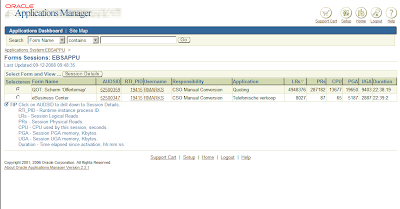 ....
In OAM the forms sessions screen looks like this..
This print is taken from a test environment, but in the production environment you will see more forms sessions. Select a session and press the 'Sessions Details' button. On the next screen you will see the logon date and time, the session id, status and much more. Also you can kill the forms session.
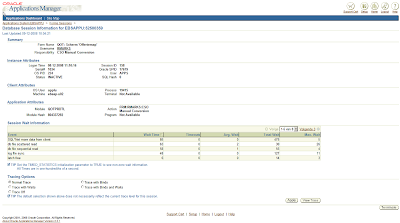
 ....
In OAM the forms sessions screen looks like this..
This print is taken from a test environment, but in the production environment you will see more forms sessions. Select a session and press the 'Sessions Details' button. On the next screen you will see the logon date and time, the session id, status and much more. Also you can kill the forms session.

Monday, November 24, 2008
Ucertify Prepkits
And again I am able to offer a 10% discount on any PrepKit from Ucertify.
Just go to the site and use the following discount code 'BASK10'. Good luck with your certification...
Just go to the site and use the following discount code 'BASK10'. Good luck with your certification...
Wednesday, November 19, 2008
Oracle Modernization Solutions
'A Practical guide to planning and implementing SOA Integration and Re-architecting to an Oracle platform'
Last week I recieved the book 'Oracle Modernization Solutions' from Packt Publishing. I was asked to review this book. The book is written by Tom Laszewski and Jason Williamson. The book describes different ways to modernize your business IT. The book is a technical dive on two approaches for Legacy Modernization, namely SOA enablement and re-architecture. They focus on these two methods because SOA is a modernization option for staying on a mainframe and re-architecture for moving off the mainframe.
According to the book there are several business objectives for a modernization project :
- Agility (enable innovation within the business)
- Value (expose and extend business value locked in the lagacy system)
- Reduced Cost
- Dwindling Technology Resources (there seems to be a decline in experienced IT personnel)
I just started, but already the book is taking most of my free time :) It's good stuff and very interesting. Although I have not finished the book yet, I already recommend this book to other Oracle technical specialists (like dba's or architects)
Monday, November 03, 2008
Freelancer
This morning I arrived at work, as a freelance Oracle eBS Dba. Did I notice anything different ? Not yet, but it sure feels good !
Subscribe to:
Posts (Atom)