I noticed a lot of visitors of this blog come to this blog with a particular question. Using a search engine, maybe a word you searched for is also present at my blog. But maybe not the way you searched for. Because I want to know what kind of problem you have with the e-Business Suite, I have opened a forum for EBS dba's. I am not sure if it's gonna work, but I will give it a try.
So, if you have any question and you cannot find the answer on the site, post a question on the forum and I will try to answer the question !
http://www.createforum.com/oracleebsdba/
Tuesday, March 20, 2007

Oracle Applications Manager in R12
A few post ago, I noticed there was no OAM link in the system administrator responsibility in the new Oracle EBS R12.
I found the OAM when accessing the workflow manager...
This problem exist on my new EBS R12 install with an empty database. Now that I have installed R12 with a vision database, sysadmin has got an 'Oracle Applications manager' entry in the system administrator responsibility. So, it seems a problem when installing an empty database instead of the vision database ??

Thursday, March 15, 2007
Date and time on virtual machine....
I had this problem with date/time synchronizing on a virtual machine with its host machine. Result of this was that the clock on my virtual machines ran slower than the real clock. So my date and time was always behind. Because I did not want to restart the timeserver (ntp server) every time from the command line (when restarting the ntp server, the date/time was correct for a few minutes....), a colleague of mine suggested to put the restart in a cronjob. Great plan and also tested on a few other virtual machines...
I placed the following lines in a fiel called time.cron
[root@vamisux32 ~]# crontab -l
# ntp update statement - workaround
0-59 * * * * /usr/sbin/ntpdate amisnt10 >>/var/log/ntpdate 2>&1
But on my Oracle Linux virtual machines, the cron job did not run. So, the virtual clock was still running slower than the real clock.
In the logfile of the crontab, the following error was shown
"ntpdate[23109]: the NTP socket is in use, exiting"
So it seems the cronjob cannot connect to the external time server, because the NTP socket is already in use.
I found out that Oracle Linux starts a NTPD process when booted. This NTPD process is blocking my NTP socket....So, I stopped the NTPD process and made sure it would not start up again when booting the virtual machine. Checked the date and time and everything seems oke now. Even the crontab logfile is without errors...
"ntpdate[18258]: step time server 10.252.252.10 offset...."
So, don't run ntpd and ntpdate next to each other...
I placed the following lines in a fiel called time.cron
[root@vamisux32 ~]# crontab -l
# ntp update statement - workaround
0-59 * * * * /usr/sbin/ntpdate amisnt10 >>/var/log/ntpdate 2>&1
But on my Oracle Linux virtual machines, the cron job did not run. So, the virtual clock was still running slower than the real clock.
In the logfile of the crontab, the following error was shown
"ntpdate[23109]: the NTP socket is in use, exiting"
So it seems the cronjob cannot connect to the external time server, because the NTP socket is already in use.
I found out that Oracle Linux starts a NTPD process when booted. This NTPD process is blocking my NTP socket....So, I stopped the NTPD process and made sure it would not start up again when booting the virtual machine. Checked the date and time and everything seems oke now. Even the crontab logfile is without errors...
"ntpdate[18258]: step time server 10.252.252.10 offset...."
So, don't run ntpd and ntpdate next to each other...
Wednesday, March 14, 2007
Oracle E-Business Suite R12 with OEM10G

After configuring the Oracle EBS 11.5.10 environment in OEM10G, it was time to also configure the new Oracle EBS R12 environment in OEM10G. Before I could configure R12 in OEM10G, I first had to upgrade the Oracle Applications plugin for EM10GR3. I downloaded the patches p5489352_R12_LINUX.zip and installed this patch on the OMS_HOME and in the local AGENT_HOME's (11i and R12 agent). For R12 also patch p5843357_R12[1].OAM.A_R12_GENERIC.zip was installed...After applying the patc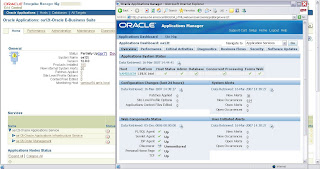 h, my first 11.5.10 configuration didn't work anymore, so I had to rediscover both R12 and 11i again. After rediscovering both environments, I was able to drop the old 11i target. So, now I have both environments in OEM10G. The services to be monitored look a little bit different for R12, because of the 10g iAS...Also OAM is integrated into OEM10G, so you can drill down into the EBS R12. How to configure R12 and 11i with the new Oracle Application plugin is documented in a Getting Started.pdf (can be downloaded from Metalink). So, now I am ready to monitor....
 h, my first 11.5.10 configuration didn't work anymore, so I had to rediscover both R12 and 11i again. After rediscovering both environments, I was able to drop the old 11i target. So, now I have both environments in OEM10G. The services to be monitored look a little bit different for R12, because of the 10g iAS...Also OAM is integrated into OEM10G, so you can drill down into the EBS R12. How to configure R12 and 11i with the new Oracle Application plugin is documented in a Getting Started.pdf (can be downloaded from Metalink). So, now I am ready to monitor....
 Tuesday, March 06, 2007
Oracle EBS 11i with 10G OEM

For our remote administration of databases, I was asked to configure our own internal EBS 11.5.10 environment in Oracle Enterprise Manager 10g.
First the Oracle EBS plugin was installed on the Oracle Management Server.
Second I had to install an agent on the EBS machine, and also apply the plugin patch into the Intelligent Agent home (patch p4678538_11i_LINUX.zip).
After the plugin patch I also applied the OAM integration patch (p3410599_11i_GENERIC.zip).
After patching the Agent home and defining targets in OEM, the Oracle EBS environment was configured in OEM. There was still one problem, when trying to configure the database target I could not connect with the sys account. Every time I tried to connect with sys, the following error occurred :
ORA-01017: invalid username/password; logon denied ORA-27037: unable to obtainfile status Compaq Tru64 UNIX Error: 2: No such file or directory Additionalinformation: 3
I found out that all I needed was a password file.....
Following note 359979.1 from Metalink helped me.
1. set REMOTE_LOGIN_PASSWORDFILE to exclusive (static parameter..)
2. Create password file using orapwd utility
3. restart database
After this you can rerun the database configuration in Grid Control....
Tuesday, February 27, 2007
First patch on Oracle E-Business Suite R12
This morning I downloaded my first patch for the new Oracle EBS R12. Already there are 2 high priority patches for the new EBS, and I downloaded one of them (patch p5856453_R12[1].AD.A_R12_LINUX.zip).
I could not help feeling a little bit excited, because patching is changed in EBS R12.
The manual steps to be taken before patching are removed from the readme and placed into an xml file. Before patching you are supposed to run a new perl script called $AD_TOP/bin/admsi.pl
This script creates an install_{patch_number}.html.
After performing the steps in the html file, you have to run $AD_TOP/bin/admsi.pl –done (to let the system know you have performed the manual steps….).
The admsi.pl also creates a custom readme which you have to read before patching.
I was a little bit disappointed, because the patch I downloaded is maybe to small. Nothing about admsi.pl in the readme…Tried to run admsi.pl anyway
cd /ebs/patches/5856453/ad/patch/115/manualsteps
[oracle@vamisux34 manualsteps]$ $AD_TOP/bin/admsi.pl
Invoking Oracle Patch Application Assistant….
Exception in thread "main" java.lang.ExceptionInInitializerError
at com.jgoodies.looks.plastic.PlasticLookAndFeel.(PlasticLookAndFeel.java:122)
at oracle.apps.ad.msi.LaunchUI._useOracleLookAndFeel(LaunchUI.java:69)
at oracle.apps.ad.msi.LaunchUI.(LaunchUI.java:29)
Caused by: java.awt.HeadlessException:
No X11 DISPLAY variable was set, but this program performed an operation which requires it.
at sun.awt.HeadlessToolkit.getScreenResolution(HeadlessToolkit.java:189)
at com.jgoodies.looks.LookUtils.isLowResolution(LookUtils.java:436)
at com.jgoodies.looks.LookUtils.(LookUtils.java:180)
… 3 more
Maybe with X-manager and $DISPLAY set ? No, admsi.pl returns a java exception…
Invoking Oracle Patch Application Assistant….
Exception in thread "main" java.lang.StringIndexOutOfBoundsException: String index out of range: -1
at java.lang.String.substring(String.java:1762)
at oracle.apps.ad.msi.LaunchUI.main(LaunchUI.java:107)
Running admsi.pl like this.....
I could not help feeling a little bit excited, because patching is changed in EBS R12.
The manual steps to be taken before patching are removed from the readme and placed into an xml file. Before patching you are supposed to run a new perl script called $AD_TOP/bin/admsi.pl
This script creates an install_{patch_number}.html.
After performing the steps in the html file, you have to run $AD_TOP/bin/admsi.pl –done (to let the system know you have performed the manual steps….).
The admsi.pl also creates a custom readme which you have to read before patching.
I was a little bit disappointed, because the patch I downloaded is maybe to small. Nothing about admsi.pl in the readme…Tried to run admsi.pl anyway
cd /ebs/patches/5856453/ad/patch/115/manualsteps
[oracle@vamisux34 manualsteps]$ $AD_TOP/bin/admsi.pl
Invoking Oracle Patch Application Assistant….
Exception in thread "main" java.lang.ExceptionInInitializerError
at com.jgoodies.looks.plastic.PlasticLookAndFeel.
at oracle.apps.ad.msi.LaunchUI._useOracleLookAndFeel(LaunchUI.java:69)
at oracle.apps.ad.msi.LaunchUI.
Caused by: java.awt.HeadlessException:
No X11 DISPLAY variable was set, but this program performed an operation which requires it.
at sun.awt.HeadlessToolkit.getScreenResolution(HeadlessToolkit.java:189)
at com.jgoodies.looks.LookUtils.isLowResolution(LookUtils.java:436)
at com.jgoodies.looks.LookUtils.
… 3 more
Maybe with X-manager and $DISPLAY set ? No, admsi.pl returns a java exception…
Invoking Oracle Patch Application Assistant….
Exception in thread "main" java.lang.StringIndexOutOfBoundsException: String index out of range: -1
at java.lang.String.substring(String.java:1762)
at oracle.apps.ad.msi.LaunchUI.main(LaunchUI.java:107)
Running admsi.pl like this.....
[oracle@vamisux34 manualsteps]$ perl $AD_TOP/bin/admsi.pl -cli
Gathering Information..
Enter the patch_top : /ebs/patches/5856453
Enter the APPS user password:
Logfile for this session is located at admsi.log
Generating installation instructions for patch 5856453..
Updating database....
install_5856453.html generated successfully
install_5856453.txt generated successfully
[oracle@vamisux34 manualsteps]$
The install_5856443.html is the new readme. Because there are no manual actions to perform, the new generated readme is the same as the old one and I can apply the patch using adpatch..
oracle@vamisux34 appl]$ cd /ebs/patches
[oracle@vamisux34 patches]$ ls
5856453 p5856453_R12[1].AD.A_R12_LINUX.zip
[oracle@vamisux34 patches]$ cd 5856453/
[oracle@vamisux34 5856453]$ adpatch options=hotpatch
************* Start of AutoPatch session *************
AutoPatch version: 12.0.0
AutoPatch started at: Tue Feb 27 2007 11:05:47
…..
AutoPatch is complete.
AutoPatch may have written informational messages to the file/appl/apps/apps_st/appl/admin/PROD/log/u5856453.lgi
Errors and warnings are listed in the log file/appl/apps/apps_st/appl/admin/PROD/log/u5856453.log
and in other log files in the same directory.
The patch finished without problems….
Monday, February 26, 2007
OAUG meeting in Amsterdam

This afternoon I was present at the OAUG netherlands. The meeting was held in the Nationaal Lucht -en Ruimtevaartlaboratorium in Amsterdam and the topic was Oracle ASM with the Oracle EBS.
So, first an Oracle certified master, Rene Kundersma, told something about Oracle ASM. Next topic was supposed to be about the Oracle EBS using ASM, but the speaker had to cancel...so Rene could tell us more about Oracle ASM without Oracle EBS. To bad, because the room was filled with Oracle EBS people, and a lot of questions were asked concerning the Oracle EBS with ASM. But, unfortunately all these questions remain unanswered...But the story Rene Kundersma told us was very interesting also !
Friday, February 23, 2007
Oracle Partner Release 12 Update seminar
This morning I was present at the Release 12 Partner update Seminar at Oracle in the Netherlands. Before the lunch there were some presentations, and one of them was very good. It was a presentation from Karsten Roigk (VP Applications), about the Oracle strategy and also some new features in Oracle General Ledger. Very interesting...
After the lunch I went to the Applications Technology meeting. This seminar was also an overview, but still there were some interesting issues. For example, in R12 the Integration Repository is part of the EBS, instead of the static html page it was in EBS 11i (http://irep.oracle.com/index.html). And now that it's part of the EBS, when a patch updates a api, the irep is also updated !!! The irep, by the way, is used for integration with the Oracle EBS. It shows us how you can integrate with the EBS. Making irep a part of the EBS R12 is also a part of the Oracle Fusion development.
After the lunch I went to the Applications Technology meeting. This seminar was also an overview, but still there were some interesting issues. For example, in R12 the Integration Repository is part of the EBS, instead of the static html page it was in EBS 11i (http://irep.oracle.com/index.html). And now that it's part of the EBS, when a patch updates a api, the irep is also updated !!! The irep, by the way, is used for integration with the Oracle EBS. It shows us how you can integrate with the EBS. Making irep a part of the EBS R12 is also a part of the Oracle Fusion development.
Friday, February 16, 2007
Oracle Applications Manager in Oracle EBS R12
I tried to find the new OAM, but could not find the responsibility for it.


When login in a 11i environment, you could choose to login into the application or login the web OAM. In R12 you cannot make this choice anymore. So where is the new web OAM ??
When logged in as 'sysadmin' the only applications manager responsibility is ' Workflow : Applications Manager'

When you choose that responsibility, it takes you to the workflow part of OAM. From there you can go to the Applications dashboard tab and you are in the known OAM webpage...
You enter the new web OAM through the following url : http://vamisux34.amis.local:8000/OA_HTML/weboam/oam/oamApps$target=PROD
and in the 11i environment the url looked like
So it changed from oa_servlets to OA_HTML.....

The OAM main page looks the same, but there is a new tab.. 'Software Updates'. Opening that page shows us the following...

The page schows us the Maintenance Activities like 'AD Administration -Disable Maintenance Mode'....
Also there is a Applied Bug Fix Check and a patch recommendation Request...
The old Applied Patches info is also available...
Wednesday, February 14, 2007
Guest password in Oracle EBS
Last Friday I received a message from an international EBS user. The GUEST password was changed in the profile option GUEST_USER_PASSWORD (default GUEST/ORACLE). After the change, they could not login the Oracle EBS anymore. She asked me for some advice, how to solve this problem since it was their production environment.
What the current password is, is shown by the following sql
SQL> select profile_option_value from fnd_profile_option_values
2 where profile_option_id = 3805;
To see if the login password for user GUEST is the default password...
select fnd_web_sec.validate_login('GUEST','ORACLE)
from dual;
Because autoconfig was no option at that time, I suggested to change the profile back to it's default by using the SAVE function from the FND_PROFILE package.
DECLARE
stat boolean;
BEGIN
dbms_output.disable;
dbms_output.enable(100000);
stat := FND_PROFILE.SAVE('GUEST_USER_PWD', 'GUEST/ORACLE', 'SITE');
IF stat
THEN
dbms_output.put_line( 'Stat = TRUE - profile updated' );
ELSE
dbms_output.put_line( 'Stat = FALSE - profile NOT updated' );
END IF;
commit;
END;
After running this function the password was set to ORACLE. The GUEST user password is also mentioned in the dbc file and in the xml file. If all the entry's are the same, everything should work fine.
Well, at Sunday we lost contact. But last Monday I received an email saying the problem was solved. I asked what solved the problem in the end, but I did not receive an answer yet.
What the current password is, is shown by the following sql
SQL> select profile_option_value from fnd_profile_option_values
2 where profile_option_id = 3805;
To see if the login password for user GUEST is the default password...
select fnd_web_sec.validate_login('GUEST','ORACLE)
from dual;
Because autoconfig was no option at that time, I suggested to change the profile back to it's default by using the SAVE function from the FND_PROFILE package.
DECLARE
stat boolean;
BEGIN
dbms_output.disable;
dbms_output.enable(100000);
stat := FND_PROFILE.SAVE('GUEST_USER_PWD', 'GUEST/ORACLE', 'SITE');
IF stat
THEN
dbms_output.put_line( 'Stat = TRUE - profile updated' );
ELSE
dbms_output.put_line( 'Stat = FALSE - profile NOT updated' );
END IF;
commit;
END;
After running this function the password was set to ORACLE. The GUEST user password is also mentioned in the dbc file and in the xml file. If all the entry's are the same, everything should work fine.
Well, at Sunday we lost contact. But last Monday I received an email saying the problem was solved. I asked what solved the problem in the end, but I did not receive an answer yet.
Thursday, February 08, 2007
Install Oracle EBS 12i
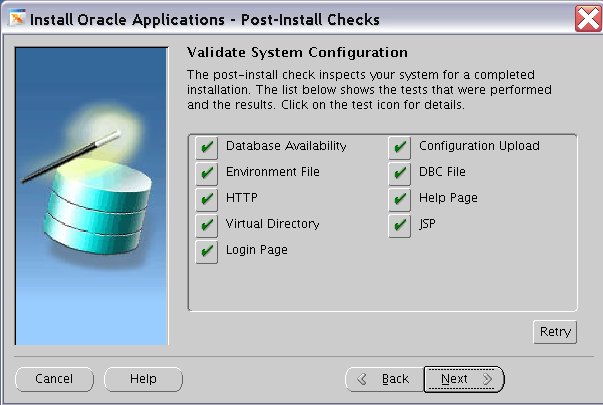
So, I finally installed the new EBS 12i release. I had to install with an empty database, because of disk space limits...
But the important thing is that the installation went well and was successful.
Some first impressions...
- the look and feel changed (we had already seen some previews..)
- some strange options when logging in the application ??
- the database is twice as big (10g vs 9i)
- new technology stack
- new instance top
I also faced a first problem. I could not startup the application in my Microsoft explorer..The java console showed the login was hanging on the appslogo_new.gif ??
I found out that when I deactivated my Oracle Dba Toolbar in the explorer, I could enter the application without any problem. But when activating the toolbar again..the login process was hanging again on the same gif. Strange...the toolbar was downloaded from OTN and is something Oracle brought to my attention... I wonder if this is a known issue....
I also saw the dbc file is now in the instance top directory. Strange, because the path to the dbc file seems the same, /appl/fnd/12.0.0/secure....but this is not in the APPL_TOP, but in the INSTANCE_TOP (inst/apps/PROD_vamisux34).
A simple ls command in the INSTANCE_TOP shows..
[oracle@vamisux34 PROD_vamisux34]$ ls
admin appltmp conf_PROD.txt logs ora pids rgf
appl certs conf_PROD.txt.bac ocm out portal temp
The admin directory contains the scripts directory, where all the start/stop scripts are located.
The appl directory shows us
[oracle@vamisux34 appl]$ ls
admin fnd
where fnd holds the dbc file and the admin directory contains the xml file.
More to come....
Friday, February 02, 2007
Sizing Oracle EBS 12i
I wanted to find out how ‘big’ the new Oracle EBS 12i release really is. So, I downloaded the software from Edelivery and created a stage area.
From the stage area I started the rapidwiz to check the required disk space.
Here is the required disk space for Oracle EBS 12i :
Database ORACLE_HOME = /ebs/db/tech_st/10.2.0
required = 4234.0
Database System File Directory = /ebs/db/apps_st/data
required = 19487.0
Database Log File Directory = /ebs/db/apps_st/data
required = 3165.0
Database Transaction File Directory = /ebs/db/apps_st/data
required = 66244.0
Database Archive File Directory = /ebs/db/apps_st/data
required = 45061.0
APPL_TOP = /ebs/apps/apps_st/appl
required = 5078.0
APPL_TOP mount 2 = /ebs/apps/apps_st/appl
required = 2639.0
APPL_TOP mount 3 = /ebs/apps/apps_st/appl
required = 4167.0
APPL_TOP mount 4 = /ebs/apps/apps_st/appl
required = 2882.0
COMMON_TOP = /ebs/apps/apps_st/comn
required = 2743.0
Apps ORACLE_HOME = /ebs/apps/tech_st/10.1.3
required = 1553.0
Tools ORACLE_HOME = /ebs/apps/tech_st/10.1.2
required = 1138.0
So, you see the database is much bigger then release 11.5.10.2 (10g vs 9i). Also the new APPL_TOP is a little bigger then the old one.
To check for yourself, here is the required disk space for Oracle EBS 11.5.10.2
Database ORACLE_HOME
required = 3091.0
Database System File Directory
required = 12023.0
Database Log File Directory
required = 160.0
Database Transaction File Directory
required = 28870.0
Database Archive File Directory
required = 21206.0
APPL_TOP
required = 5707.0
APPL_TOP mount 2
required = 3212.0
APPL_TOP mount 3
required = 5852.0
APPL_TOP mount 4
required = 2524.0
COMMON_TOP
required = 2963.0
Apps ORACLE_HOME (iAS)
required = 2600.0
Tools ORACLE_HOME (8.0.6)
required = 3027.0
From the stage area I started the rapidwiz to check the required disk space.
Here is the required disk space for Oracle EBS 12i :
Database ORACLE_HOME = /ebs/db/tech_st/10.2.0
required = 4234.0
Database System File Directory = /ebs/db/apps_st/data
required = 19487.0
Database Log File Directory = /ebs/db/apps_st/data
required = 3165.0
Database Transaction File Directory = /ebs/db/apps_st/data
required = 66244.0
Database Archive File Directory = /ebs/db/apps_st/data
required = 45061.0
APPL_TOP = /ebs/apps/apps_st/appl
required = 5078.0
APPL_TOP mount 2 = /ebs/apps/apps_st/appl
required = 2639.0
APPL_TOP mount 3 = /ebs/apps/apps_st/appl
required = 4167.0
APPL_TOP mount 4 = /ebs/apps/apps_st/appl
required = 2882.0
COMMON_TOP = /ebs/apps/apps_st/comn
required = 2743.0
Apps ORACLE_HOME = /ebs/apps/tech_st/10.1.3
required = 1553.0
Tools ORACLE_HOME = /ebs/apps/tech_st/10.1.2
required = 1138.0
So, you see the database is much bigger then release 11.5.10.2 (10g vs 9i). Also the new APPL_TOP is a little bigger then the old one.
To check for yourself, here is the required disk space for Oracle EBS 11.5.10.2
Database ORACLE_HOME
required = 3091.0
Database System File Directory
required = 12023.0
Database Log File Directory
required = 160.0
Database Transaction File Directory
required = 28870.0
Database Archive File Directory
required = 21206.0
APPL_TOP
required = 5707.0
APPL_TOP mount 2
required = 3212.0
APPL_TOP mount 3
required = 5852.0
APPL_TOP mount 4
required = 2524.0
COMMON_TOP
required = 2963.0
Apps ORACLE_HOME (iAS)
required = 2600.0
Tools ORACLE_HOME (8.0.6)
required = 3027.0
Thursday, February 01, 2007
Applications unlimited
Yesterday morning I visited a seminair about Oracle Fusion middleware. It was an overview, so a lot of info in a few hours. The overview helped me understanding SOA, BPELL, FUSION APPS, ESB a little bit.
In the afternoon I visited Oracle again, this time in Amsterdam for the Applications Unlimited session. In a beautifull environment, the board room in the Rembrandt Tower, I saw the Applications unlimited presentation from New York. Saw some old colleques and enjoyed the whole scene....
Now back to work , trying to complete the staging area for the EBS 12i....
In the afternoon I visited Oracle again, this time in Amsterdam for the Applications Unlimited session. In a beautifull environment, the board room in the Rembrandt Tower, I saw the Applications unlimited presentation from New York. Saw some old colleques and enjoyed the whole scene....
Now back to work , trying to complete the staging area for the EBS 12i....
Tuesday, January 30, 2007
Before installing the new Oracle EBS 12i release, these are the disk space requirements
Rapid Install installs the file system and database files for all products, regardless of
their licensed status. The approximate file system requirements in a standard
installation are:
Applications node file system (includes AS
10.1.2 ORACLE_HOME, AS 10.1.3
ORACLE_HOME, COMMON_TOP,
APPL_TOP, and INST_TOP)
28 GB
Database node file system (Fresh install) 45 GB
Database node file system (Vision Demo database)
133 GB
The total space required for a standard system,
not including the stage area, is 73 GB for a fresh install with
a production database, and 161 GB for a fresh install with a Vision
Demo database.
Note: The database node disk space requirements for both the
production database and the Vision Demo database include database
1-10 Oracle Applications Installation Guide: Using Rapid Install
files (.dbf) and the 10g R2 database ORACLE_HOME.
Stage area
For a production database install, running Rapid Install from a stage area requires at
least 33 GB to accommodate the file system and database files in the stage area.
Rapid Install installs the file system and database files for all products, regardless of
their licensed status. The approximate file system requirements in a standard
installation are:
Applications node file system (includes AS
10.1.2 ORACLE_HOME, AS 10.1.3
ORACLE_HOME, COMMON_TOP,
APPL_TOP, and INST_TOP)
28 GB
Database node file system (Fresh install) 45 GB
Database node file system (Vision Demo database)
133 GB
The total space required for a standard system,
not including the stage area, is 73 GB for a fresh install with
a production database, and 161 GB for a fresh install with a Vision
Demo database.
Note: The database node disk space requirements for both the
production database and the Vision Demo database include database
1-10 Oracle Applications Installation Guide: Using Rapid Install
files (.dbf) and the 10g R2 database ORACLE_HOME.
Stage area
For a production database install, running Rapid Install from a stage area requires at
least 33 GB to accommodate the file system and database files in the stage area.
Monday, January 29, 2007
EBS 12i
This weekend i used to download the new EBS 12i release. More then 100 gb of EBS cd's I had to download. Now I'm looking for a place to install the EBS 12i...
This week is also the launch of the new EBS 12i in Amsterdam. This launch is on wednesday. In the morning I'm visiting Oracle for a fusion middleware overview, and later on I'm going to Amsterdam for the global launch...
http://www.oracle.com/webapps/events/EventsDetail.jsp?p_eventId=61972&src=4852728&src=4852728&Act=26
This week is also the launch of the new EBS 12i in Amsterdam. This launch is on wednesday. In the morning I'm visiting Oracle for a fusion middleware overview, and later on I'm going to Amsterdam for the global launch...
http://www.oracle.com/webapps/events/EventsDetail.jsp?p_eventId=61972&src=4852728&src=4852728&Act=26
Thursday, January 18, 2007
Installing WEB ADI in EBS 11.5.10.2
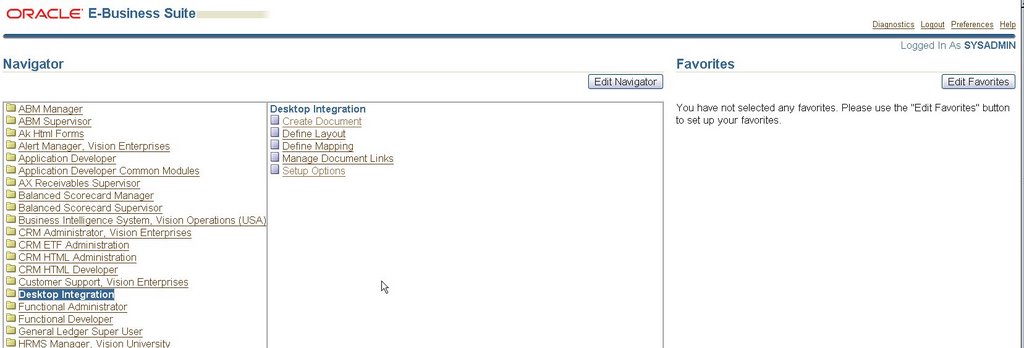
Install Webadi (BNE.D) on EBS 11.5.10.2
1. note 287080.1 on Metalink
2. check if WEB ADI is spliced into your environment
[oracle@ebs2 prod_ebs2]$ sqlplus apps/apps
SQL*Plus: Release 10.2.0.2.0 - Production on Tue Jan 16 08:23:42 2007
Copyright (c) 1982, 2005, Oracle. All Rights Reserved.
Connected to:
Oracle Database 10g Enterprise Edition Release 10.2.0.2.0 - Production
With the Partitioning, OLAP and Data Mining options
SQL> Select * from APPLSYS.FND_APPLICATION where APPLICATION_SHORT_NAME = 'BNE';
APPLICATION_ID APPLICATION_SHORT_NAME
-------------- --------------------------------------------------
LAST_UPDATE_DAT LAST_UPDATED_BY CREATION_DATE CREATED_BY LAST_UPDATE_LOGIN
--------------- --------------- --------------- ---------- -----------------
BASEPATH PRODUCT_CODE
-------------------- --------------------------------------------------
231 BNE01-SEP-04 2 01-JAN-80 1 0BNE_TOP BNE
SQL>
If a record returns, then WEB ADI has been spliced.
2. install patch 4291053
3. install patch 3218526 (BNE.D)
4. from the adadmin menu compile apps schema (1)
Compile/Reload Applications Database Entities
---------------------------------------------------
1. Compile APPS schema
2. Compile menu information
3. Compile flexfields
4. Reload JAR files to database
5. Return to Main Menu
5. in the same adadmin session compile flexfield data in AOL tables (option 3)
6. restart application middle tier
7. Now you have a responsability 'Desktop Integraton' (see screen print on top..)
Tuesday, January 16, 2007
FNDCPASS ALLORACLE
FNDCPASS is an EBS tool to change passwords of database schema's within the Oracle EBS. For example, you can change the APPS password using FNDCPASS, but also any other schema in the EBS database. FNDCPASS can also be used to change the password of an application user (like sysadmin).
To change the APPS password use...
FNDCPASS apps/*** 0 Y system/***** SYSTEM APPLSYS [new_password]
(the apps password is also mentioned in some config files, so you have to change those files manually !!!)
To change any other schema...
FNDCPASS apps/**** 0 Y system/***** ORACLE GL [new_password]
To change the password of a application user
FNDCPASS apps/*** 0 Y system/****** USER SYSADMIN [new_password]
When changing the password of all schemas in the database, you have a lot off FNDCPASS to do...there are almost 200 schemas in the EBS database that need to be changed. Default the password is schema name, so gl/gl and ap/ap...
When installing patch 4676589 (11i.ATG_PF.H Rollup 4) a new feature is added to FNDCPASS. Now you can use the ALLORACLE functionality to change all the schema passwords in one FNDCPASS.
Here is what I did to use the new FNDCPASS feature...
1. install AD: Patch 11i.AD.I.4 (patch 4712852)
2. install patch 5452096
sqlplus -s APPS/***** @/appl/prodappl/ad/11.5.0/admin/sql/adtpurge.sql 10 1000
Spawned Process 17504
Done purging timing information for prior sessions.
AutoPatch is complete.
AutoPatch may have written informational messages to the file/appl/prodappl/admin/prod/log/u5452096.lgi
Errors and warnings are listed in the log file/appl/prodappl/admin/prod/log/u5452096.log
and in other log files in the same directory.
3. run the Technology Stack Validation Utility
[oracle@ebs2 bin]$ ./txkprepatchcheck.pl -script=ValidateRollup -outfile=$APPLTMP/txkValidateRollup.html -appspass=apps
*** ALL THE FOLLOWING FILES ARE REQUIRED FOR RESOLVING RUNTIME ERRORS
***STDOUT /appl/prodcomn/rgf/prod_ebs2/TXK/txkValidateRollup_Mon_Jan_8_stdout.log
Reportfile /appl/prodcomn/temp/txkValidateRollup.html generated successfully.
4. run autoconfig
5. apply patch 4676589 (11i.ATG_PF.H Rollup 4, Applications Technology Family)
6. After the install
7. apply patch 3865683 (AD: Release 11.5.10 Products Name Patch)
8. apply patch 4583125 (Oracle XML Parser for Java) see note 271148.1
Verify if the upgrade has been successful..
cd $JAVA_TOP
[oracle@ebs2 java]$ unzip -l appsborg.zip grep 9.0.4
0 04-19-03 02:10 .xdkjava_version_9.0.4.0.0_production
[oracle@ebs2 java]$
if there is an xdkjava_version_9.0.4.0.0_production entry, then XML parser is installed.
9. run autoconfig
10. disable maintenance mode (via adadmin)
Change Maintenance Mode
----------------------------------------
Maintenance Mode is currently: [Enabled].
Maintenance mode should normally be enabled when patchingOracle Applications and disabled when users are logged onto the system. See the Oracle Applications MaintenanceUtilities manual for more information about maintenance mode.
Please select an option:
1. Enable Maintenance Mode
2. Disable Maintenance Mode
3. Return to Main Menu
Enter your choice [3] : 2
sqlplus -s &un_apps/***** @/appl/prodappl/ad/11.5.0/patch/115/sql/adsetmmd.sql DISABLE
Successfully disabled Maintenance Mode.
Now try the new FNDCPASS function..
[oracle@ebs2 prod_ebs2]$ FNDCPASS apps/apps 0 Y system/manager ALLORACLE WELCOME
Log filename : L2726002.log
Report filename : O2726002.out
[oracle@ebs2 prod_ebs2]$
[oracle@ebs2 prod_ebs2]$ sqlplus apps/apps
SQL*Plus: Release 8.0.6.0.0 - Production on Mon Jan 15 08:50:39 2007
(c) Copyright 1999 Oracle Corporation. All rights reserved.
Connected to:
Oracle Database 10g Enterprise Edition Release 10.2.0.2.0 - Production
With the Partitioning, OLAP and Data Mining options
SQL> conn gl/welcome
Connected.
SQL> conn ap/welcome
Connected.
SQL>
To change the APPS password use...
FNDCPASS apps/*** 0 Y system/***** SYSTEM APPLSYS [new_password]
(the apps password is also mentioned in some config files, so you have to change those files manually !!!)
To change any other schema...
FNDCPASS apps/**** 0 Y system/***** ORACLE GL [new_password]
To change the password of a application user
FNDCPASS apps/*** 0 Y system/****** USER SYSADMIN [new_password]
When changing the password of all schemas in the database, you have a lot off FNDCPASS to do...there are almost 200 schemas in the EBS database that need to be changed. Default the password is schema name, so gl/gl and ap/ap...
When installing patch 4676589 (11i.ATG_PF.H Rollup 4) a new feature is added to FNDCPASS. Now you can use the ALLORACLE functionality to change all the schema passwords in one FNDCPASS.
Here is what I did to use the new FNDCPASS feature...
1. install AD: Patch 11i.AD.I.4 (patch 4712852)
2. install patch 5452096
sqlplus -s APPS/***** @/appl/prodappl/ad/11.5.0/admin/sql/adtpurge.sql 10 1000
Spawned Process 17504
Done purging timing information for prior sessions.
AutoPatch is complete.
AutoPatch may have written informational messages to the file/appl/prodappl/admin/prod/log/u5452096.lgi
Errors and warnings are listed in the log file/appl/prodappl/admin/prod/log/u5452096.log
and in other log files in the same directory.
3. run the Technology Stack Validation Utility
[oracle@ebs2 bin]$ ./txkprepatchcheck.pl -script=ValidateRollup -outfile=$APPLTMP/txkValidateRollup.html -appspass=apps
*** ALL THE FOLLOWING FILES ARE REQUIRED FOR RESOLVING RUNTIME ERRORS
***STDOUT /appl/prodcomn/rgf/prod_ebs2/TXK/txkValidateRollup_Mon_Jan_8_stdout.log
Reportfile /appl/prodcomn/temp/txkValidateRollup.html generated successfully.
4. run autoconfig
5. apply patch 4676589 (11i.ATG_PF.H Rollup 4, Applications Technology Family)
6. After the install
7. apply patch 3865683 (AD: Release 11.5.10 Products Name Patch)
8. apply patch 4583125 (Oracle XML Parser for Java) see note 271148.1
Verify if the upgrade has been successful..
cd $JAVA_TOP
[oracle@ebs2 java]$ unzip -l appsborg.zip grep 9.0.4
0 04-19-03 02:10 .xdkjava_version_9.0.4.0.0_production
[oracle@ebs2 java]$
if there is an xdkjava_version_9.0.4.0.0_production entry, then XML parser is installed.
9. run autoconfig
10. disable maintenance mode (via adadmin)
Change Maintenance Mode
----------------------------------------
Maintenance Mode is currently: [Enabled].
Maintenance mode should normally be enabled when patchingOracle Applications and disabled when users are logged onto the system. See the Oracle Applications MaintenanceUtilities manual for more information about maintenance mode.
Please select an option:
1. Enable Maintenance Mode
2. Disable Maintenance Mode
3. Return to Main Menu
Enter your choice [3] : 2
sqlplus -s &un_apps/***** @/appl/prodappl/ad/11.5.0/patch/115/sql/adsetmmd.sql DISABLE
Successfully disabled Maintenance Mode.
Now try the new FNDCPASS function..
[oracle@ebs2 prod_ebs2]$ FNDCPASS apps/apps 0 Y system/manager ALLORACLE WELCOME
Log filename : L2726002.log
Report filename : O2726002.out
[oracle@ebs2 prod_ebs2]$
[oracle@ebs2 prod_ebs2]$ sqlplus apps/apps
SQL*Plus: Release 8.0.6.0.0 - Production on Mon Jan 15 08:50:39 2007
(c) Copyright 1999 Oracle Corporation. All rights reserved.
Connected to:
Oracle Database 10g Enterprise Edition Release 10.2.0.2.0 - Production
With the Partitioning, OLAP and Data Mining options
SQL> conn gl/welcome
Connected.
SQL> conn ap/welcome
Connected.
SQL>
Tuesday, January 02, 2007
My EBS congifuration
So, what is my EBS configuration so far ?
1. Oracle EBS 11.5.10.2
2. Multi node (two nodes) install
3. shared $APPL_TOP
4. shared technology stack (iAS and 8.0.6)
5. Oracle 10.2.0.2 database
6. Oracle Linux operating system
1. Oracle EBS 11.5.10.2
2. Multi node (two nodes) install
3. shared $APPL_TOP
4. shared technology stack (iAS and 8.0.6)
5. Oracle 10.2.0.2 database
6. Oracle Linux operating system
EBS database upgrade 10GR2..
Here are the steps I have taken to upgrade my EBS database from 9.2.0.6 to 10.2.0.2
1. patch 5478710 (TXK (FND & ADX) AUTOCONFIG ROLLUP PATCH O)
[oracle@ebs2 bin]$ ./txkprepatchcheck.pl -script=ValidateRollup -outfile=$APPLTMP/txkValidateRollup.html -appspass=apps*** ALL THE FOLLOWING FILES ARE REQUIRED FOR RESOLVING RUNTIME ERRORS*** STDOUT = /appl/prodcomn/rgf/prod_ebs2/TXK/txkValidateRollup_Tue_Dec_19_23_36_11_2006_stdout.log
Reportfile /appl/prodcomn/temp/txkValidateRollup.html generated successfully.
enable maintenance mode using adadmin
Please select an option:
1. Enable Maintenance Mode
2. Disable Maintenance Mode
3. Return to Main Menu
Enter your choice [3] : 1
sqlplus -s &un_apps/***** @/appl/prodappl/ad/11.5.0/patch/115/sql/adsetmmd.sql ENABLESpawned Process 30742
Successfully enabled Maintenance Mode.
After applying the patch make a new appsutil.zip file...
[oracle@ebs1 5478710]$ $ADPERLPRG $AD_TOP/bin/admkappsutil.plStarting the generation of appsutil.zipLog file located at /appl/prodappl/admin/log/MakeAppsUtil_12200852.logoutput located at /appl/prodappl/admin/out/appsutil.zipMakeAppsUtil completed successfully.
Copy appsutil.zip to your new 10g $ORACLE_RDBMS_HOME, once you have created this new $ORACLE_HOME. In the new ORACLE_HOME unzip -o..
run autoconfig on db-tier
[oracle@ebs2 prod_ebs2]$ ./adautocfg.shEnter the APPS user password:AutoConfig is configuring the Database environment...
AutoConfig will consider the custom templates if present. Using ORACLE_HOME location : /ebs/proddb/9.2.0 Classpath : /ebs/proddb/9.2.0/jre/1.4.2/lib/rt.jar:/ebs/proddb/9.2.0/jdbc/lib/ojdbc14.jar
:/ebs/proddb/9.2.0/appsutil/java/xmlparserv2.zip:/ebs/proddb/9.2.0/appsutil/java:/ebs/proddb/9.2.0/jlib/netcfg.jar
Using Context file : /ebs/proddb/9.2.0/appsutil/prod_ebs2.xml
Context Value Management will now update the Context file
Updating Context file...COMPLETED
Attempting upload of Context file and templates to database...COMPLETED
Updating rdbms version in Context file to db920Updating rdbms type in Context file to 32 bitsConfiguring templates from ORACLE_HOME ...
AutoConfig completed successfully.
The log file for this session is located at: /ebs/proddb/9.2.0/appsutil/log/prod_ebs2/12200014/adconfig.log
Because I work with 11i.AD.I.2, I had to manually regenerate my jar files using adadmin.
2. patch 4653225, 11.5.10 INTEROP PATCH FOR 10GR2
3. 10201_database_linux32.zip
using runInstaller to install the 10GR2 software in it's own ORACLE_HOME /ebs/proddb/10.2.0
4. 10201_companion_linux32.zip
Install 10G products in the 10g ORACLE_HOME (second option in the install menu...)
5. p4547817_10202_LINUX.zip
6. before the database upgrade I first ran the tool utlu102i.sql in the old 9i database. This script wil generate a upgrade report, and will show what changes have to be made before you can upgrade.
SQL> @utlu102i.sql
Oracle Database 10.2 Upgrade Information Utility 12-20-2006 02:33:32
**********************************************************************
Database:
**********************************************************************
--> name: PROD-
-> version: 9.2.0.6.0
--> compatible: 9.2.0
--> blocksize: 8192.
**********************************************************************
Logfiles: [make adjustments in the current environment]**********************************************************************
--> The existing log files are adequate. No changes are required.
....
7. Gather statistics
8. created the SYSAUX tablespace..
CREATE TABLESPACE SYSAUX DATAFILE '/ebs/proddata/sysaux01.dbf' SIZE 500M AUTOEXTEND ON NEXT 10M MAXSIZE 2000M
NOLOGGING
ONLINE
PERMANENT
EXTENT MANAGEMENT LOCAL
AUTOALLOCATEBLOCKSIZE 8K
SEGMENT SPACE MANAGEMENT AUTO;
9. copy the initprod.ora to the new ORACLE_HOME and adjust the parameters for 10gR2
10. set the following variables to the new 10g home... - ORACLE_HOME - PATH - ORA_NLS10 - LD_LIBRARY_PATH
11. Startup database in upgrade mode....
SQL> startup upgrade pfile=/ebs/proddb/10.2.0/dbs/initprod.ora
ORA-32006: SQL_TRACE initialization parameter has been deprecated
ORACLE instance started.
Total System Global Area 1073741824 bytes
Fixed Size 1264892 bytes
Variable Size 411042564 bytes
Database Buffers 650117120 bytes
Redo Buffers 11317248 bytes
Database mounted.
Database opened.
SQL> shutdown abort;
ORACLE instance shut down.
There are still wrong parameters in de init.ora, shuwdown and correct the parameterfile...
SQL> startup upgrade pfile=/ebs/proddb/10.2.0/dbs/initprod.ora
ORACLE instance started.
Total System Global Area 1073741824 bytes
Fixed Size 1264892 bytes
Variable Size 411042564 bytes
Database Buffers 650117120 bytes
Redo Buffers 11317248 bytes
Database mounted.
Database opened.
SQL>SPOOL upgrade.log
SQL>@catupgrd.sql
During this sql the following error occurs..
ERROR at line 1:ORA-06553: PLS-213: package STANDARD not accessible
SQL> conn sys as sysdba
Enter password:
Connected.
SQL> SELECT * FROM DBA_OBJECTS WHERE OWNER = 'SYS' 2 AND OBJECT_NAME = 'STANDARD';
Seems status is invalid..The standard package is needed to compile...
SQL> ALTER PACKAGE STANDARD COMPILE;
Still errors occured.
Then commend out the following plsql part in the init.ora
#plsql_optimize_level = 2 #MP
#plsql_code_type = native #MP
#plsql_native_library_dir = /prod11i/plsql_nativelib
#plsql_native_library_subdir_count = 149
restarted the catupgrd.sql and now the error did not occur...
Now the upgrade runs into a
ORA-0600 ORA-00600: internal error code,
arguments: [kqludp2], [0x49A44E2C], [1], [], [], [], [], []
Don't forget to set the following parameter to 0...
aq_tm_processes = 0
finally after a few days with ORA-0600 errors and startingover again..
TIMESTAMP
--------------------------------------------------------------------------------
COMP_TIMESTAMP UPGRD_END 2006-12-27 17:33:11
1 row selected.
.Oracle Database 10.2 Upgrade Status Utility 12-27-2006 17:33:12.
Component Status Version HH:MM:SS
Oracle Database Server VALID 10.2.0.2.0 00:41:17
JServer JAVA Virtual Machine VALID 10.2.0.2.0 00:00:00
Oracle XDK VALID 10.2.0.2.0 00:00:00
Oracle Database Java Packages VALID 10.2.0.2.0 00:00:00
Oracle Text VALID 10.2.0.2.0 00:00:00
Oracle XML Database VALID 10.2.0.2.0 00:00:00
Oracle Real Application Clusters INVALID 10.2.0.2.0 00:00:02
Oracle Data Mining VALID 10.2.0.2.0 00:00:00
OLAP Analytic Workspace VALID 10.2.0.2.0 00:00:00
OLAP Catalog VALID 10.2.0.2.0 00:00:00
Oracle OLAP API VALID 10.2.0.2.0 00:00:00
Oracle interMedia VALID 10.2.0.2.0 00:00:00
Spatial VALID 10.2.0.2.0 00:05:28.
Total Upgrade Time: 01:11:16
PL/SQL procedure successfully completed.
12. Shutdown the database
SQL> shutdown immediate;
Database closed.
Database dismounted.
ORACLE instance shut down.
SQL>
Do not use shutdown abort !!!!!
13. Compile remaining stored PL/SQL and JAVA code
SQL> startup restrict
ORACLE instance started.
Total System Global Area 1073741824 bytes
Fixed Size 1264892 bytes
Variable Size 411042564 bytes
Database Buffers 650117120 bytes
Redo Buffers 11317248 bytes
Database mounted.
Database opened.
SQL>@utlrp.sql
TIMESTAMP
--------------------------------------------------------------------------------
COMP_TIMESTAMP UTLRP_BGN 2006-12-27 17:54:11
one hour later, still
SQL> SELECT COUNT(*) FROM obj$ WHERE status IN (4, 5, 6);
COUNT(*)
----------
111314
invalid objects to go....
And already...
SQL> SELECT COUNT(*) FROM UTL_RECOMP_COMPILED;
COUNT(*)
----------
45517
objects compiled...
TIMESTAMP
--------------------------------------------------------------------------------
COMP_TIMESTAMP UTLRP_END 2006-12-28 09:30:58
1 row selected.
SQL> SELECT COUNT(*) FROM obj$ WHERE status IN (4, 5, 6);
COUNT(*)
----------
230
SQL> select count(*) from dba_objects
2 where status like 'INVALID';
COUNT(*)
----------
238
Still invalid objects...maybe compiling via adadmin will work.
14. run $APPL_TOP/admin/adgrants.sql
[oracle@ebs2 admin]$ sqlplus /nolog
SQL*Plus: Release 10.2.0.2.0 - Production on Thu Dec 28 13:18:50 2006
Copyright (c) 1982, 2005, Oracle. All Rights Reserved.
SQL> conn sys as sysdba
Enter password:
Connected.
SQL> @adgrants.sql applsys
15. create spfile from pfile
SQL> create spfile from pfile='/ebs/proddb/10.2.0/dbs/initprod.ora';
File created.
16. grant create procedure to ctxsys
SQL> shutdown immediate;
Database closed.
Database dismounted.
ORACLE instance shut down.
SQL> startup
ORACLE instance started.
Total System Global Area 1073741824 bytes
Fixed Size 1264892 bytes
Variable Size 411042564 bytes
Database Buffers 650117120 bytes
Redo Buffers 11317248 bytes
Database mounted.
Database opened.
SQL> conn apps/apps
Connected.
SQL> @adctxprv.sql manager CTXSYS
Connecting to SYSTEM
Connected.
PL/SQL procedure successfully completed.
Commit complete.
Disconnected from Oracle Database 10g Enterprise Edition Release 10.2.0.2.0 - ProductionWith the Partitioning, OLAP and Data Mining options
17. Next step should be 'run autoconfig'...but where is the context file ??
First create the context file...
[oracle@ebs2 bin]$ perl adbldxml.pl tier=db appsuser=apps appspass=apps
Starting context file generation for db tier..
Using JVM from /ebs/proddb/10.2.0/jre/1.4.2/bin/java to execute java programs..
The log file for this adbldxml session is located at:/ebs/proddb/10.2.0/appsutil/log/adbldxml_12281400.log
Enter the value for Display Variable: >ebs2:0.0
The context file has been created at:/ebs/proddb/10.2.0/appsutil/prod_ebs2.xml
Now run autoconfig
[oracle@ebs2 bin]$ ./adconfig.sh
Enter the full path to the Context file: /ebs/proddb/10.2.0/appsutil/prod_ebs2.xml
Enter the APPS user password:
AutoConfig is configuring the Database environment...
AutoConfig will consider the custom templates if present.
Using ORACLE_HOME location : /ebs/proddb/10.2.0 Classpath : /ebs/proddb/10.2.0/jre/1.4.2/lib/rt.jar:/ebs/proddb/10.2.0/jdbc/lib/ojdbc14.jar:/ebs/proddb/10.2.0/appsutil/java/xmlparserv2.zip
:/ebs/proddb/10.2.0/appsutil/java:/ebs/proddb/10.2.0/jlib/netcfg.jar:/ebs/proddb/10.2.0/jlib/ldapjclnt10.jar
Using Context file : /ebs/proddb/10.2.0/appsutil/prod_ebs2.xml
Context Value Management will now update the Context file
Updating Context file...COMPLETED
Attempting upload of Context file and templates to database...COMPLETED
Updating rdbms version in Context file to db102Updating rdbms type in Context file to 32 bitsConfiguring templates from ORACLE_HOME ...
AutoConfig completed successfully.The log file for this session is located at: /ebs/proddb/10.2.0/appsutil/log/prod_ebs2/12281412/adconfig.log
18. Gather sys statistics
SQL> conn sys as sysdba
Enter password:
Connected.
SQL> shutdown immediate;
Database closed.
Database dismounted.
ORACLE instance shut down.
SQL> startup restrict;
ORACLE instance started.
Total System Global Area 1073741824 bytes
Fixed Size 1264892 bytes
Variable Size 415236868 bytes
Database Buffers 645922816 bytes
Redo Buffers 11317248 bytes
Database mounted.
Database opened.
SQL> @/appl/prodappl/admin/adstats.sql
Connected.
-----------------------------------------------------
adstats.sql started at 2006-12-28 14:18:20
---
Checking for the DB version and collecting statistics ...
PL/SQL procedure successfully completed.
---------------------------------------------------
adstats.sql ended at 2006-12-28 15:10:41
---
Commit complete.
19. Re-create grants and synonyms using adadmin
Maintain Applications Database Entities
---------------------------------------------------
1. Validate APPS schema
2. Re-create grants and synonyms for APPS schema
Following error occurs...
declare*ERROR at line 1:ORA-04063: package body "SYSTEM.AD_DDL" has errors
ORA-06508: PL/SQL: could not find program unit being called: "SYSTEM.AD_DDL"ORA-06512: at line 19
Seems a known problem according to Metalink.
Note 387745.1 brings the sollution...
Run utlrp.sql again....
[oracle@ebs2 admin]$ sqlplus /nolog
SQL*Plus: Release 10.2.0.2.0 - Production on Thu Dec 28 15:39:13 2006
Copyright (c) 1982, 2005, Oracle. All Rights Reserved.
SQL> conn sys as sysdba
Enter password:
Connected.
SQL> shutdown
Database closed.
Database dismounted.
ORACLE instance shut down.
SQL> startup upgrade
ORACLE instance started.
Total System Global Area 1073741824 bytes
Fixed Size 1264892 bytes
Variable Size 415236868 bytes
Database Buffers 645922816 bytes
Redo Buffers 11317248 bytes
Database mounted.
Database opened.
SQL> @utlirp.sql
SQL>shutdown
SQL>startup
SQL>@utlrp.sql
Problem solved...
Again run adadmin
20. Startup services.
1. patch 5478710 (TXK (FND & ADX) AUTOCONFIG ROLLUP PATCH O)
[oracle@ebs2 bin]$ ./txkprepatchcheck.pl -script=ValidateRollup -outfile=$APPLTMP/txkValidateRollup.html -appspass=apps*** ALL THE FOLLOWING FILES ARE REQUIRED FOR RESOLVING RUNTIME ERRORS*** STDOUT = /appl/prodcomn/rgf/prod_ebs2/TXK/txkValidateRollup_Tue_Dec_19_23_36_11_2006_stdout.log
Reportfile /appl/prodcomn/temp/txkValidateRollup.html generated successfully.
enable maintenance mode using adadmin
Please select an option:
1. Enable Maintenance Mode
2. Disable Maintenance Mode
3. Return to Main Menu
Enter your choice [3] : 1
sqlplus -s &un_apps/***** @/appl/prodappl/ad/11.5.0/patch/115/sql/adsetmmd.sql ENABLESpawned Process 30742
Successfully enabled Maintenance Mode.
After applying the patch make a new appsutil.zip file...
[oracle@ebs1 5478710]$ $ADPERLPRG $AD_TOP/bin/admkappsutil.plStarting the generation of appsutil.zipLog file located at /appl/prodappl/admin/log/MakeAppsUtil_12200852.logoutput located at /appl/prodappl/admin/out/appsutil.zipMakeAppsUtil completed successfully.
Copy appsutil.zip to your new 10g $ORACLE_RDBMS_HOME, once you have created this new $ORACLE_HOME. In the new ORACLE_HOME unzip -o..
run autoconfig on db-tier
[oracle@ebs2 prod_ebs2]$ ./adautocfg.shEnter the APPS user password:AutoConfig is configuring the Database environment...
AutoConfig will consider the custom templates if present. Using ORACLE_HOME location : /ebs/proddb/9.2.0 Classpath : /ebs/proddb/9.2.0/jre/1.4.2/lib/rt.jar:/ebs/proddb/9.2.0/jdbc/lib/ojdbc14.jar
:/ebs/proddb/9.2.0/appsutil/java/xmlparserv2.zip:/ebs/proddb/9.2.0/appsutil/java:/ebs/proddb/9.2.0/jlib/netcfg.jar
Using Context file : /ebs/proddb/9.2.0/appsutil/prod_ebs2.xml
Context Value Management will now update the Context file
Updating Context file...COMPLETED
Attempting upload of Context file and templates to database...COMPLETED
Updating rdbms version in Context file to db920Updating rdbms type in Context file to 32 bitsConfiguring templates from ORACLE_HOME ...
AutoConfig completed successfully.
The log file for this session is located at: /ebs/proddb/9.2.0/appsutil/log/prod_ebs2/12200014/adconfig.log
Because I work with 11i.AD.I.2, I had to manually regenerate my jar files using adadmin.
2. patch 4653225, 11.5.10 INTEROP PATCH FOR 10GR2
3. 10201_database_linux32.zip
using runInstaller to install the 10GR2 software in it's own ORACLE_HOME /ebs/proddb/10.2.0
4. 10201_companion_linux32.zip
Install 10G products in the 10g ORACLE_HOME (second option in the install menu...)
5. p4547817_10202_LINUX.zip
6. before the database upgrade I first ran the tool utlu102i.sql in the old 9i database. This script wil generate a upgrade report, and will show what changes have to be made before you can upgrade.
SQL> @utlu102i.sql
Oracle Database 10.2 Upgrade Information Utility 12-20-2006 02:33:32
**********************************************************************
Database:
**********************************************************************
--> name: PROD-
-> version: 9.2.0.6.0
--> compatible: 9.2.0
--> blocksize: 8192.
**********************************************************************
Logfiles: [make adjustments in the current environment]**********************************************************************
--> The existing log files are adequate. No changes are required.
....
7. Gather statistics
8. created the SYSAUX tablespace..
CREATE TABLESPACE SYSAUX DATAFILE '/ebs/proddata/sysaux01.dbf' SIZE 500M AUTOEXTEND ON NEXT 10M MAXSIZE 2000M
NOLOGGING
ONLINE
PERMANENT
EXTENT MANAGEMENT LOCAL
AUTOALLOCATEBLOCKSIZE 8K
SEGMENT SPACE MANAGEMENT AUTO;
9. copy the initprod.ora to the new ORACLE_HOME and adjust the parameters for 10gR2
10. set the following variables to the new 10g home... - ORACLE_HOME - PATH - ORA_NLS10 - LD_LIBRARY_PATH
11. Startup database in upgrade mode....
SQL> startup upgrade pfile=/ebs/proddb/10.2.0/dbs/initprod.ora
ORA-32006: SQL_TRACE initialization parameter has been deprecated
ORACLE instance started.
Total System Global Area 1073741824 bytes
Fixed Size 1264892 bytes
Variable Size 411042564 bytes
Database Buffers 650117120 bytes
Redo Buffers 11317248 bytes
Database mounted.
Database opened.
SQL> shutdown abort;
ORACLE instance shut down.
There are still wrong parameters in de init.ora, shuwdown and correct the parameterfile...
SQL> startup upgrade pfile=/ebs/proddb/10.2.0/dbs/initprod.ora
ORACLE instance started.
Total System Global Area 1073741824 bytes
Fixed Size 1264892 bytes
Variable Size 411042564 bytes
Database Buffers 650117120 bytes
Redo Buffers 11317248 bytes
Database mounted.
Database opened.
SQL>SPOOL upgrade.log
SQL>@catupgrd.sql
During this sql the following error occurs..
ERROR at line 1:ORA-06553: PLS-213: package STANDARD not accessible
SQL> conn sys as sysdba
Enter password:
Connected.
SQL> SELECT * FROM DBA_OBJECTS WHERE OWNER = 'SYS' 2 AND OBJECT_NAME = 'STANDARD';
Seems status is invalid..The standard package is needed to compile...
SQL> ALTER PACKAGE STANDARD COMPILE;
Still errors occured.
Then commend out the following plsql part in the init.ora
#plsql_optimize_level = 2 #MP
#plsql_code_type = native #MP
#plsql_native_library_dir = /prod11i/plsql_nativelib
#plsql_native_library_subdir_count = 149
restarted the catupgrd.sql and now the error did not occur...
Now the upgrade runs into a
ORA-0600 ORA-00600: internal error code,
arguments: [kqludp2], [0x49A44E2C], [1], [], [], [], [], []
Don't forget to set the following parameter to 0...
aq_tm_processes = 0
finally after a few days with ORA-0600 errors and startingover again..
TIMESTAMP
--------------------------------------------------------------------------------
COMP_TIMESTAMP UPGRD_END 2006-12-27 17:33:11
1 row selected.
.Oracle Database 10.2 Upgrade Status Utility 12-27-2006 17:33:12.
Component Status Version HH:MM:SS
Oracle Database Server VALID 10.2.0.2.0 00:41:17
JServer JAVA Virtual Machine VALID 10.2.0.2.0 00:00:00
Oracle XDK VALID 10.2.0.2.0 00:00:00
Oracle Database Java Packages VALID 10.2.0.2.0 00:00:00
Oracle Text VALID 10.2.0.2.0 00:00:00
Oracle XML Database VALID 10.2.0.2.0 00:00:00
Oracle Real Application Clusters INVALID 10.2.0.2.0 00:00:02
Oracle Data Mining VALID 10.2.0.2.0 00:00:00
OLAP Analytic Workspace VALID 10.2.0.2.0 00:00:00
OLAP Catalog VALID 10.2.0.2.0 00:00:00
Oracle OLAP API VALID 10.2.0.2.0 00:00:00
Oracle interMedia VALID 10.2.0.2.0 00:00:00
Spatial VALID 10.2.0.2.0 00:05:28.
Total Upgrade Time: 01:11:16
PL/SQL procedure successfully completed.
12. Shutdown the database
SQL> shutdown immediate;
Database closed.
Database dismounted.
ORACLE instance shut down.
SQL>
Do not use shutdown abort !!!!!
13. Compile remaining stored PL/SQL and JAVA code
SQL> startup restrict
ORACLE instance started.
Total System Global Area 1073741824 bytes
Fixed Size 1264892 bytes
Variable Size 411042564 bytes
Database Buffers 650117120 bytes
Redo Buffers 11317248 bytes
Database mounted.
Database opened.
SQL>@utlrp.sql
TIMESTAMP
--------------------------------------------------------------------------------
COMP_TIMESTAMP UTLRP_BGN 2006-12-27 17:54:11
one hour later, still
SQL> SELECT COUNT(*) FROM obj$ WHERE status IN (4, 5, 6);
COUNT(*)
----------
111314
invalid objects to go....
And already...
SQL> SELECT COUNT(*) FROM UTL_RECOMP_COMPILED;
COUNT(*)
----------
45517
objects compiled...
TIMESTAMP
--------------------------------------------------------------------------------
COMP_TIMESTAMP UTLRP_END 2006-12-28 09:30:58
1 row selected.
SQL> SELECT COUNT(*) FROM obj$ WHERE status IN (4, 5, 6);
COUNT(*)
----------
230
SQL> select count(*) from dba_objects
2 where status like 'INVALID';
COUNT(*)
----------
238
Still invalid objects...maybe compiling via adadmin will work.
14. run $APPL_TOP/admin/adgrants.sql
[oracle@ebs2 admin]$ sqlplus /nolog
SQL*Plus: Release 10.2.0.2.0 - Production on Thu Dec 28 13:18:50 2006
Copyright (c) 1982, 2005, Oracle. All Rights Reserved.
SQL> conn sys as sysdba
Enter password:
Connected.
SQL> @adgrants.sql applsys
15. create spfile from pfile
SQL> create spfile from pfile='/ebs/proddb/10.2.0/dbs/initprod.ora';
File created.
16. grant create procedure to ctxsys
SQL> shutdown immediate;
Database closed.
Database dismounted.
ORACLE instance shut down.
SQL> startup
ORACLE instance started.
Total System Global Area 1073741824 bytes
Fixed Size 1264892 bytes
Variable Size 411042564 bytes
Database Buffers 650117120 bytes
Redo Buffers 11317248 bytes
Database mounted.
Database opened.
SQL> conn apps/apps
Connected.
SQL> @adctxprv.sql manager CTXSYS
Connecting to SYSTEM
Connected.
PL/SQL procedure successfully completed.
Commit complete.
Disconnected from Oracle Database 10g Enterprise Edition Release 10.2.0.2.0 - ProductionWith the Partitioning, OLAP and Data Mining options
17. Next step should be 'run autoconfig'...but where is the context file ??
First create the context file...
[oracle@ebs2 bin]$ perl adbldxml.pl tier=db appsuser=apps appspass=apps
Starting context file generation for db tier..
Using JVM from /ebs/proddb/10.2.0/jre/1.4.2/bin/java to execute java programs..
The log file for this adbldxml session is located at:/ebs/proddb/10.2.0/appsutil/log/adbldxml_12281400.log
Enter the value for Display Variable: >ebs2:0.0
The context file has been created at:/ebs/proddb/10.2.0/appsutil/prod_ebs2.xml
Now run autoconfig
[oracle@ebs2 bin]$ ./adconfig.sh
Enter the full path to the Context file: /ebs/proddb/10.2.0/appsutil/prod_ebs2.xml
Enter the APPS user password:
AutoConfig is configuring the Database environment...
AutoConfig will consider the custom templates if present.
Using ORACLE_HOME location : /ebs/proddb/10.2.0 Classpath : /ebs/proddb/10.2.0/jre/1.4.2/lib/rt.jar:/ebs/proddb/10.2.0/jdbc/lib/ojdbc14.jar:/ebs/proddb/10.2.0/appsutil/java/xmlparserv2.zip
:/ebs/proddb/10.2.0/appsutil/java:/ebs/proddb/10.2.0/jlib/netcfg.jar:/ebs/proddb/10.2.0/jlib/ldapjclnt10.jar
Using Context file : /ebs/proddb/10.2.0/appsutil/prod_ebs2.xml
Context Value Management will now update the Context file
Updating Context file...COMPLETED
Attempting upload of Context file and templates to database...COMPLETED
Updating rdbms version in Context file to db102Updating rdbms type in Context file to 32 bitsConfiguring templates from ORACLE_HOME ...
AutoConfig completed successfully.The log file for this session is located at: /ebs/proddb/10.2.0/appsutil/log/prod_ebs2/12281412/adconfig.log
18. Gather sys statistics
SQL> conn sys as sysdba
Enter password:
Connected.
SQL> shutdown immediate;
Database closed.
Database dismounted.
ORACLE instance shut down.
SQL> startup restrict;
ORACLE instance started.
Total System Global Area 1073741824 bytes
Fixed Size 1264892 bytes
Variable Size 415236868 bytes
Database Buffers 645922816 bytes
Redo Buffers 11317248 bytes
Database mounted.
Database opened.
SQL> @/appl/prodappl/admin/adstats.sql
Connected.
-----------------------------------------------------
adstats.sql started at 2006-12-28 14:18:20
---
Checking for the DB version and collecting statistics ...
PL/SQL procedure successfully completed.
---------------------------------------------------
adstats.sql ended at 2006-12-28 15:10:41
---
Commit complete.
19. Re-create grants and synonyms using adadmin
Maintain Applications Database Entities
---------------------------------------------------
1. Validate APPS schema
2. Re-create grants and synonyms for APPS schema
Following error occurs...
declare*ERROR at line 1:ORA-04063: package body "SYSTEM.AD_DDL" has errors
ORA-06508: PL/SQL: could not find program unit being called: "SYSTEM.AD_DDL"ORA-06512: at line 19
Seems a known problem according to Metalink.
Note 387745.1 brings the sollution...
Run utlrp.sql again....
[oracle@ebs2 admin]$ sqlplus /nolog
SQL*Plus: Release 10.2.0.2.0 - Production on Thu Dec 28 15:39:13 2006
Copyright (c) 1982, 2005, Oracle. All Rights Reserved.
SQL> conn sys as sysdba
Enter password:
Connected.
SQL> shutdown
Database closed.
Database dismounted.
ORACLE instance shut down.
SQL> startup upgrade
ORACLE instance started.
Total System Global Area 1073741824 bytes
Fixed Size 1264892 bytes
Variable Size 415236868 bytes
Database Buffers 645922816 bytes
Redo Buffers 11317248 bytes
Database mounted.
Database opened.
SQL> @utlirp.sql
SQL>shutdown
SQL>startup
SQL>@utlrp.sql
Problem solved...
Again run adadmin
20. Startup services.
Friday, December 29, 2006
EBS database upgrade 10gR2
After installing the EBS 11.5.10 multinode, I asked myself what could be next....I decided to upgrade the database (9.2.0.6) to 10gr2 (10.2.0.2.0)
It took me a few days of hard work, but finally the upgrade has finished and I am now performing the last steps to complete the upgrade and if the EBS is still working.
I used Metalink note 362203.1 to upgrade and choose to manually upgrade the database instead of using the database upgrade assistent (DBUA).
More to come...
It took me a few days of hard work, but finally the upgrade has finished and I am now performing the last steps to complete the upgrade and if the EBS is still working.
I used Metalink note 362203.1 to upgrade and choose to manually upgrade the database instead of using the database upgrade assistent (DBUA).
More to come...
Subscribe to:
Posts (Atom)