Surfing my favorite EBS blogs, I saw something nice on the Online Apps DBA blog.
It seems Oracle had developed a new Metalink. Looks a lot better then the old one, check it out for yourself !
https://csm.oracle.com/CSP/ui/index.html
Monday, April 28, 2008

Monday, April 21, 2008
CPU April 2008 patch
Today I started the Cpu patch April, 2008.
I started with the RDBMS patch, followed by the HTTP patch.
No problems so far, unfortunatly for me the EBS 11i patches I have to apply are not cummulative. I have to apply EBS 11i CPU patches from October 2005 till now...
When applying so many EBS patches, something must be going wrong :)
I will keep you posted.
I started with the RDBMS patch, followed by the HTTP patch.
No problems so far, unfortunatly for me the EBS 11i patches I have to apply are not cummulative. I have to apply EBS 11i CPU patches from October 2005 till now...
When applying so many EBS patches, something must be going wrong :)
I will keep you posted.
Thursday, April 17, 2008
Create pfile from memory...
During the post 11g upgrade steps, I discovered a new feature in 11g.
In the 11g database, you can now create a pfile/spfile from memory !
I was used to create a pfile from the current spfile in 10g, and offcourse create a spfile from the adjusted pfile...but now it's also possible to creaet a pfile from memory. The syntax is almost the same..
[oracle@ebs2 log]$ sqlplus '/ as sysdba'
SQL*Plus: Release 11.1.0.6.0 - Production on Wed Apr 16 17:06:02 2008
Copyright (c) 1982, 2007, Oracle. All rights reserved.
Connected to:
Oracle Database 11g Enterprise Edition Release 11.1.0.6.0 - Production
With the Partitioning, OLAP, Data Mining and Real Application Testing options
SQL> create pfile='/ebs/proddb/11.1.0/dbs/init_prod.ora' from memory;
File created.
In the 11g database, you can now create a pfile/spfile from memory !
I was used to create a pfile from the current spfile in 10g, and offcourse create a spfile from the adjusted pfile...but now it's also possible to creaet a pfile from memory. The syntax is almost the same..
[oracle@ebs2 log]$ sqlplus '/ as sysdba'
SQL*Plus: Release 11.1.0.6.0 - Production on Wed Apr 16 17:06:02 2008
Copyright (c) 1982, 2007, Oracle. All rights reserved.
Connected to:
Oracle Database 11g Enterprise Edition Release 11.1.0.6.0 - Production
With the Partitioning, OLAP, Data Mining and Real Application Testing options
SQL> create pfile='/ebs/proddb/11.1.0/dbs/init_prod.ora' from memory;
File created.
Wednesday, April 16, 2008
Post 11g upgrade steps..
After the database upgrade, you will have to perform some post upgrade steps like compiling invalid objects etc...
These are the steps I have taken :
1. verify upgrade by running utlu111s.sql
[oracle@ebs2 admin]$ sqlplus /nolog
SQL*Plus: Release 11.1.0.6.0 - Production on Mon Apr 14 20:30:58 2008
Copyright (c) 1982, 2007, Oracle. All rights reserved.
SQL> conn / as sysdba
Connected to an idle instance.
SQL> startup
ORACLE instance started.
Total System Global Area 1071333376 bytes
Fixed Size 1304704 bytes
Variable Size 411043712 bytes
Database Buffers 645922816 bytes
Redo Buffers 13062144 bytes
Database mounted.
Database opened.
SQL> @utlu111s.sql
Oracle Database 11.1 Post-Upgrade Status Tool 04-14-2008 20:37:33.
Component Status Version HH:MM:SS.
Oracle Server. VALID 11.1.0.6.0 01:29:42
JServer JAVA Virtual Machine. VALID 11.1.0.6.0 00:00:00
Oracle Real Application Clusters. INVALID 11.1.0.6.0 00:00:04
OLAP Analytic Workspace. VALID 11.1.0.6.0 00:00:00
OLAP Catalog. VALID 11.1.0.6.0 00:00:00
Oracle OLAP API. VALID 11.1.0.6.0 00:00:00
Oracle XDK. VALID 11.1.0.6.0 00:00:00
Oracle Text. VALID 11.1.0.6.0 00:00:00
Oracle XML Database. VALID 11.1.0.6.0 00:00:00
Oracle Database Java Packages. VALID 11.1.0.6.0 00:00:00
Oracle Multimedia. VALID 11.1.0.6.0 00:00:00
Spatial. VALID 11.1.0.6.0 00:00:00
Gathering Statistics. 00:52:16
2. Run catuppst.sql
SQL> @catuppst.sql
3. compile invalid objects
SQL> SELECT COUNT(*) FROM obj$ WHERE status IN (4, 5, 6);
COUNT(*)
----------
108064
SQL> @utlrp.sql
During compiling the invalid objects, I also copied the tns_admin directory and the appsutil directory to the new 11g $ORACLE_HOME
Nex step is to get EBS started.
These are the steps I have taken :
1. verify upgrade by running utlu111s.sql
[oracle@ebs2 admin]$ sqlplus /nolog
SQL*Plus: Release 11.1.0.6.0 - Production on Mon Apr 14 20:30:58 2008
Copyright (c) 1982, 2007, Oracle. All rights reserved.
SQL> conn / as sysdba
Connected to an idle instance.
SQL> startup
ORACLE instance started.
Total System Global Area 1071333376 bytes
Fixed Size 1304704 bytes
Variable Size 411043712 bytes
Database Buffers 645922816 bytes
Redo Buffers 13062144 bytes
Database mounted.
Database opened.
SQL> @utlu111s.sql
Oracle Database 11.1 Post-Upgrade Status Tool 04-14-2008 20:37:33.
Component Status Version HH:MM:SS.
Oracle Server. VALID 11.1.0.6.0 01:29:42
JServer JAVA Virtual Machine. VALID 11.1.0.6.0 00:00:00
Oracle Real Application Clusters. INVALID 11.1.0.6.0 00:00:04
OLAP Analytic Workspace. VALID 11.1.0.6.0 00:00:00
OLAP Catalog. VALID 11.1.0.6.0 00:00:00
Oracle OLAP API. VALID 11.1.0.6.0 00:00:00
Oracle XDK. VALID 11.1.0.6.0 00:00:00
Oracle Text. VALID 11.1.0.6.0 00:00:00
Oracle XML Database. VALID 11.1.0.6.0 00:00:00
Oracle Database Java Packages. VALID 11.1.0.6.0 00:00:00
Oracle Multimedia. VALID 11.1.0.6.0 00:00:00
Spatial. VALID 11.1.0.6.0 00:00:00
Gathering Statistics. 00:52:16
2. Run catuppst.sql
SQL> @catuppst.sql
3. compile invalid objects
SQL> SELECT COUNT(*) FROM obj$ WHERE status IN (4, 5, 6);
COUNT(*)
----------
108064
SQL> @utlrp.sql
During compiling the invalid objects, I also copied the tns_admin directory and the appsutil directory to the new 11g $ORACLE_HOME
Nex step is to get EBS started.
Tuesday, April 15, 2008
Database upgrade...
Last weekend I started the database upgrade from 10gr2 to 11gr1. As I mentioned before, I decided to manually upgrade the database. Before upgrading I already recieved an error.
[oracle@ebs2 admin]$ sqlplus /nolog
SQL*Plus: Release 11.1.0.6.0 - Production on Thu Apr 10 08:19:14 2008
Copyright (c) 1982, 2007, Oracle. All rights reserved.
SQL> conn / as sysdba
Connected to an idle instance.
SQL> startup upgrade
ORACLE instance started.
Total System Global Area 1071333376 bytes
Fixed Size 1304704 bytes
Variable Size 411043712 bytes
Database Buffers 645922816 bytes
Redo Buffers 13062144 bytes
Database mounted.
Database opened.
SQL> set echo on
SQL> spool upgrade.log
SQL> @catupgrd.sql
Upgrade error :
SQL> SELECT TO_NUMBER('MUST_BE_SAME_TIMEZONE_FILE_VERSION')
2 FROM registry$database
3 WHERE tz_version != (SELECT version from v$timezone_file);
SELECT TO_NUMBER('MUST_BE_SAME_TIMEZONE_FILE_VERSION')
*ERROR at line 1:
ORA-01722: invalid number
Have to upgrade the timezone to 4.
Current timezone :
SQL> select * from v$timezone_file;
FILENAME VERSION
------------ ----------
timezlrg.dat 2
To upgrade my timezone to version 4, I applied the following patches :
1. 5601428
2. 5746835
3. 5632264, NEED UPDATED TIMEZONE FILES (VERSION 4) FOR MORE DST RULE CHANGES
After upgrading the timezone I started teh upgrade again, and this time the catupgrd.sql went fine...
Today I will finish the database upgrade following metalink note 429825.1, Complete checklist for Manual Upgrade to 11gR1.
[oracle@ebs2 admin]$ sqlplus /nolog
SQL*Plus: Release 11.1.0.6.0 - Production on Thu Apr 10 08:19:14 2008
Copyright (c) 1982, 2007, Oracle. All rights reserved.
SQL> conn / as sysdba
Connected to an idle instance.
SQL> startup upgrade
ORACLE instance started.
Total System Global Area 1071333376 bytes
Fixed Size 1304704 bytes
Variable Size 411043712 bytes
Database Buffers 645922816 bytes
Redo Buffers 13062144 bytes
Database mounted.
Database opened.
SQL> set echo on
SQL> spool upgrade.log
SQL> @catupgrd.sql
Upgrade error :
SQL> SELECT TO_NUMBER('MUST_BE_SAME_TIMEZONE_FILE_VERSION')
2 FROM registry$database
3 WHERE tz_version != (SELECT version from v$timezone_file);
SELECT TO_NUMBER('MUST_BE_SAME_TIMEZONE_FILE_VERSION')
*ERROR at line 1:
ORA-01722: invalid number
Have to upgrade the timezone to 4.
Current timezone :
SQL> select * from v$timezone_file;
FILENAME VERSION
------------ ----------
timezlrg.dat 2
To upgrade my timezone to version 4, I applied the following patches :
1. 5601428
2. 5746835
3. 5632264, NEED UPDATED TIMEZONE FILES (VERSION 4) FOR MORE DST RULE CHANGES
After upgrading the timezone I started teh upgrade again, and this time the catupgrd.sql went fine...
Today I will finish the database upgrade following metalink note 429825.1, Complete checklist for Manual Upgrade to 11gR1.
Wednesday, April 09, 2008
Installing 11g database software
Next step is to install the 11g database software. Be sure to install the 11g software in a new ORACLE_HOME. Also, only install the software ! Do not create a new database and do not choose to upgrade the database during the install.


After installing the software, create nls/data/9idata directory..
[oracle@ebs2 old]$ perl cr9idata.plCreating directory /ebs/proddb/11.1.0/nls/data/9idata ...Copying files to /ebs/proddb/11.1.0/nls/data/9idata...Copy finished.Please reset environment variable ORA_NLS10 to /ebs/proddb/11.1.0/nls/data/9idata!
Now apply some additional 11.1.0.6 RDBMS patches. Apply the following patches using Opatch :
1. 6778860, 11.1.0.6 BUNDLED PATCH FOR EBS 11I
2. 6501565, APPSST11G:11510CU2:+11G INTEGRATION ENVIRONMENT IS HAVING ISSUES IN DATABASE
3. 6670485, 11.5.10(TK11GR6E):POPULATE MEASURES WORKFLOW FAILING
4. 6636451, OLAP_TABLE - QUERIES FAIL IN 11G
Before running the first patch, be sure to apply patch 4898608, OPatch 10.2.0.1.6. Without this patch the opatch napply -skip_subset -skip_duplicate will fail...
After downgrading the excisting opatch utility, you can start the patches..
[oracle@ebs2 6778860]$ opatch napply -skip_subset -skip_duplicateInvoking OPatch 10.2.0.1.6
Oracle Interim Patch Installer version 10.2.0.1.6Copyright (c) 2007, Oracle Corporation. All rights reserved.
Setting N-Apply implicit patch base-directory to /ebs/patches/11g/6778860UTIL session
Oracle Home : /ebs/proddb/11.1.0Central Inventory : /etc/oraInventory from : /etc/oraInst.locOPatch version : 10.2.0.1.6OUI version : 11.1.0.6.0OUI location : /ebs/proddb/11.1.0/ouiLog file location : /ebs/proddb/11.1.0/cfgtoollogs/opatch/opatch2008-04-09_13-59-41PM.log
Invoking utility "napply"Checking conflict among patches...Checking if Oracle Home has components required by patches...Checking skip_duplicateChecking skip_subsetChecking conflicts against Oracle Home...OPatch continues with these patches: 6318357 6353873 6412375 6417271 6431470 6454237 6530141 6617137 6633314 6633347 6735167 6744214
Do you want to proceed? [yn]
Oracle Interim Patch Installer version 10.2.0.1.6Copyright (c) 2007, Oracle Corporation. All rights reserved.
Setting N-Apply implicit patch base-directory to /ebs/patches/11g/6778860UTIL session
Oracle Home : /ebs/proddb/11.1.0Central Inventory : /etc/oraInventory from : /etc/oraInst.locOPatch version : 10.2.0.1.6OUI version : 11.1.0.6.0OUI location : /ebs/proddb/11.1.0/ouiLog file location : /ebs/proddb/11.1.0/cfgtoollogs/opatch/opatch2008-04-09_13-59-41PM.log
Invoking utility "napply"Checking conflict among patches...Checking if Oracle Home has components required by patches...Checking skip_duplicateChecking skip_subsetChecking conflicts against Oracle Home...OPatch continues with these patches: 6318357 6353873 6412375 6417271 6431470 6454237 6530141 6617137 6633314 6633347 6735167 6744214
Do you want to proceed? [yn]
When the 11g ORACLE_HOME is patched, the database (10gr2) must be upgraded to 11g. I choose the manual upgrade instead of using DBUA....
Applied Apps patches for 11g upgrade...
Yesterday I started the 11g upgrade off my own EBS database (10gr2).
Before doing anything with 11g, I first had to patch the EBS environment.
The following EBS patches have been applied :
1. Patch 3460000, 11.5.10 ORACLE E-BUSINESS SUITE CONSOLIDATED UPDATE 2
2. Patch 6328363, 11GR1 APPS INTEROPERABILITY PATCH
3. Patchset 5903765, 11i.ATG_PF.H.RUP6
After succesfully (allthough Gabor provided me some errors he experienced....thnx again for that ;), I did not ran into any error...) installing these patches, I am now ready to install the 11g database software.
More to come.....
Before doing anything with 11g, I first had to patch the EBS environment.
The following EBS patches have been applied :
1. Patch 3460000, 11.5.10 ORACLE E-BUSINESS SUITE CONSOLIDATED UPDATE 2
2. Patch 6328363, 11GR1 APPS INTEROPERABILITY PATCH
3. Patchset 5903765, 11i.ATG_PF.H.RUP6
After succesfully (allthough Gabor provided me some errors he experienced....thnx again for that ;), I did not ran into any error...) installing these patches, I am now ready to install the 11g database software.
More to come.....
Tuesday, April 08, 2008
11g database upgrade EBS 11.5.10
Today I started the database upgrade to 11g on my own EBS 11i environment.
Because I did not patch my environment since the 10gr2 upgrade, the first patch to apply on my EBS environment is patch 3460000 'ORACLE E-BUSINESS SUITE CONSOLIDATED UPDATE 2'
After this patch I have to install the 11g Release 1 interoperability patch for 11.5.10....
At this moment the CU2 is still running. To be continued...

Tuesday, April 01, 2008
Notifications not send with 10g Grid Control
We are working with 10g Grid Control (10.2.0.3) for a few months now and we noticed a problem with the notifications from OEM. It seemed OEM was holding back a lot of notifications. I could not find any error in OEM, and because some notifications did reach us by email, the email setup was oke.
According to note 285093.1 I installed the EMDiagkit to examine the problem.
Running the following statement showed me the problem..
[oemprd01@amssys07 bin]$ ./repvfy verify notifications -level 9
Please enter the SYSMAN password:
---------------------------------------------------------------------------
EMDIAG: 2008.0321 Repository: 10.2.0.3.0 31-Mar-2008 14:24:44
---------------------------------------------------------------------------
verifyNOTIFICATIONS
100. Notification backlog: 3
103. Stuck notification waiting to be delivered: 7352
104. Notification delivery delay: 2
So, more than 7000 notifications are stuck in OEM ?
I decided to log a SR on Metalink, because we were missing some critical notifications concerning our production databases...
After loggin the SR, I decided to check note 356774.1 again. I already noticed the DBMS_JOB's were running. But just to be sure I executed the following sql statements :
SQL> exec emd_maintenance.remove_em_dbms_jobs (to remove broken jobs..)
and
SQL> exec emd_maintenance.submit_em_dbms_jobs (submit all jobs again)
After these statements I recieved a few 1000 emails with old notifications !
The problem now seems to be solved, we are recieving a lot more emails than we used to.
Checking if some notifications are still hold back by OEM..
[oemprd01@amssys07 bin]$ ./repvfy verify notifications -level 9
Please enter the SYSMAN password:
---------------------------------------------------------------------------
EMDIAG: 2008.0321 Repository: 10.2.0.3.0 01-Apr-2008 10:00:07
---------------------------------------------------------------------------
verifyNOTIFICATIONS
And nothing is left behind this time....
According to note 285093.1 I installed the EMDiagkit to examine the problem.
Running the following statement showed me the problem..
[oemprd01@amssys07 bin]$ ./repvfy verify notifications -level 9
Please enter the SYSMAN password:
---------------------------------------------------------------------------
EMDIAG: 2008.0321 Repository: 10.2.0.3.0 31-Mar-2008 14:24:44
---------------------------------------------------------------------------
verifyNOTIFICATIONS
100. Notification backlog: 3
103. Stuck notification waiting to be delivered: 7352
104. Notification delivery delay: 2
So, more than 7000 notifications are stuck in OEM ?
I decided to log a SR on Metalink, because we were missing some critical notifications concerning our production databases...
After loggin the SR, I decided to check note 356774.1 again. I already noticed the DBMS_JOB's were running. But just to be sure I executed the following sql statements :
SQL> exec emd_maintenance.remove_em_dbms_jobs (to remove broken jobs..)
and
SQL> exec emd_maintenance.submit_em_dbms_jobs (submit all jobs again)
After these statements I recieved a few 1000 emails with old notifications !
The problem now seems to be solved, we are recieving a lot more emails than we used to.
Checking if some notifications are still hold back by OEM..
[oemprd01@amssys07 bin]$ ./repvfy verify notifications -level 9
Please enter the SYSMAN password:
---------------------------------------------------------------------------
EMDIAG: 2008.0321 Repository: 10.2.0.3.0 01-Apr-2008 10:00:07
---------------------------------------------------------------------------
verifyNOTIFICATIONS
And nothing is left behind this time....
Friday, March 28, 2008
uCertify prepkit O1Z0-043
I was aked to evaluate the uCertify prep kit oz10-034. Because I am studying for the o1z0-043 exeam anyway, I thought it would be usefull to test the prep kit.
For the OCA exam, I only used the OCA study quide from Sybex. For the OCP exam, I also used the Sybex study guide, but also th euCertify prepkit.
I must say, the prepkit looks fine to me. It's a user friendly tool, with a lot of options to choose from.

Above you see the welcome screen with all options. So what can you do with the prepkit ?
- you can choose from 7 different tests (this is great, because making exams is the best way to get used to the actual exam..)
- there are study tips
- you can read related articles
- you can use the studynotes, which are all the important subjects from the book
- offcourse the prepkit saves your test results, so you can check your test history
- you can create a readiness report, check if you are already prepared for the real exam
- you can update the prepkit, so it's never out of date !
I think the tool is great for preparing for your Oracle OCP exam, and I am sure the prepkit will help me prepare.
For the OCA exam, I only used the OCA study quide from Sybex. For the OCP exam, I also used the Sybex study guide, but also th euCertify prepkit.
I must say, the prepkit looks fine to me. It's a user friendly tool, with a lot of options to choose from.

Above you see the welcome screen with all options. So what can you do with the prepkit ?
- you can choose from 7 different tests (this is great, because making exams is the best way to get used to the actual exam..)
- there are study tips
- you can read related articles
- you can use the studynotes, which are all the important subjects from the book
- offcourse the prepkit saves your test results, so you can check your test history
- you can create a readiness report, check if you are already prepared for the real exam
- you can update the prepkit, so it's never out of date !
I think the tool is great for preparing for your Oracle OCP exam, and I am sure the prepkit will help me prepare.
Wednesday, March 26, 2008
Oracle 11g certified with EBS11i
Today 11g certification for EBS 11i was announced on the Steven Chan blog.
See http://blogs.oracle.com/schan/2008/03/26#a2532 for more info..
See http://blogs.oracle.com/schan/2008/03/26#a2532 for more info..
Friday, March 14, 2008
Startup/shutdown Oracle EBS when linux is booted
For a demo, I installed Oracle EBS on a laptop with Oracle Linux version 4.
Because the consultants take thelaptop with them during the demo, and I am not present at that demo, I wanted the Oracle EBS to start when the laptop was turned on and also stopped when the laptop was turned off...
Starting Oracle EBS at laptop startup was not that kind of a problem. I just created a script in the /etc/rc.d/init.d directory called 'oracleebs'. Just a simple start script for EBS, just be sure to put this line in the script...
# chkconfig: 2345 99 10
This lets the chkconfig tool know in which runlevel the script must be started (2345) and the script should be started after all ohther scripts (99), the stop must be the 10th script to be run (10)
After creating the script, add your script using the chkconfig tool
chkconfig --add oraclebs
to check if the script was added.....
[root@ebsdemo init.d]# chkconfig --list
ipmi 0:off 1:off 2:off 3:off 4:off 5:off 6:off
sysstat 0:off 1:on 2:on 3:on 4:on 5:on 6:off
readahead 0:off 1:off 2:off 3:off 4:off 5:on 6:off
apmd 0:off 1:off 2:on 3:on 4:on 5:on 6:off
arptables_jf 0:off 1:off 2:on 3:on 4:on 5:on 6:off
oracleebs 0:off 1:off 2:on 3:on 4:on 5:on 6:off
I tested the startup and everything went fine. But when shutting down the laptop, the script was not executed. Offcourse the Oracle EBS was stopped, but I wanted it to be stopped the right way. I noticed the K* scripts in the runlevels 0,1 and 6. So why isn't the stop script executed ??
I found out, a simple touch was missing :)
The shutdown is checking if the proces that has to be stopped is actually running. If the proces is running, there must be an entry in the /var/lock/subsys...
So, when a touch /var/lock/subsys/oracleebs is added to the startup part of the script, the shutdown will also execute the stop part of the script. This time the Oracle EBS was stopped nicely.
Oh, booting linux is hanging on ' starting killall' .....
Don't forget to remove the created lock after the EBS is stopped. At the end of the script add
rm -f /var/lock/subsys/oracleebs
Now, booting linux runs smoothly
Because the consultants take thelaptop with them during the demo, and I am not present at that demo, I wanted the Oracle EBS to start when the laptop was turned on and also stopped when the laptop was turned off...
Starting Oracle EBS at laptop startup was not that kind of a problem. I just created a script in the /etc/rc.d/init.d directory called 'oracleebs'. Just a simple start script for EBS, just be sure to put this line in the script...
# chkconfig: 2345 99 10
This lets the chkconfig tool know in which runlevel the script must be started (2345) and the script should be started after all ohther scripts (99), the stop must be the 10th script to be run (10)
After creating the script, add your script using the chkconfig tool
chkconfig --add oraclebs
to check if the script was added.....
[root@ebsdemo init.d]# chkconfig --list
ipmi 0:off 1:off 2:off 3:off 4:off 5:off 6:off
sysstat 0:off 1:on 2:on 3:on 4:on 5:on 6:off
readahead 0:off 1:off 2:off 3:off 4:off 5:on 6:off
apmd 0:off 1:off 2:on 3:on 4:on 5:on 6:off
arptables_jf 0:off 1:off 2:on 3:on 4:on 5:on 6:off
oracleebs 0:off 1:off 2:on 3:on 4:on 5:on 6:off
I tested the startup and everything went fine. But when shutting down the laptop, the script was not executed. Offcourse the Oracle EBS was stopped, but I wanted it to be stopped the right way. I noticed the K* scripts in the runlevels 0,1 and 6. So why isn't the stop script executed ??
I found out, a simple touch was missing :)
The shutdown is checking if the proces that has to be stopped is actually running. If the proces is running, there must be an entry in the /var/lock/subsys...
So, when a touch /var/lock/subsys/oracleebs is added to the startup part of the script, the shutdown will also execute the stop part of the script. This time the Oracle EBS was stopped nicely.
Oh, booting linux is hanging on ' starting killall' .....
Don't forget to remove the created lock after the EBS is stopped. At the end of the script add
rm -f /var/lock/subsys/oracleebs
Now, booting linux runs smoothly
Wednesday, March 12, 2008
Oracle White papers
On the Oracle Insight blog I found this interesting site : the Oracle White papers site
A nice site with a lot of white papers concerning Oracle..
You have to register yourself before accessing the white papers.
Enjoy !!
A nice site with a lot of white papers concerning Oracle..
You have to register yourself before accessing the white papers.
Enjoy !!

Thursday, March 06, 2008
uCertify
Last week I received an email from uCertify. This company creates preparation kits for different certification programs, like Oracle OCP Dba....
They noticed my blog and asked me if I was willing to review one of their preparation kits and share my experience with this prep kit. Because I am studying for my OCP 10g, I agreed and yesterday I received the registration key for the 1Z0-043 PrepKit. During the download I noticed what in the prepkit, and I must say..it looks good !
Full version includes:
282 challenging questions with full explanation
199 Study Notes and Articles
5 Full length interactive tests
Detailed reports and analysis tools
No adware, malware or spyware
One year free upgrades
24x7 Support
100% money back guarantee
I will continu my study and use the prep kit also. I will share my experience with the prep kit in future posts...
For more info check the site http://www.ucertify.com/
They noticed my blog and asked me if I was willing to review one of their preparation kits and share my experience with this prep kit. Because I am studying for my OCP 10g, I agreed and yesterday I received the registration key for the 1Z0-043 PrepKit. During the download I noticed what in the prepkit, and I must say..it looks good !
Full version includes:
282 challenging questions with full explanation
199 Study Notes and Articles
5 Full length interactive tests
Detailed reports and analysis tools
No adware, malware or spyware
One year free upgrades
24x7 Support
100% money back guarantee
I will continu my study and use the prep kit also. I will share my experience with the prep kit in future posts...
For more info check the site http://www.ucertify.com/
Tuesday, March 04, 2008
Accessing Oracle EBS from linux client...
We cloned an Oracle EBS enviroment to a laptop for demo purposes. We installed Oracle Enterprise Linux 4, and cloned an excisting EBS environment.
After I got the EBS running, I tried to access the application from the linux laptop. But there was one problem, Jinitiator only works with windows. So, I was able to download the jini.exe, but could not execute it. Another way to work with the Oracle EBS (11.5.10.2) is using the sun java plugin.
I found out no plugins were installed in Firefox yet, so I had to download the sun java plugin.
I decided to download version 1.5.0.12. After installing the downloaded file, the plugin has to be noticed by Firefox. You can do this by creating a link in the FIREFOX_HOME/plugins directory.
Create a link to the libjavaplugin_oji.so from the installed jre...
ln -s /usr/java/jre1.5.0_12/plugin/i386/ns7/libjavaplugin_oji.so ./libjavaplugin_oij.so
After the link is created, the java plugin is recognized in Firefox.
Next step is to let EBS now, you can also use the sun java plgin instead of the default jinitiator. This can be done by adjusting the $OA_HTML/bin/appsweb_sid.cfg and change the following lines.
sun_plugin_mimetype=application/x-java-applet;jpi-version=1.5.0_12
sun_plugin_version=1.5.0_12
After bouncing the webserver you can use the sun java plugin, but also the default jinitiator.
After I got the EBS running, I tried to access the application from the linux laptop. But there was one problem, Jinitiator only works with windows. So, I was able to download the jini.exe, but could not execute it. Another way to work with the Oracle EBS (11.5.10.2) is using the sun java plugin.
I found out no plugins were installed in Firefox yet, so I had to download the sun java plugin.
I decided to download version 1.5.0.12. After installing the downloaded file, the plugin has to be noticed by Firefox. You can do this by creating a link in the FIREFOX_HOME/plugins directory.
Create a link to the libjavaplugin_oji.so from the installed jre...
ln -s /usr/java/jre1.5.0_12/plugin/i386/ns7/libjavaplugin_oji.so ./libjavaplugin_oij.so
After the link is created, the java plugin is recognized in Firefox.
Next step is to let EBS now, you can also use the sun java plgin instead of the default jinitiator. This can be done by adjusting the $OA_HTML/bin/appsweb_sid.cfg and change the following lines.
sun_plugin_mimetype=application/x-java-applet;jpi-version=1.5.0_12
sun_plugin_version=1.5.0_12
After bouncing the webserver you can use the sun java plugin, but also the default jinitiator.
Friday, February 29, 2008
GAPP performance approach
Yesterday evening I visited an Amis query about performance. Speaker this time was Gerwin Hendriksem from Amis, a real performance freak. He designed his own approach for solving performance problems, and it was a good session. Gerwin used Oracle data mining to spot performance issues. He gathered system data for more then a year and using data mining to analyze and predict the bottlenecks. He succesfully used this approach with at least two customers.
Next week he will be giving the same presentation in the VS at the Hotsos symposium in Dallas. He also gave his approach a name, the GAPP approach.
So, be ware of te GAPP....
Next week he will be giving the same presentation in the VS at the Hotsos symposium in Dallas. He also gave his approach a name, the GAPP approach.
So, be ware of te GAPP....
Thursday, February 21, 2008
Changing IP and hostname in Application Server 10g
Because we moved our new OEM10gr2 server to the datacenter, the IP address and the hostname changed. When added to the datacenter I had to start all the services again, but first I had to change the opmn configuration. Instead of changing all the config files by hand, I noticed a shell script in the $OMS_HOME/chgip/scripts, called chgiphost.sh
This script changes all the config files and replaces the ip and hostname. It will ask you for the source and target ip/hostname...
Saved me some time...
This script changes all the config files and replaces the ip and hostname. It will ask you for the source and target ip/hostname...
Saved me some time...
Friday, February 15, 2008
Discovering windows host in linux oms...
Yesterday I decided to add a windows host to my Oracle 10gr2 Grid. The 10gr2 Grid control is running on Oracle Enterprise Linux release 4.5
I downloaded the windows agent 10.2.0.3 and installed this agent on the windows machine. After installing I checked my OEM site to see if the target was already discovered....
I did not see the windows host, so I decided to check the windows agent log files. The following error was found :
Thread-7244 ERROR pingManager: nmepm_pingReposURL: Cannot connect to https://oemserver.local:1159/em/upload: retStatus=-12008-02-14 12:45:17 Thread-928 ERROR upload: Error in uploadXMLFiles. Trying again in 900.00 seconds or earlier.2008-02-14 12:45:32 Thread-2924 ERROR upload: Error in uploadXMLFiles
It seems the agent cannot connect to the oms, but why ? I tried uploading the data manually...
D:\oracle\agent\10203\agent10g\BIN>emctl upload
Oracle Enterprise Manager 10g Release 3 Grid Control 10.2.0.3.0.Copyright (c) 1996, 2007 Oracle Corporation. All rights reserved.
---------------------------------------------------------------
EMD upload error: uploadXMLFiles skipped :: OMS version not checked yet..
Checking Metalink brought me the sollution. It had to unsecure the agent...
To unlock the oms you do
OMS_HOME/bin/emctl secure oms unlock
Then restart the agent
AGENT_HOME/bin/emctl start agent
and unsecure it using:
AGENT_HOME/bin/emctl unsecure agent
then issue a clearstate for the agent:
AGENT_HOME/bin/emctl clearstate agent
then attempt the upload
AGENT_HOME/bin/emctl upload agent
And thsi time the upload was succesfull. Checking the status of the agent today showed me the following...
D:\oracle\agent\10203\agent10g\BIN>emctl status agent
Oracle Enterprise Manager 10g Release 3 Grid Control 10.2.0.3.0.Copyright (c) 1996, 2007 Oracle Corporation. All rights reserved.
---------------------------------------------------------------
Agent Version : 10.2.0.3.0
OMS Version : 10.2.0.3.0
Protocol Version : 10.2.0.2.0
Agent Home : D:\oracle\agent\10203\agent10g
Agent binaries : D:\oracle\agent\10203\agent10g
Agent Process ID : 6828
Agent URL : http://agenthost.local:3872/emd/main/
Repository URL : http://oemhost.local:4889/em/upload/
Started at : 2008-02-14 14:36:10
Started by user : SYSTEM
Last Reload : 2008-02-14 14:36:10
Last successful upload : 2008-02-15 10:39:37
Total Megabytes of XML files uploaded so far : 20.17
Number of XML files pending upload : 0
Size of XML files pending upload(MB) : 0.00
Available disk space on upload filesystem : 95.40%
Last successful heartbeat to OMS : 2008-02-15 10:41:37
---------------------------------------------------------------
Agent is Running and Ready
I downloaded the windows agent 10.2.0.3 and installed this agent on the windows machine. After installing I checked my OEM site to see if the target was already discovered....
I did not see the windows host, so I decided to check the windows agent log files. The following error was found :
Thread-7244 ERROR pingManager: nmepm_pingReposURL: Cannot connect to https://oemserver.local:1159/em/upload: retStatus=-12008-02-14 12:45:17 Thread-928 ERROR upload: Error in uploadXMLFiles. Trying again in 900.00 seconds or earlier.2008-02-14 12:45:32 Thread-2924 ERROR upload: Error in uploadXMLFiles
It seems the agent cannot connect to the oms, but why ? I tried uploading the data manually...
D:\oracle\agent\10203\agent10g\BIN>emctl upload
Oracle Enterprise Manager 10g Release 3 Grid Control 10.2.0.3.0.Copyright (c) 1996, 2007 Oracle Corporation. All rights reserved.
---------------------------------------------------------------
EMD upload error: uploadXMLFiles skipped :: OMS version not checked yet..
Checking Metalink brought me the sollution. It had to unsecure the agent...
To unlock the oms you do
OMS_HOME/bin/emctl secure oms unlock
Then restart the agent
AGENT_HOME/bin/emctl start agent
and unsecure it using:
AGENT_HOME/bin/emctl unsecure agent
then issue a clearstate for the agent:
AGENT_HOME/bin/emctl clearstate agent
then attempt the upload
AGENT_HOME/bin/emctl upload agent
And thsi time the upload was succesfull. Checking the status of the agent today showed me the following...
D:\oracle\agent\10203\agent10g\BIN>emctl status agent
Oracle Enterprise Manager 10g Release 3 Grid Control 10.2.0.3.0.Copyright (c) 1996, 2007 Oracle Corporation. All rights reserved.
---------------------------------------------------------------
Agent Version : 10.2.0.3.0
OMS Version : 10.2.0.3.0
Protocol Version : 10.2.0.2.0
Agent Home : D:\oracle\agent\10203\agent10g
Agent binaries : D:\oracle\agent\10203\agent10g
Agent Process ID : 6828
Agent URL : http://agenthost.local:3872/emd/main/
Repository URL : http://oemhost.local:4889/em/upload/
Started at : 2008-02-14 14:36:10
Started by user : SYSTEM
Last Reload : 2008-02-14 14:36:10
Last successful upload : 2008-02-15 10:39:37
Total Megabytes of XML files uploaded so far : 20.17
Number of XML files pending upload : 0
Size of XML files pending upload(MB) : 0.00
Available disk space on upload filesystem : 95.40%
Last successful heartbeat to OMS : 2008-02-15 10:41:37
---------------------------------------------------------------
Agent is Running and Ready
Tuesday, February 05, 2008
Concurrent Manager recovery
This morning I faced an issue with the concurrent managers in a production environment.
After bouncing the database because of a memory fault, I decided also to startup the concurrent managers again.
But after starting them, using the start script in the $COMMON_TOP/admin/scripts, the application showed me no concurrent managers ??
Checking the logfile of the internal manager for errors...
APP-FND-01564: ORACLE error 1000 in afpsmrsc
Cause: afpsmrsc failed due to ORA-01000: maximum open cursors exceeded.
The SQL statement being executed at the time of the error was: &SQLSTMT and was executed from the file &ERRFILE.
The parameter open_cursors seemed high enough, so I looked for another reason. I also checked the v$open_cursor, which showed me a lot of open cursors. I already bounced the database, so that did not solve anything.
I decided to use the 'Concurrent Manager recovery' in Oracle Application Manager.
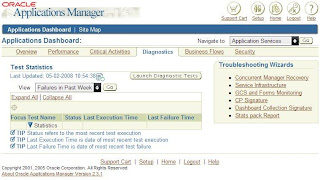
This recovery proces showed me concurrent managers with an active status in the database, but no active process on the OS or a active connection to the database. Maybe, that's the reason for the open cursor error ?
After cleaning them using this recovery tool, and going throuhg all the steps, I started the concurrent managers again. And this time, they started !
After bouncing the database because of a memory fault, I decided also to startup the concurrent managers again.
But after starting them, using the start script in the $COMMON_TOP/admin/scripts, the application showed me no concurrent managers ??
Checking the logfile of the internal manager for errors...
APP-FND-01564: ORACLE error 1000 in afpsmrsc
Cause: afpsmrsc failed due to ORA-01000: maximum open cursors exceeded.
The SQL statement being executed at the time of the error was: &SQLSTMT and was executed from the file &ERRFILE.
The parameter open_cursors seemed high enough, so I looked for another reason. I also checked the v$open_cursor, which showed me a lot of open cursors. I already bounced the database, so that did not solve anything.
I decided to use the 'Concurrent Manager recovery' in Oracle Application Manager.

This recovery proces showed me concurrent managers with an active status in the database, but no active process on the OS or a active connection to the database. Maybe, that's the reason for the open cursor error ?
After cleaning them using this recovery tool, and going throuhg all the steps, I started the concurrent managers again. And this time, they started !
Friday, February 01, 2008
Grid control 10g
The last two days I have been busy installing and upgrading Grid control 10g.
Because of problems wth an older version of OEM 10g , we decided to install a new version (10gr2).
On a new dell server I installed Oracle Enterprise Linux release 4 (update 6). After installing linux, I started the 10.2.0.1 Grid install.
Next step was the 10.2.0.3 upgrade of the oms and agent. I also decided to upgrade the database itself, which is default 10.1.0.4 (even after the 10.2.0.3 upgrade...)
Before upgrading the database, I tested the Grid control. Everything worked fine. Stopped and started the oms/agents a few time to check stability. No problems so far.
I started the upgrade, which means I first had to install the 10.2.0.1 Oracle software in a new $ORACLE_HOME. After this fresh install, upgrade the new ORACLE_HOME to 10.2.03. When the software is patched to the desired level, use the dbua from your new home to upgrade the excisting 10.1.0.4 database. At this point, some problems occured.
At first the dbua could not perform any OEM configuration ?? Checking the logfile only told me to try this manually...so I did. Oke, the configuration ended without errors, so lets try to start things up.
I started up the oms, no problems. Next, I started the agent....
Seems the agent would not start, the http server could not be started ? Does thsi has anything to do with my database upgrade ??? I can't see how ?
The logfiles showed me there was a port conflict. Suddenly the agent http server wants to use the same port as the oms http server ? Before the upgrade the could work together without a problem, but suddenly they are fighting over the same 6102 port....
The problem was fixed easy, I just changed the local port in the /oem/oemprd01/oms10g/opmn/conf/opmn.xml file.
After this change, the startup succeeded.
But I still don't understand why this port conflict arrived after the database upgrade ?
Because of problems wth an older version of OEM 10g , we decided to install a new version (10gr2).
On a new dell server I installed Oracle Enterprise Linux release 4 (update 6). After installing linux, I started the 10.2.0.1 Grid install.
Next step was the 10.2.0.3 upgrade of the oms and agent. I also decided to upgrade the database itself, which is default 10.1.0.4 (even after the 10.2.0.3 upgrade...)
Before upgrading the database, I tested the Grid control. Everything worked fine. Stopped and started the oms/agents a few time to check stability. No problems so far.
I started the upgrade, which means I first had to install the 10.2.0.1 Oracle software in a new $ORACLE_HOME. After this fresh install, upgrade the new ORACLE_HOME to 10.2.03. When the software is patched to the desired level, use the dbua from your new home to upgrade the excisting 10.1.0.4 database. At this point, some problems occured.
At first the dbua could not perform any OEM configuration ?? Checking the logfile only told me to try this manually...so I did. Oke, the configuration ended without errors, so lets try to start things up.
I started up the oms, no problems. Next, I started the agent....
Seems the agent would not start, the http server could not be started ? Does thsi has anything to do with my database upgrade ??? I can't see how ?
The logfiles showed me there was a port conflict. Suddenly the agent http server wants to use the same port as the oms http server ? Before the upgrade the could work together without a problem, but suddenly they are fighting over the same 6102 port....
The problem was fixed easy, I just changed the local port in the /oem/oemprd01/oms10g/opmn/conf/opmn.xml file.
After this change, the startup succeeded.
But I still don't understand why this port conflict arrived after the database upgrade ?
Subscribe to:
Posts (Atom)